> ## Documentation Index
> Fetch the complete documentation index at: https://rpa.bazhuayu.com/helpcenter/llms.txt
> Use this file to discover all available pages before exploring further.
# 票据识别
## 指令说明
**描述:** 使用 OCR 结构化识别通用票据、增值税发票、银行回单、完税证明、医疗票据和网约车行程单等票据的文字内容。
## 参数说明
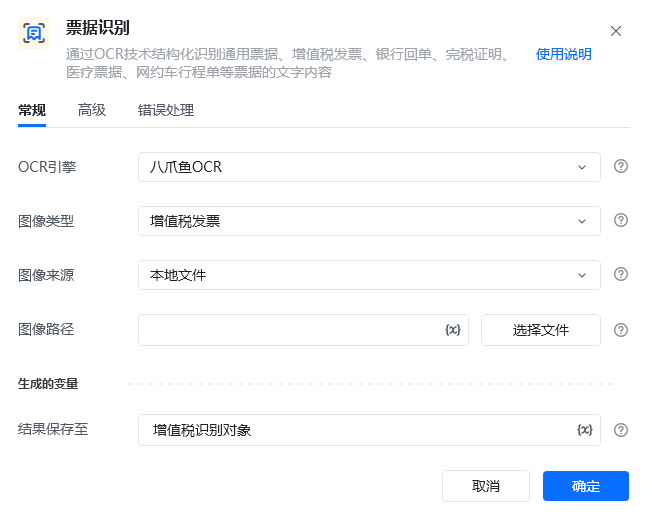 | 参数 | 说明 |
| ------------------ | --------------------------------------------- |
| **OCR引擎** | 默认使用八爪鱼OCR |
| **图像类型** | 请选择需要识别的图像类型:増值税发票、定额发票、火车票、出租车发票、银行回单 |
| **图像来源** | 请选择将要识别的图像来源:本地文件、网络图片、桌面元素、网页元素 |
| **网页路径(本地文件)** | 请输入要识别图像的文件路径 |
| **图像URL(网络图片)** | 请输入要识别图像的URL |
| **桌面元素(桌面元素)** | 请选择或捕获要识别的桌面元素 |
| **网页对象(网页元素)** | 输入一个获取到的或者通过"打开网页”创建的网页对象 |
| **网页元素(网页元素)** | 请选择或捕获要识别的网页元素 |
| **结果保存至** | 将识别到文字坐标保存到文本变量中。 |
| **PDF页码(开启PDF识别)** | 需要识别的PDF文件的对应页码,当pdf file 参数有效时,识别传入页码的对应页面内容 |
| **等待元素存在(s)** | 等待目标元素存在的超时时间 |
| 参数 | 说明 |
| ------------------ | --------------------------------------------- |
| **OCR引擎** | 默认使用八爪鱼OCR |
| **图像类型** | 请选择需要识别的图像类型:増值税发票、定额发票、火车票、出租车发票、银行回单 |
| **图像来源** | 请选择将要识别的图像来源:本地文件、网络图片、桌面元素、网页元素 |
| **网页路径(本地文件)** | 请输入要识别图像的文件路径 |
| **图像URL(网络图片)** | 请输入要识别图像的URL |
| **桌面元素(桌面元素)** | 请选择或捕获要识别的桌面元素 |
| **网页对象(网页元素)** | 输入一个获取到的或者通过"打开网页”创建的网页对象 |
| **网页元素(网页元素)** | 请选择或捕获要识别的网页元素 |
| **结果保存至** | 将识别到文字坐标保存到文本变量中。 |
| **PDF页码(开启PDF识别)** | 需要识别的PDF文件的对应页码,当pdf file 参数有效时,识别传入页码的对应页面内容 |
| **等待元素存在(s)** | 等待目标元素存在的超时时间 |
 ## 使用示例
 **该流程执行逻辑:**
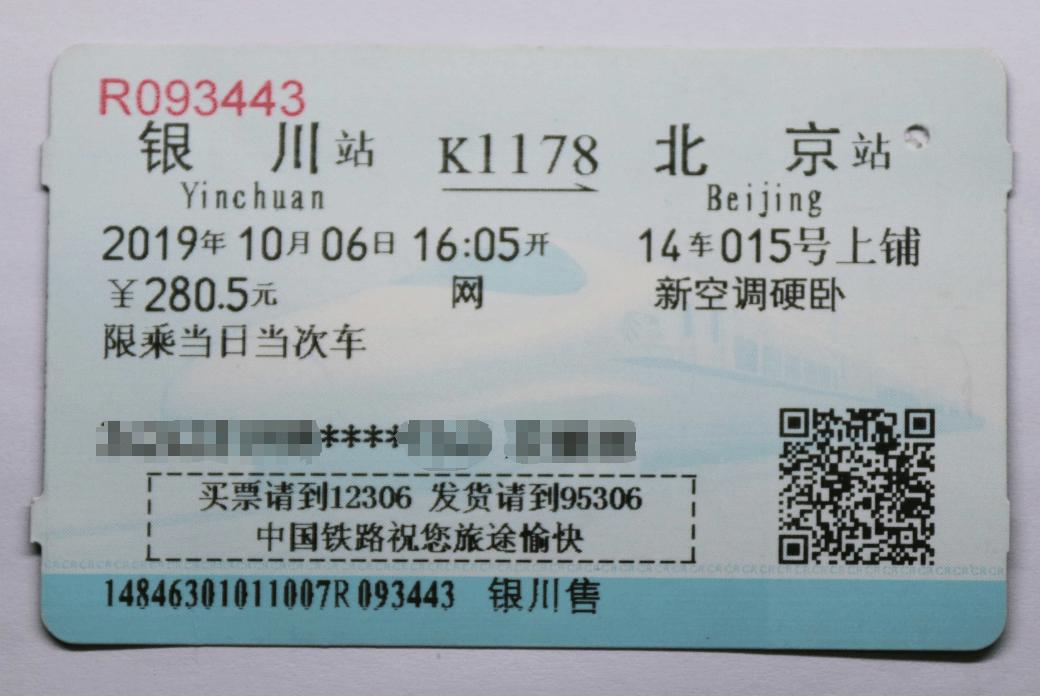
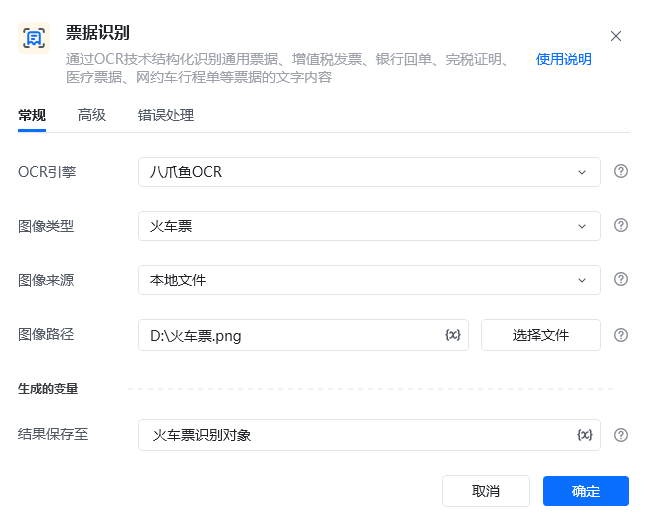
1. 准备火车票图片 `D:\火车票.png`,在【票据识别】中选择“火车票”和“本地文件”,并设置结果变量“火车票识别结果”。
2. 执行【票据识别】,由 OCR 提取票据中的出发地、目的地、金额等结构化信息。
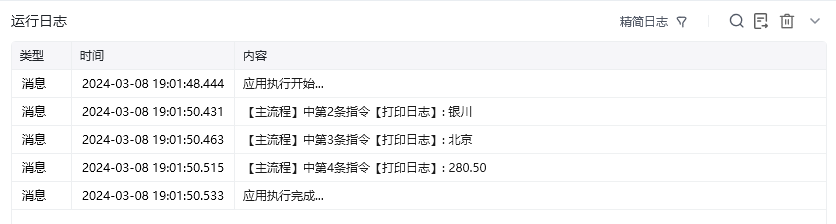
3. 使用【打印日志】分别读取并输出识别结果中的“银川”“北京”和“280.50”,核对关键信息是否正确。
完整流程示例:[打开应用示例](https://rpa.bazhuayu.com/shareableLink/65eaf0900d8a9abd448d77dd)
### 效果展示
**该流程执行逻辑:**
1. 准备火车票图片 `D:\火车票.png`,在【票据识别】中选择“火车票”和“本地文件”,并设置结果变量“火车票识别结果”。
2. 执行【票据识别】,由 OCR 提取票据中的出发地、目的地、金额等结构化信息。
3. 使用【打印日志】分别读取并输出识别结果中的“银川”“北京”和“280.50”,核对关键信息是否正确。
完整流程示例:[打开应用示例](https://rpa.bazhuayu.com/shareableLink/65eaf0900d8a9abd448d77dd)
### 效果展示
 使用指令过程中遇到问题?前往 [八爪鱼RPA 开发者社区问答板块](https://rpa.bazhuayu.com/community/questions) 提问,获取官方与社区帮助。