> ## Documentation Index
> Fetch the complete documentation index at: https://rpa.bazhuayu.com/helpcenter/llms.txt
> Use this file to discover all available pages before exploring further.

# reCAPTCHA V2验证码

## 指令说明

**描述：** 自动识别并处理Google reCaptcha V2验证码弹窗

## 参数说明
<Tabs>
  <Tab title="常规">
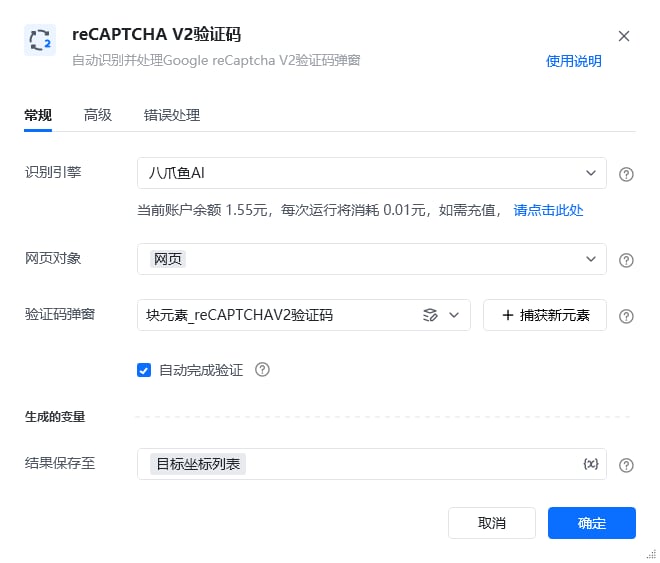
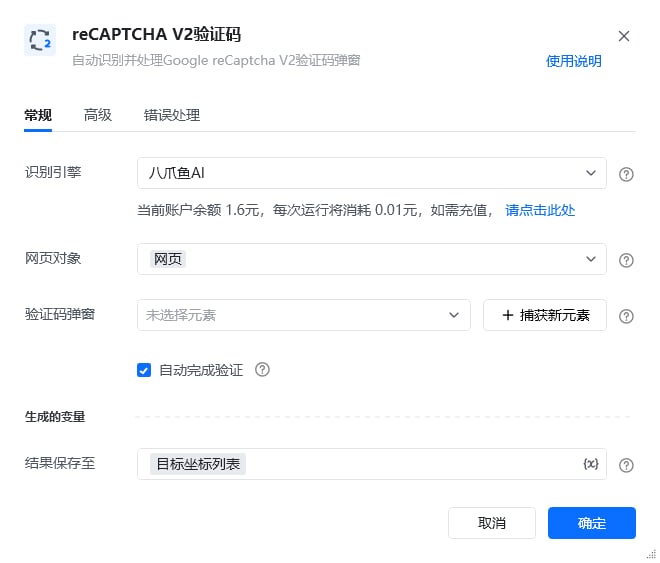
    <img src="https://mintcdn.com/bazhuayu-rpa-docs/EtocdB47VU9Ofcfu/helpcenter/commands/ai/images/recognizerecaptchav2command-01.png?fit=max&auto=format&n=EtocdB47VU9Ofcfu&q=85&s=f97ec93db13da74680256381070201bc" alt="reCAPTCHA V2验证码指令参数面板" width="660" height="563" data-path="helpcenter/commands/ai/images/recognizerecaptchav2command-01.png" />

    | 参数         | 说明                                             |
    | ---------- | ---------------------------------------------- |
    | **识别引擎**   | 请选择需要使用的验证码引擎（默认八爪鱼AI）                         |
    | **网页对象**   | 输入一个获取到的或者通过”打开网页"创建的网页对象                      |
    | **验证码弹窗**  | 请选择reCAPTCHA验证码弹窗，需要包含文字部分、图片部分、按钮部分（可通过捕获新元素） |
    | **自动完成验证** | 如果勾选，将自动识别验证码图片并点击完成验证，否则只进行验证码识别，返回待点选区域的坐标列表 |
  </Tab>

  <Tab title="高级">
    | 参数            | 说明                  |
    | ------------- | ------------------- |
    | **等待元素存在(s)** | 等待目标元素存在的最大超时时间，单位秒 |
  </Tab>
</Tabs>

## 使用示例

<img src="https://mintcdn.com/bazhuayu-rpa-docs/EtocdB47VU9Ofcfu/helpcenter/commands/ai/images/recognizerecaptchav2command-04.png?fit=max&auto=format&n=EtocdB47VU9Ofcfu&q=85&s=2adac419b5cc465a79659a90c1d790c0" alt="reCAPTCHA V2验证码使用示例" width="1326" height="150" data-path="helpcenter/commands/ai/images/recognizerecaptchav2command-04.png" />

<img src="https://mintcdn.com/bazhuayu-rpa-docs/EtocdB47VU9Ofcfu/helpcenter/commands/ai/images/recognizerecaptchav2command-05.png?fit=max&auto=format&n=EtocdB47VU9Ofcfu&q=85&s=6c8253ebfed8adc7269dd2e13f895054" alt="reCAPTCHA V2验证码使用示例" width="660" height="563" data-path="helpcenter/commands/ai/images/recognizerecaptchav2command-05.png" />

<img src="https://mintcdn.com/bazhuayu-rpa-docs/EtocdB47VU9Ofcfu/helpcenter/commands/ai/images/recognizerecaptchav2command-03.png?s=ab94dcc9fb8f894767e2a121f623e42b" alt="reCAPTCHA V2验证码使用示例" width="1916" height="1036" data-path="helpcenter/commands/ai/images/recognizerecaptchav2command-03.png" />

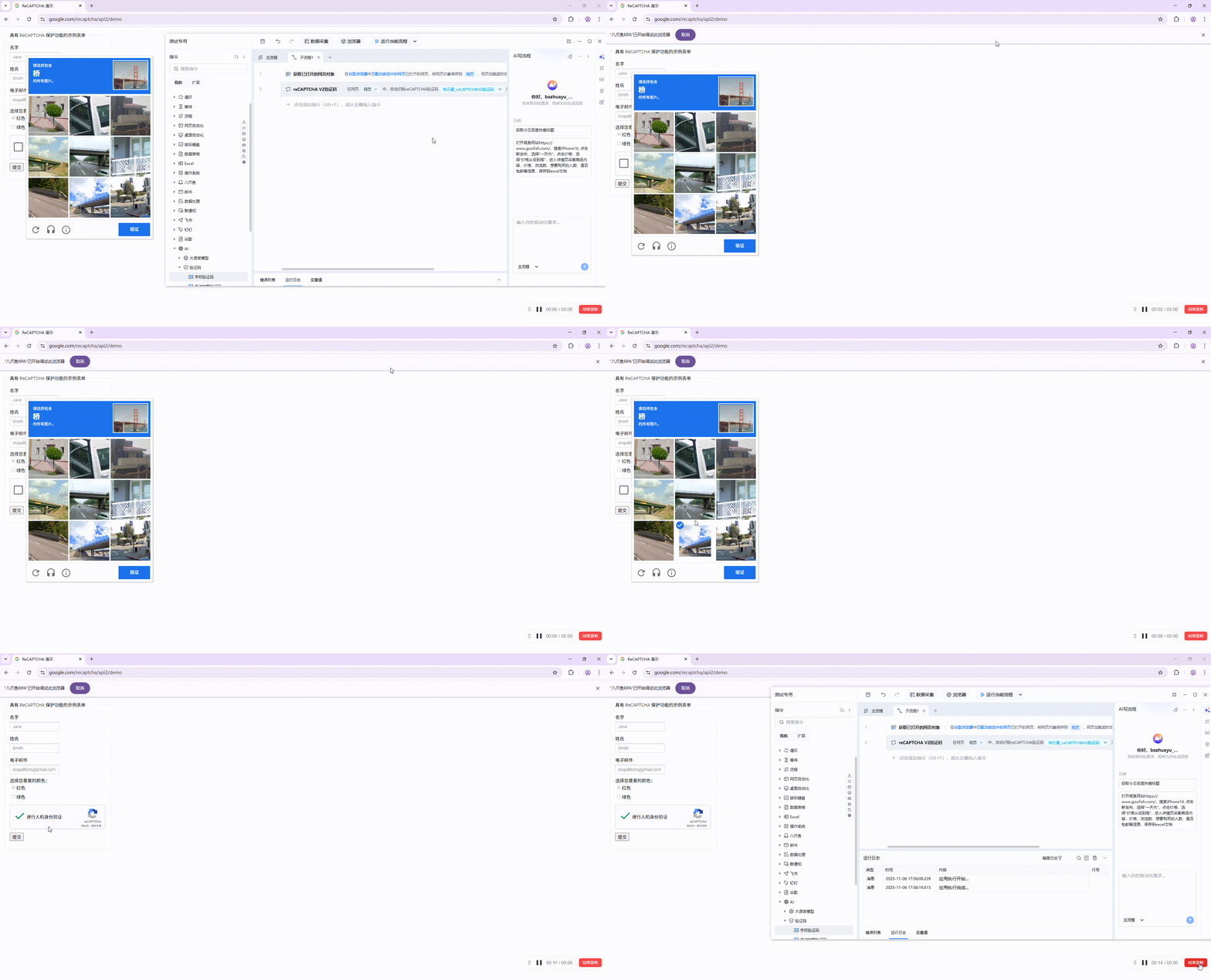
**该流程执行逻辑：**

1. 获取谷歌浏览器中已打开的 reCAPTCHA 示例网页对象。
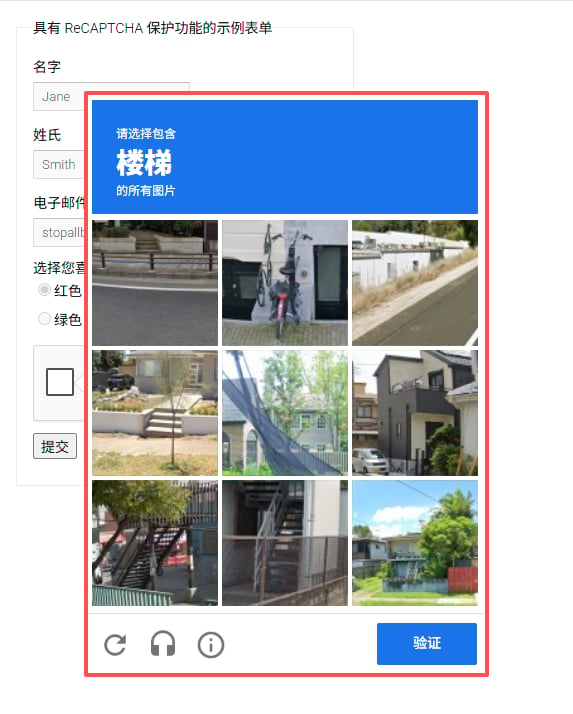
2. 执行【reCAPTCHA V2验证码】，识别题目要求选择的目标类型；本例需要找出包含“桥”的图片。
3. 指令将识别到的图片位置保存到“目标坐标列表”。由于示例勾选了“自动完成验证”，流程会自动选择对应图片并点击“验证”按钮。

### 效果展示

<img src="https://mintcdn.com/bazhuayu-rpa-docs/EtocdB47VU9Ofcfu/helpcenter/commands/ai/images/recognizerecaptchav2command-02.png?fit=max&auto=format&n=EtocdB47VU9Ofcfu&q=85&s=ae92da9d32c11ba8bb05cfa575c069af" alt="reCAPTCHA V2验证码效果展示" width="573" height="714" data-path="helpcenter/commands/ai/images/recognizerecaptchav2command-02.png" />

<img src="https://mintcdn.com/bazhuayu-rpa-docs/EtocdB47VU9Ofcfu/helpcenter/commands/ai/images/recognizerecaptchav2command-06.png?fit=max&auto=format&n=EtocdB47VU9Ofcfu&q=85&s=6f6487dd4ef2acd4829ebf7b33872618" alt="reCAPTCHA V2验证码效果展示" width="1315" height="164" data-path="helpcenter/commands/ai/images/recognizerecaptchav2command-06.png" />

<Info>
  使用指令过程中遇到问题？前往 [八爪鱼RPA 开发者社区问答板块](https://rpa.bazhuayu.com/community/questions) 提问，获取官方与社区帮助。
</Info>