> ## Documentation Index
> Fetch the complete documentation index at: https://rpa.bazhuayu.com/helpcenter/llms.txt
> Use this file to discover all available pages before exploring further.
# If 图像存在
## 指令说明
**描述:** 判断目标图像是否出现在界面上(可以是整个屏幕、指定窗口或当前激活窗口)。
## 参数说明
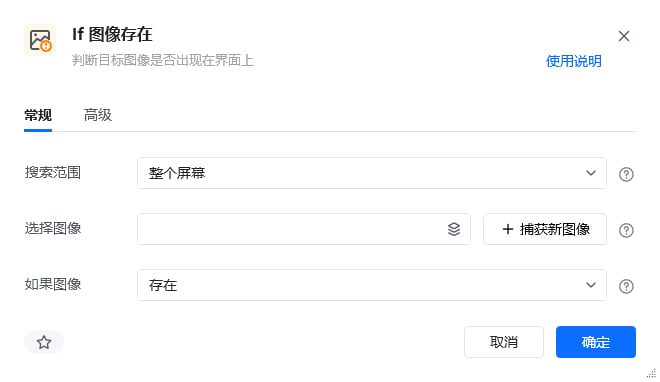 | 参数 | 说明 |
| -------- | -------------------------------------------- |
| **搜索范围** | 查找目标图像的范围,可选整个屏幕、指定窗口对象或当前激活窗口 |
| **窗口对象** | 当"搜索目标"选择"指定窗口对象"时,需要输入一个通过【获取窗口对象】指令获取的窗口对象 |
| **选择图像** | 可选择已存在的图像,或捕获新图像 |
| **如果图像** | 选择判断条件,选项:存在 / 不存在 |
| 参数 | 说明 |
| ---------- | ------------------------------------------------------------------------ |
| **匹配模式** | 可选项,选项为:彩色匹配、灰度匹配。彩色匹配为原色匹配,彩色匹配相对灰度匹配更加精确;灰度匹配是将图片转为灰度图后再进行匹配,灰度匹配速度会更快 |
| **相似度(%)** | 指定目标图像与原始图像的相似程度,推荐相似度为 80% |
## 使用示例
| 参数 | 说明 |
| -------- | -------------------------------------------- |
| **搜索范围** | 查找目标图像的范围,可选整个屏幕、指定窗口对象或当前激活窗口 |
| **窗口对象** | 当"搜索目标"选择"指定窗口对象"时,需要输入一个通过【获取窗口对象】指令获取的窗口对象 |
| **选择图像** | 可选择已存在的图像,或捕获新图像 |
| **如果图像** | 选择判断条件,选项:存在 / 不存在 |
| 参数 | 说明 |
| ---------- | ------------------------------------------------------------------------ |
| **匹配模式** | 可选项,选项为:彩色匹配、灰度匹配。彩色匹配为原色匹配,彩色匹配相对灰度匹配更加精确;灰度匹配是将图片转为灰度图后再进行匹配,灰度匹配速度会更快 |
| **相似度(%)** | 指定目标图像与原始图像的相似程度,推荐相似度为 80% |
## 使用示例
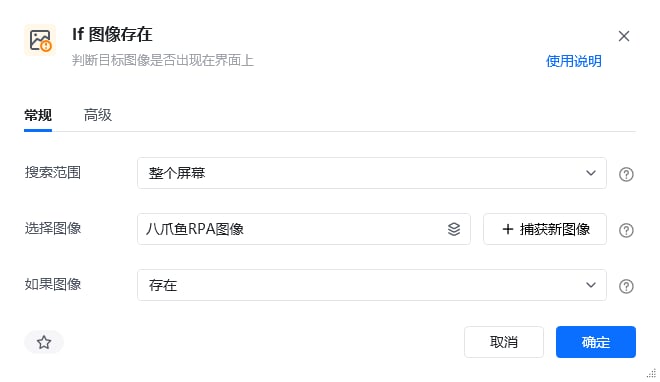
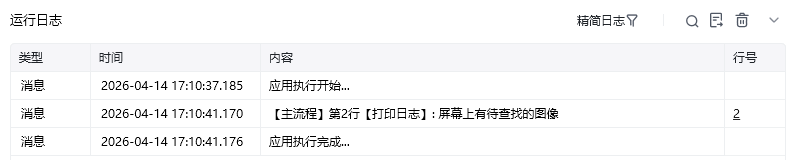
 **该流程执行逻辑:**
先点击捕获对应图像,捕获桌面八爪鱼 RPA 图标
使用【If 图像存在】,选择刚才捕获的图标,判断方式为"存在"
如果在屏幕上识别到了指定图像,在控制台打印 "屏幕上有待查找的图像"
否则在控制台打印 "屏幕上未发现待查找图像"
### 效果展示
**该流程执行逻辑:**
先点击捕获对应图像,捕获桌面八爪鱼 RPA 图标
使用【If 图像存在】,选择刚才捕获的图标,判断方式为"存在"
如果在屏幕上识别到了指定图像,在控制台打印 "屏幕上有待查找的图像"
否则在控制台打印 "屏幕上未发现待查找图像"
### 效果展示
 **使用小 Tips:** v2.2.1185.825 及以上版本优化了"图像匹配抗分辨率",即【点击图像】、【鼠标悬浮在图像上】、【等待图像】和【If 图像存在】指令的运行不会受桌面分辨率的影响。
使用指令过程中遇到问题?前往 [八爪鱼RPA 开发者社区问答板块](https://rpa.bazhuayu.com/community/questions) 提问,获取官方与社区帮助。
**使用小 Tips:** v2.2.1185.825 及以上版本优化了"图像匹配抗分辨率",即【点击图像】、【鼠标悬浮在图像上】、【等待图像】和【If 图像存在】指令的运行不会受桌面分辨率的影响。
使用指令过程中遇到问题?前往 [八爪鱼RPA 开发者社区问答板块](https://rpa.bazhuayu.com/community/questions) 提问,获取官方与社区帮助。