> ## Documentation Index
> Fetch the complete documentation index at: https://rpa.bazhuayu.com/helpcenter/llms.txt
> Use this file to discover all available pages before exploring further.

# 提取PDF指定区域文字

# 提取pdf区域XY轴坐标

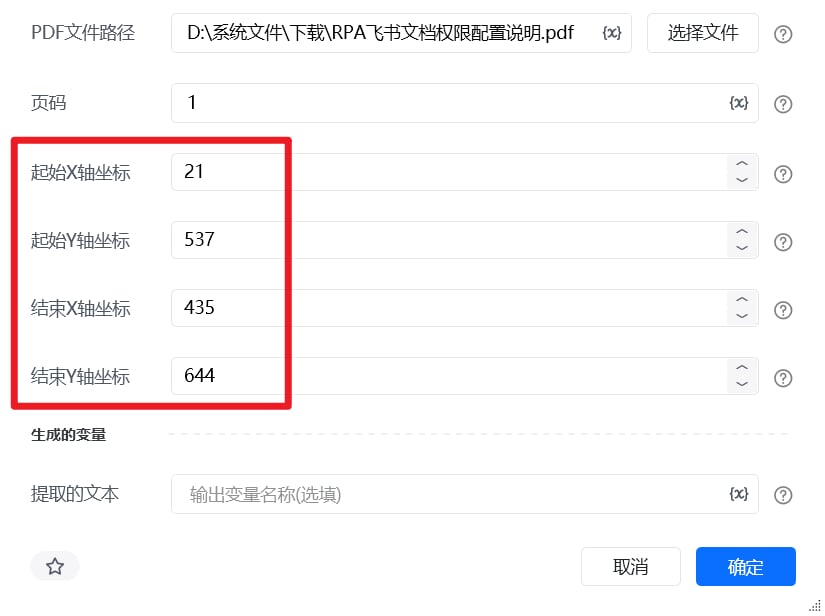
我们需要获取目标文字区域的四个绝对坐标：x0 (左)、y0 (上)、x1 (右)、y1 (下)。

<strong>核心原则：</strong> PDF 的坐标原点 (0, 0) 永远位于页面的<strong>左上角</strong>。
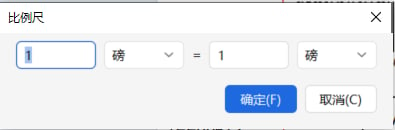
第一步：环境配置与单位统一使用 PDF 阅读器（如 WPS）打开目标 PDF 文件。在菜单栏中找到并开启\*\*“批注”和“测量工具”**功能。关键操作：点击“比例尺”设置，强制将测量单位更改为**“磅 (pt)”\*\*。这一步是为了确保获取的数据能够直接用于代码计算，无需二次换算。

<img src="https://mintcdn.com/bazhuayu-rpa-docs/N2_JlZ5xSCqGiIcu/helpcenter/commands/custom-commands/3Yl16hhX/images/SfNI5YCh-01.png?fit=max&auto=format&n=N2_JlZ5xSCqGiIcu&q=85&s=d24bc663111b4a425ee1f8d19b43a82a" alt="image" width="1910" height="131" data-path="helpcenter/commands/custom-commands/3Yl16hhX/images/SfNI5YCh-01.png" />

<img src="https://mintcdn.com/bazhuayu-rpa-docs/N2_JlZ5xSCqGiIcu/helpcenter/commands/custom-commands/3Yl16hhX/images/SfNI5YCh-02.png?fit=max&auto=format&n=N2_JlZ5xSCqGiIcu&q=85&s=e766b4de2b33487bd2e7e071de2b557e" alt="image" width="1885" height="116" data-path="helpcenter/commands/custom-commands/3Yl16hhX/images/SfNI5YCh-02.png" />

<img src="https://mintcdn.com/bazhuayu-rpa-docs/N2_JlZ5xSCqGiIcu/helpcenter/commands/custom-commands/3Yl16hhX/images/SfNI5YCh-03.png?fit=max&auto=format&n=N2_JlZ5xSCqGiIcu&q=85&s=8480d28a7f4e163a24a8d4a2c975e9a8" alt="image" width="395" height="130" data-path="helpcenter/commands/custom-commands/3Yl16hhX/images/SfNI5YCh-03.png" />

#### 第二步：明确基准点并测量距离

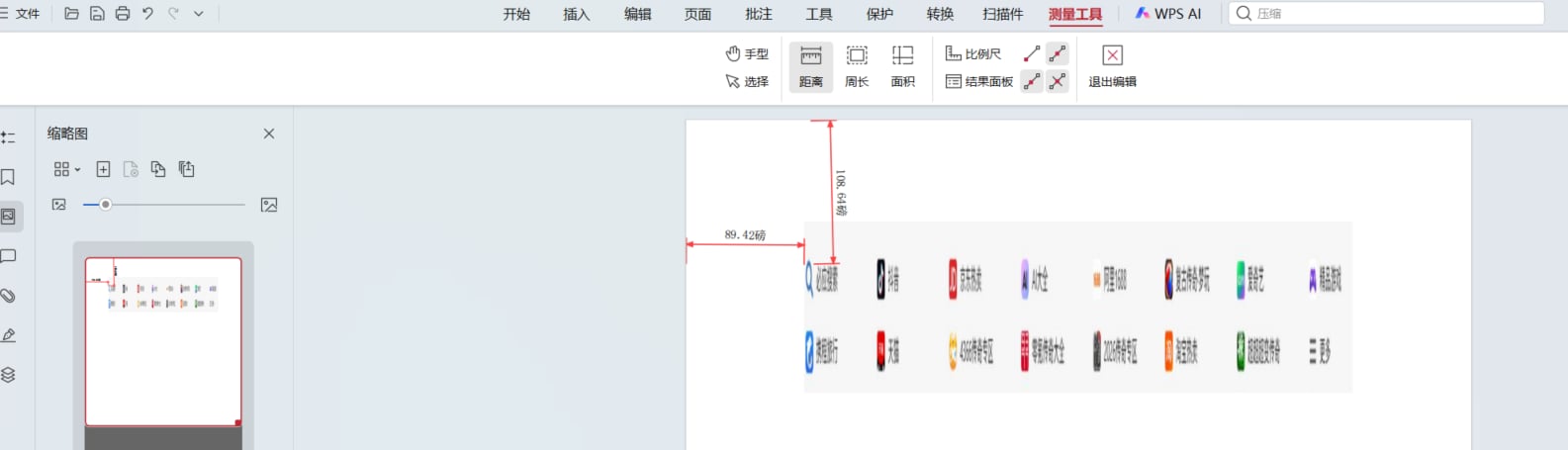
使用“距离”测量工具，分别以页面的<strong>最左侧边缘</strong>和<strong>最顶部边缘</strong>为基准，拉取测量线到目标文字的边缘：获取 x0（左边界）：从页面最左侧边缘，水平拉取到目标文字的左侧边缘。获取 x1（右边界）：从页面最左侧边缘，水平拉取到目标文字的右侧边缘。获取 y0（上边界）：从页面最顶部边缘，垂直拉取到目标文字的顶部边缘。获取 y1（下边界）：从页面最顶部边缘，垂直拉取到目标文字的底部边缘。

<em>操作提示：拉取完每一段距离后，点击右键完成测量结束本次测量，以便将获取到的距离数值固定并记录下来。</em>

<img src="https://mintcdn.com/bazhuayu-rpa-docs/N2_JlZ5xSCqGiIcu/helpcenter/commands/custom-commands/3Yl16hhX/images/SfNI5YCh-04.png?fit=max&auto=format&n=N2_JlZ5xSCqGiIcu&q=85&s=946e9afbee18efd935f8e8a002a64e9f" alt="image" width="1909" height="85" data-path="helpcenter/commands/custom-commands/3Yl16hhX/images/SfNI5YCh-04.png" />

<img src="https://mintcdn.com/bazhuayu-rpa-docs/JBql1tUaLPluZpOA/helpcenter/commands/custom-commands/3Yl16hhX/images/SfNI5YCh-05.png?fit=max&auto=format&n=JBql1tUaLPluZpOA&q=85&s=19c7afc5c985845c3dc02b372f9c4fda" alt="image" width="1585" height="455" data-path="helpcenter/commands/custom-commands/3Yl16hhX/images/SfNI5YCh-05.png" />

<img src="https://mintcdn.com/bazhuayu-rpa-docs/JBql1tUaLPluZpOA/helpcenter/commands/custom-commands/3Yl16hhX/images/SfNI5YCh-06.png?fit=max&auto=format&n=JBql1tUaLPluZpOA&q=85&s=ccfcefb6369a397acef908ff86725920" alt="image" width="825" height="616" data-path="helpcenter/commands/custom-commands/3Yl16hhX/images/SfNI5YCh-06.png" />

<strong>不填坐标则默认提取一整页的文本</strong>

<Info>
  使用指令过程中遇到问题？前往 [八爪鱼RPA 开发者社区问答板块](https://rpa.bazhuayu.com/community/questions) 提问，获取官方与社区帮助。
</Info>