> ## Documentation Index
> Fetch the complete documentation index at: https://rpa.bazhuayu.com/helpcenter/llms.txt
> Use this file to discover all available pages before exploring further.
# 查询数据
## 一、指令用途
该指令用于对本地SQLite 3数据库执行 SQL 查询,并将查询结果保存为数据表格变量,以便后续流程直接调用。
## 二、参数说明
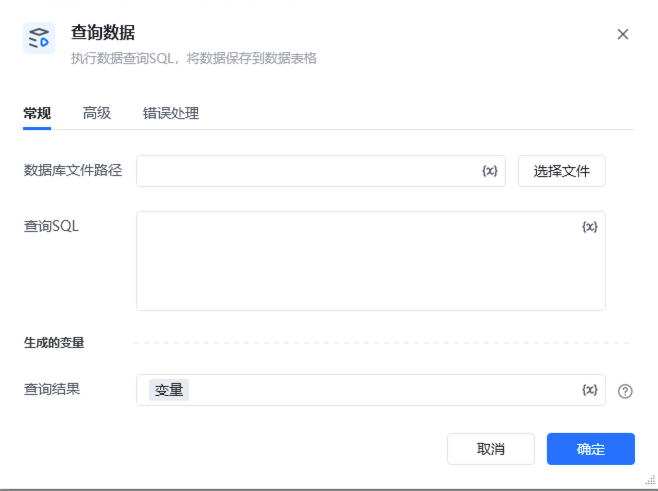 参数说明数据库文件路径用于指定本地数据库文件(.db)的完整路径。可点击「选择文件」按钮,通过可视化界面选择目标文件。查询 SQL输入符合目标数据库语法的 SQL 查询语句,例如:SELECT \* FROM 产品表 WHERE 库存数量 > 0查询结果指定一个变量名称(默认值为「变量」),查询结果会以表格形式保存到该变量中,后续流程可直接读取变量中的数据进行处理。
## 三、使用示例
参数说明数据库文件路径用于指定本地数据库文件(.db)的完整路径。可点击「选择文件」按钮,通过可视化界面选择目标文件。查询 SQL输入符合目标数据库语法的 SQL 查询语句,例如:SELECT \* FROM 产品表 WHERE 库存数量 > 0查询结果指定一个变量名称(默认值为「变量」),查询结果会以表格形式保存到该变量中,后续流程可直接读取变量中的数据进行处理。
## 三、使用示例
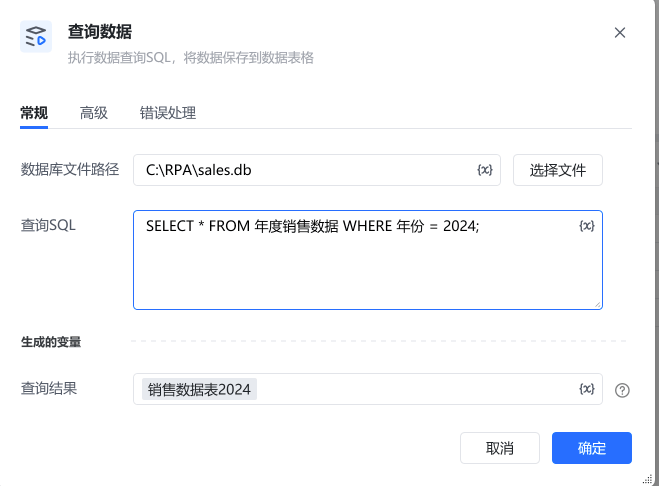 在「数据库文件路径」中,点击「选择文件」,选择本地的 sales.db 文件。在「查询 SQL」中输入:将「查询结果」保存到变量「销售数据2024」中。后续流程可通过「销售数据2024」变量,读取并分析销售记录,用于生成年度报表。
## 四、注意事项
使用指令过程中遇到问题?前往 [八爪鱼RPA 开发者社区问答板块](https://rpa.bazhuayu.com/community/questions) 提问,获取官方与社区帮助。
在「数据库文件路径」中,点击「选择文件」,选择本地的 sales.db 文件。在「查询 SQL」中输入:将「查询结果」保存到变量「销售数据2024」中。后续流程可通过「销售数据2024」变量,读取并分析销售记录,用于生成年度报表。
## 四、注意事项
使用指令过程中遇到问题?前往 [八爪鱼RPA 开发者社区问答板块](https://rpa.bazhuayu.com/community/questions) 提问,获取官方与社区帮助。