> ## Documentation Index
> Fetch the complete documentation index at: https://rpa.bazhuayu.com/helpcenter/llms.txt
> Use this file to discover all available pages before exploring further.
# 导出数据到文件
## 一、指令概述
该指令用于将本地 SQLite 3数据库表中的数据导出为 Excel 或 CSV 文件,方便进行数据备份、分析或分享。
## 二、参数说明
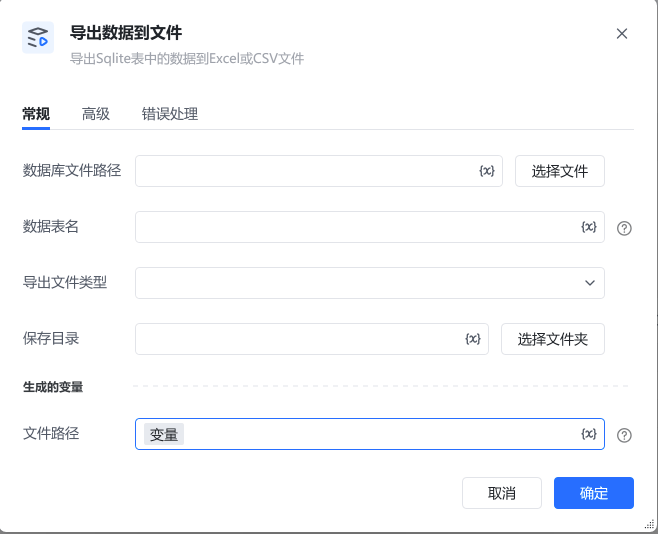 参数说明数据库文件路径指定本地 SQLite 数据库文件(如 .db)的完整路径。可点击「选择文件」按钮,通过可视化界面选择目标数据库文件。数据表名输入要导出数据的目标表名称(如 年度销售数据),确保该表在指定数据库中存在。导出文件类型选择导出文件的格式,支持 Excel(如 .xlsx)和 CSV(逗号分隔文本)两种类型。保存目录指定导出文件的保存路径。可点击「选择文件夹」按钮,可视化选择目标文件夹,需确保该目录有写入权限。文件路径指定一个变量名称(默认值为「变量」),导出完成后,文件的完整路径会保存到该变量中,后续流程可通过此变量引用该文件。
## 三、使用示例
使用指令过程中遇到问题?前往 [八爪鱼RPA 开发者社区问答板块](https://rpa.bazhuayu.com/community/questions) 提问,获取官方与社区帮助。
参数说明数据库文件路径指定本地 SQLite 数据库文件(如 .db)的完整路径。可点击「选择文件」按钮,通过可视化界面选择目标数据库文件。数据表名输入要导出数据的目标表名称(如 年度销售数据),确保该表在指定数据库中存在。导出文件类型选择导出文件的格式,支持 Excel(如 .xlsx)和 CSV(逗号分隔文本)两种类型。保存目录指定导出文件的保存路径。可点击「选择文件夹」按钮,可视化选择目标文件夹,需确保该目录有写入权限。文件路径指定一个变量名称(默认值为「变量」),导出完成后,文件的完整路径会保存到该变量中,后续流程可通过此变量引用该文件。
## 三、使用示例
使用指令过程中遇到问题?前往 [八爪鱼RPA 开发者社区问答板块](https://rpa.bazhuayu.com/community/questions) 提问,获取官方与社区帮助。