> ## Documentation Index
> Fetch the complete documentation index at: https://rpa.bazhuayu.com/helpcenter/llms.txt
> Use this file to discover all available pages before exploring further.

# 亚马逊-广告-导出时间选择

# 一.功能描述

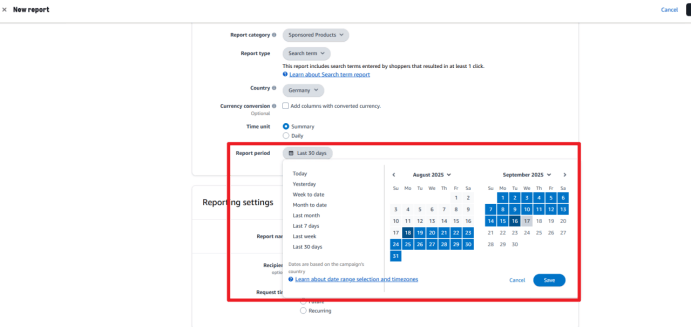
该指令用于亚马逊-广告创建导出报告选择时间。

<img src="https://mintcdn.com/bazhuayu-rpa-docs/JBql1tUaLPluZpOA/helpcenter/commands/custom-commands/6958FmJ9/images/DnggJFFQ-01.png?fit=max&auto=format&n=JBql1tUaLPluZpOA&q=85&s=5ccd0c05a8fbf759c8bc7e7614a15178" alt="image" width="692" height="87" data-path="helpcenter/commands/custom-commands/6958FmJ9/images/DnggJFFQ-01.png" />

<img src="https://mintcdn.com/bazhuayu-rpa-docs/JBql1tUaLPluZpOA/helpcenter/commands/custom-commands/6958FmJ9/images/DnggJFFQ-02.png?fit=max&auto=format&n=JBql1tUaLPluZpOA&q=85&s=f6dd31499830c85395947461e8f257d0" alt="image" width="691" height="327" data-path="helpcenter/commands/custom-commands/6958FmJ9/images/DnggJFFQ-02.png" />

# 二.使用参数说明

## 1.输入参数

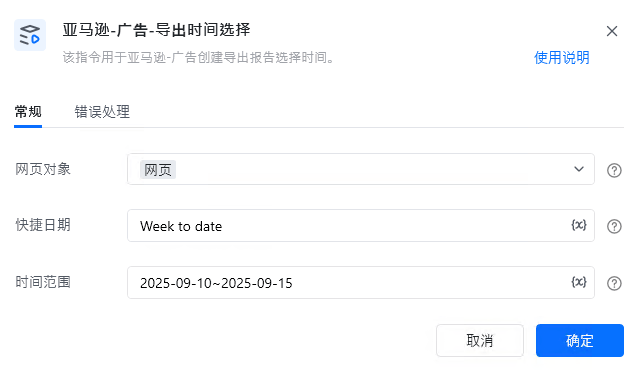
<strong>网页对象：</strong>

传入已打开的网页对象。

<strong>快捷日期：</strong>

输入快捷日，例如：Today，Yesterday。

若填写【日期范围】则该项不填。

<strong>日期范围：</strong>

填写日期范围，例如：2025-09-01\~2025-09-15。

若填写【快捷日期】，可不填该项。

# 三.使用说明

<img src="https://mintcdn.com/bazhuayu-rpa-docs/JBql1tUaLPluZpOA/helpcenter/commands/custom-commands/6958FmJ9/images/DnggJFFQ-03.png?fit=max&auto=format&n=JBql1tUaLPluZpOA&q=85&s=4b9941d4138896ec6cfffedaa81e0b00" alt="image" width="639" height="370" data-path="helpcenter/commands/custom-commands/6958FmJ9/images/DnggJFFQ-03.png" />

<Info>
  使用指令过程中遇到问题？前往 [八爪鱼RPA 开发者社区问答板块](https://rpa.bazhuayu.com/community/questions) 提问，获取官方与社区帮助。
</Info>