> ## Documentation Index
> Fetch the complete documentation index at: https://rpa.bazhuayu.com/helpcenter/llms.txt
> Use this file to discover all available pages before exploring further.
# 亚马逊-广告-下载明细
# 一.功能描述
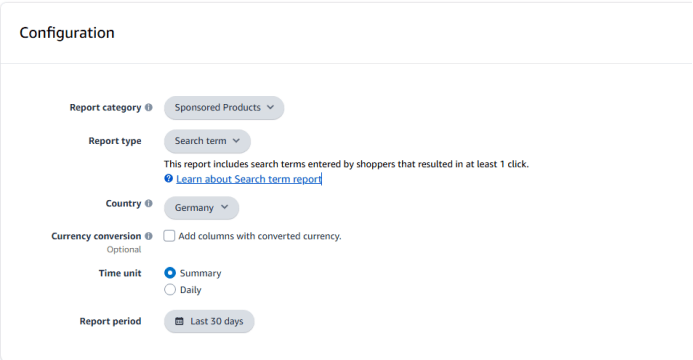
该指令用于下载广告明细,可支持多个维度的导出下载。

 # 二.使用参数说明
## 1.输入参数
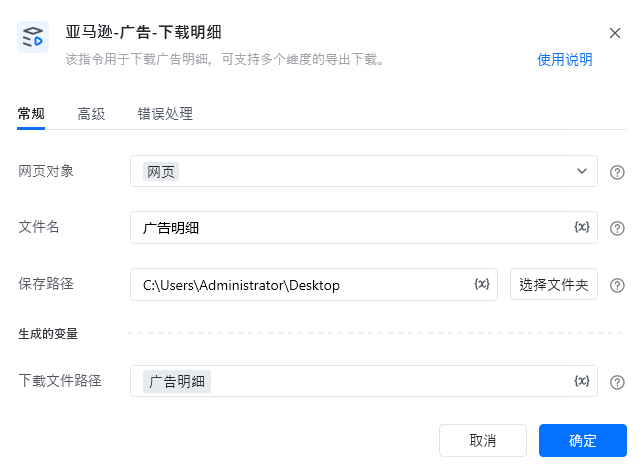
网页对象:
传入已打开的网页对象。
文件名:
输入保存的文件名,无需填写后缀。
保存路径:
输入保存文件路径。
## 高级
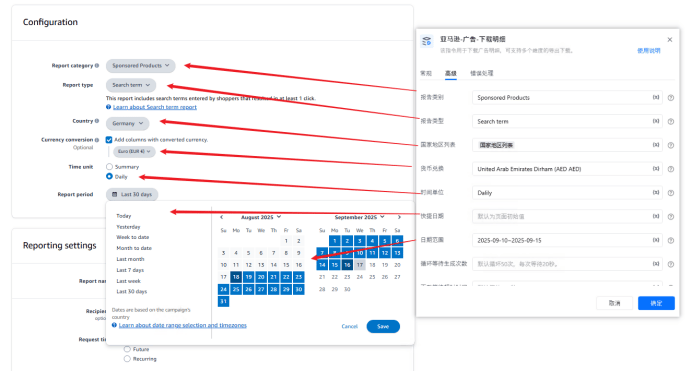
报告类别:
输入报告类别,例如:Sponsored Products
报告类型:
输入报告类型,例如:Search term
国家地区列表:
传入地区列表,例如:\['France','Italy']
货币兑换:
输入货币兑换值,例如:United Arab Emirates Dirham (AED AED)
时间单位:
输入时间单位,例如:Summary,Daily
快捷日期:
输入快捷日,例如:Today,Yesterday。
若填写【日期范围】则该项不填。
日期范围:
填写日期范围,例如:2025-09-01\~2025-09-15。
若填写【快捷日期】,可不填该项。
循环等待生成次数:
输入每次等待下载按钮的次数,每次等待20秒。
默认循环50次,每次等待20秒。
下载等待超时时间:
输入下载等待超时时间,默认300秒。
默认等待300秒
## 2.输出参数
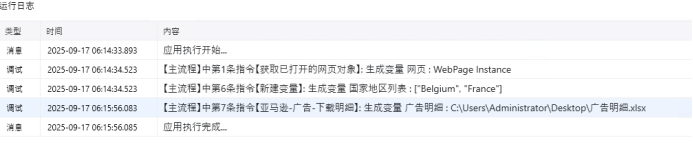
下载文件路径:
输出下载文件路径。
# 三.使用说明
# 二.使用参数说明
## 1.输入参数
网页对象:
传入已打开的网页对象。
文件名:
输入保存的文件名,无需填写后缀。
保存路径:
输入保存文件路径。
## 高级
报告类别:
输入报告类别,例如:Sponsored Products
报告类型:
输入报告类型,例如:Search term
国家地区列表:
传入地区列表,例如:\['France','Italy']
货币兑换:
输入货币兑换值,例如:United Arab Emirates Dirham (AED AED)
时间单位:
输入时间单位,例如:Summary,Daily
快捷日期:
输入快捷日,例如:Today,Yesterday。
若填写【日期范围】则该项不填。
日期范围:
填写日期范围,例如:2025-09-01\~2025-09-15。
若填写【快捷日期】,可不填该项。
循环等待生成次数:
输入每次等待下载按钮的次数,每次等待20秒。
默认循环50次,每次等待20秒。
下载等待超时时间:
输入下载等待超时时间,默认300秒。
默认等待300秒
## 2.输出参数
下载文件路径:
输出下载文件路径。
# 三.使用说明
 使用指令过程中遇到问题?前往 [八爪鱼RPA 开发者社区问答板块](https://rpa.bazhuayu.com/community/questions) 提问,获取官方与社区帮助。