> ## Documentation Index
> Fetch the complete documentation index at: https://rpa.bazhuayu.com/helpcenter/llms.txt
> Use this file to discover all available pages before exploring further.
# 新增字段
## 输入
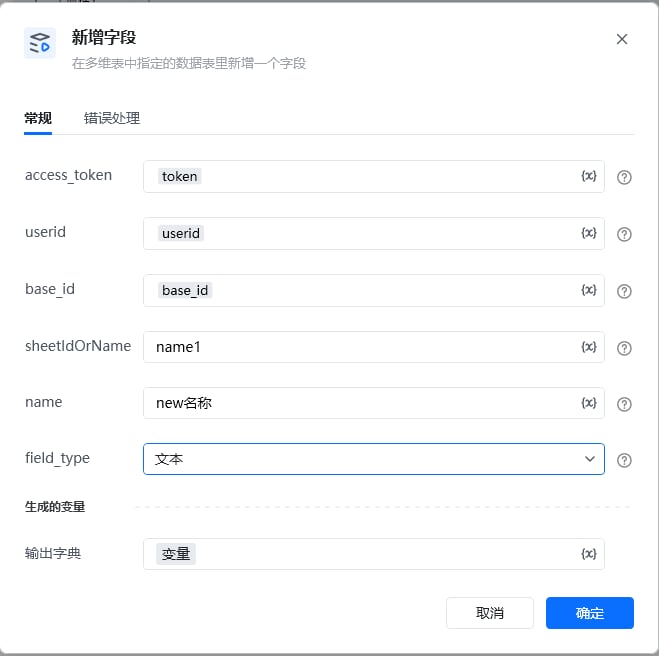
access\_token: 可通过【获取access\_token】指令获取
userid: 用户id,在钉钉后台管理——成员管理中获取到用户的UserID,可参考指令【创建数据表】指令使用说明有图文教程
base\_id: 表格id,可以从文档信息里面获取,点击文档右上角的三个小点,选择文档信息,其中文档ID就是多维表id,可以通过查看【创建数据表】指令使用说明有图文教程
sheetIdOrName: 名称可以直接在表里面查看,数据表ID可以通过调用【获取所有数据表】接口获取ID
name:字段的名称
field\_type:选择指定的字段类型
 使用指令过程中遇到问题?前往 [八爪鱼RPA 开发者社区问答板块](https://rpa.bazhuayu.com/community/questions) 提问,获取官方与社区帮助。