> ## Documentation Index
> Fetch the complete documentation index at: https://rpa.bazhuayu.com/helpcenter/llms.txt
> Use this file to discover all available pages before exploring further.
# 获取图层文字
Photoshop 版本:Photoshop 版本支持2025✅2024✅2023✅2022✅2021✅2020✅CC2019✅CC2018✅CC2017✅
# # 获取图层文字
## 描述
该指令获取 PS 文字图层的文字
## 参数配置
### 指令输入
Photoshop 文件路径
图层名: 字符串 ; 图层的名称, 找不到该图层会报错
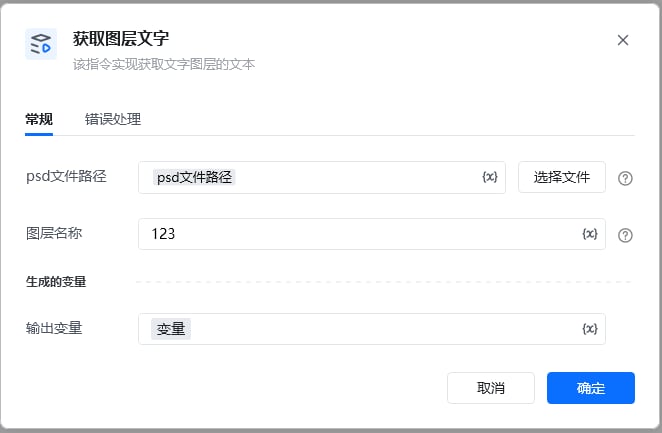 ### 指令输出
输出为字典类型 text\_content
\{
"success": true,
"file\_path": "D:\444.psd",
"file\_name": "444.psd",
"layer\_name": "123",
"text\_content": "成功了",
"layer\_type": "2"
}
### 指令输出
输出为字典类型 text\_content
\{
"success": true,
"file\_path": "D:\444.psd",
"file\_name": "444.psd",
"layer\_name": "123",
"text\_content": "成功了",
"layer\_type": "2"
}
 使用指令过程中遇到问题?前往 [八爪鱼RPA 开发者社区问答板块](https://rpa.bazhuayu.com/community/questions) 提问,获取官方与社区帮助。