> ## Documentation Index
> Fetch the complete documentation index at: https://rpa.bazhuayu.com/helpcenter/llms.txt
> Use this file to discover all available pages before exploring further.

# 重命名图层

Photoshop 版本：Photoshop 版本支持2025✅2024✅2023✅2022✅2021✅2020✅CC2019✅CC2018✅CC2017✅

# # 重命名图层

## 描述

该指令通过调用接口重命名 ps 文件图层名称的功能

## 配置

### 输入

#### 常规

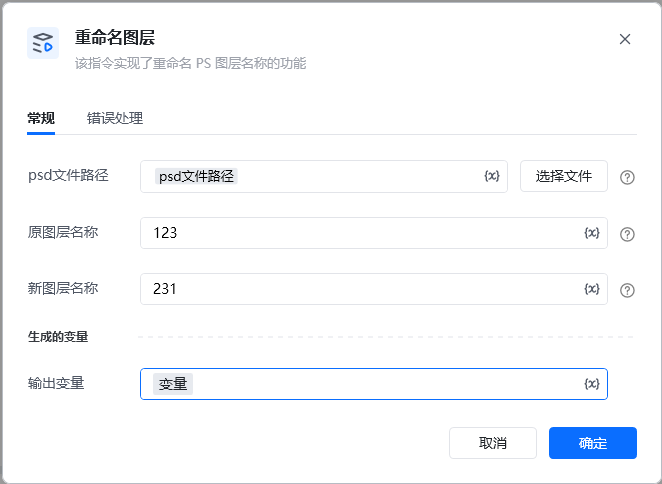
<strong>Photoshop 路径</strong>文件

<strong>原图层名: </strong><em>字符串, </em>待重命名图层的名称

<strong>新图层名称: </strong><em>字符串, </em>重命名后的图层名称

<img src="https://mintcdn.com/bazhuayu-rpa-docs/gYxFt2wpwEe3BGZG/helpcenter/commands/custom-commands/AJpKshiX/images/S1vKwdrr-01.png?fit=max&auto=format&n=gYxFt2wpwEe3BGZG&q=85&s=55b7bc69962a6a4c068536f7df1bd1b4" alt="image" width="662" height="484" data-path="helpcenter/commands/custom-commands/AJpKshiX/images/S1vKwdrr-01.png" />

输出

<img src="https://mintcdn.com/bazhuayu-rpa-docs/gYxFt2wpwEe3BGZG/helpcenter/commands/custom-commands/AJpKshiX/images/S1vKwdrr-02.png?fit=max&auto=format&n=gYxFt2wpwEe3BGZG&q=85&s=4781feec328510e1608ea6dd10ba1cae" alt="image" width="1064" height="195" data-path="helpcenter/commands/custom-commands/AJpKshiX/images/S1vKwdrr-02.png" />

<Info>
  使用指令过程中遇到问题？前往 [八爪鱼RPA 开发者社区问答板块](https://rpa.bazhuayu.com/community/questions) 提问，获取官方与社区帮助。
</Info>