> ## Documentation Index
> Fetch the complete documentation index at: https://rpa.bazhuayu.com/helpcenter/llms.txt
> Use this file to discover all available pages before exploring further.
# 显示隐藏图层
Photoshop 版本:Photoshop 版本支持2025✅2024✅2023✅2022✅2021✅2020✅CC2019✅CC2018✅CC2017✅
# # 显示/隐藏图层
### 描述
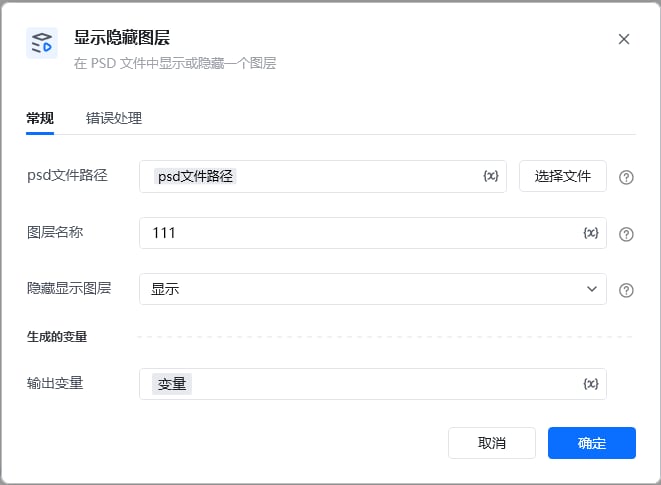
按图层名找到一个图层,显示或隐藏这个图层。
### 配置项说明
#### 输入
psd文件路径:
图层名: 图层名,可在ps里面查看图层名称
设置为: 设置为隐藏或者显示。
 ### 输出示例
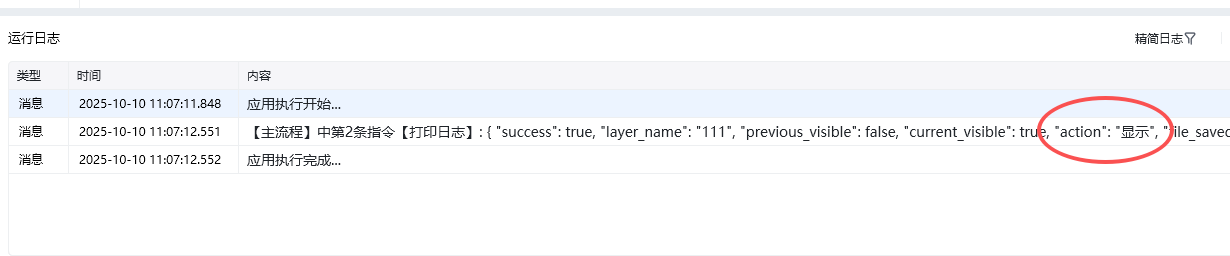
\{
"success": true,
"layer\_name": "111",
"previous\_visible": true,
"current\_visible": false,
"action": "隐藏",
"file\_saved": true,
"file\_path": "D:\333.psd",
"file\_name": "333.psd"
}
### 输出示例
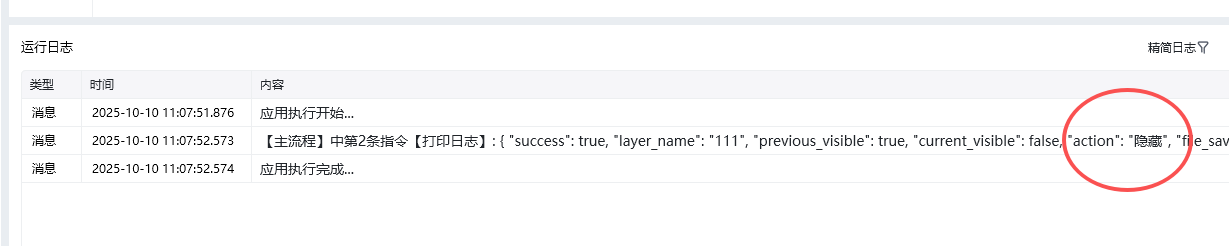
\{
"success": true,
"layer\_name": "111",
"previous\_visible": true,
"current\_visible": false,
"action": "隐藏",
"file\_saved": true,
"file\_path": "D:\333.psd",
"file\_name": "333.psd"
}
 使用指令过程中遇到问题?前往 [八爪鱼RPA 开发者社区问答板块](https://rpa.bazhuayu.com/community/questions) 提问,获取官方与社区帮助。