> ## Documentation Index
> Fetch the complete documentation index at: https://rpa.bazhuayu.com/helpcenter/llms.txt
> Use this file to discover all available pages before exploring further.
# 获取钉钉存储的文件或文件夹列表
## 一、指令概述
该指令用于调用钉钉开放平台 API,获取指定钉盘空间、指定父目录下的所有文件与子文件夹列表,支持分页查询,返回结构化 JSON 数据,适用于钉盘文件遍历、批量下载、目录同步、文件监控等自动化场景。
可查看官方文档: [https://open.dingtalk.com/document/development/get-a-list-of-files-or-folders\[https://open.dingtalk.com/document/development/get-a-list-of-files-or-folders](https://open.dingtalk.com/document/development/get-a-list-of-files-or-folders\[https://open.dingtalk.com/document/development/get-a-list-of-files-or-folders)]\([https://open.dingtalk.com/document/development/get-a-list-of-files-or-folders](https://open.dingtalk.com/document/development/get-a-list-of-files-or-folders))
## 二、核心参数配置参数名称说明输入格式 / 规则凭证钉钉开放平台接口调用凭证(access\_token)必填;通过「获取开发平台凭证」指令获取用户 Id操作人的钉钉用户 ID必填;为一串数字,可通过「查询用户 Id」指令或钉钉管理后台 - 通讯录获取space\_id钉盘空间 ID必填;通过「获取空间列表」指令获取,用于指定要访问的钉盘空间父目录 Id目标目录 ID必填;0代表用户空间根目录,填写具体 ID 则查询对应子目录next\_token分页查询标识选填;首次查询留空;分页查询时,传入上一轮接口返回的next\_token,获取下一页数据生成变量【获取文件或者文件夹列表】存储查询结果的输出变量必填;返回字典格式,包含文件 / 文件夹明细列表、分页标识等信息
## 三、典型操作示例
### 示例:查询钉钉钉盘根目录文件列表
· 凭证:ding\_access\_token\_xxxx
· 用户 Id:m4Pxxxxxxxxxx
· space\_id:xxxxxxxx
· 父目录 Id:0
· next\_token:(留空)
· 输出变量:ding\_file\_list
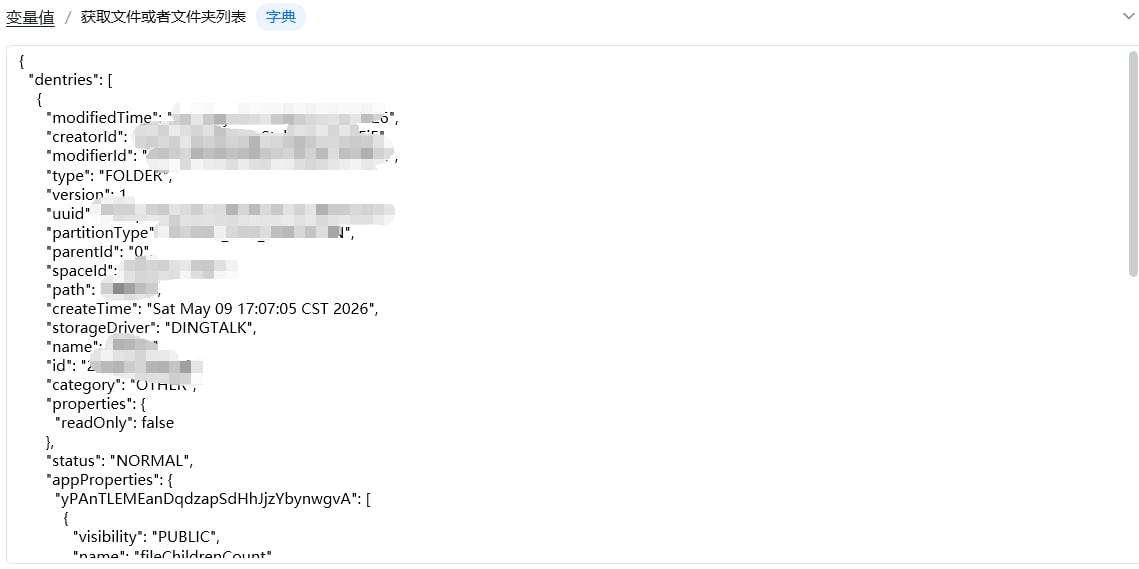
· 执行效果:返回该钉盘空间根目录下所有文件、文件夹的完整信息
#### 输出结果:
 ## 四、注意事项
1. 权限校验:操作人必须拥有目标钉盘空间、目录的查看权限,否则返回无权限报错;
2. 分页逻辑:钉盘接口单次返回数据有限,文件较多时需通过next\_token循环分页;
3. 数据区分:通过type字段区分文件(FILE)与文件夹(FOLDER),可用于递归遍历子目录;
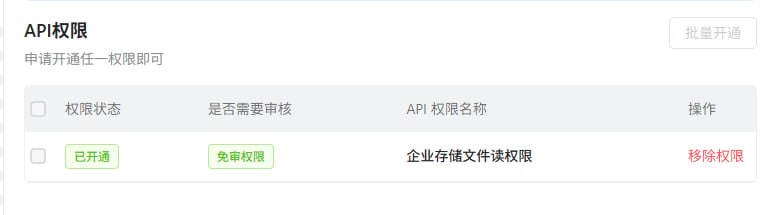
权限:这俩个权限记得要开
## 四、注意事项
1. 权限校验:操作人必须拥有目标钉盘空间、目录的查看权限,否则返回无权限报错;
2. 分页逻辑:钉盘接口单次返回数据有限,文件较多时需通过next\_token循环分页;
3. 数据区分:通过type字段区分文件(FILE)与文件夹(FOLDER),可用于递归遍历子目录;
权限:这俩个权限记得要开

 使用指令过程中遇到问题?前往 [八爪鱼RPA 开发者社区问答板块](https://rpa.bazhuayu.com/community/questions) 提问,获取官方与社区帮助。