> ## Documentation Index
> Fetch the complete documentation index at: https://rpa.bazhuayu.com/helpcenter/llms.txt
> Use this file to discover all available pages before exploring further.

# 添加子表

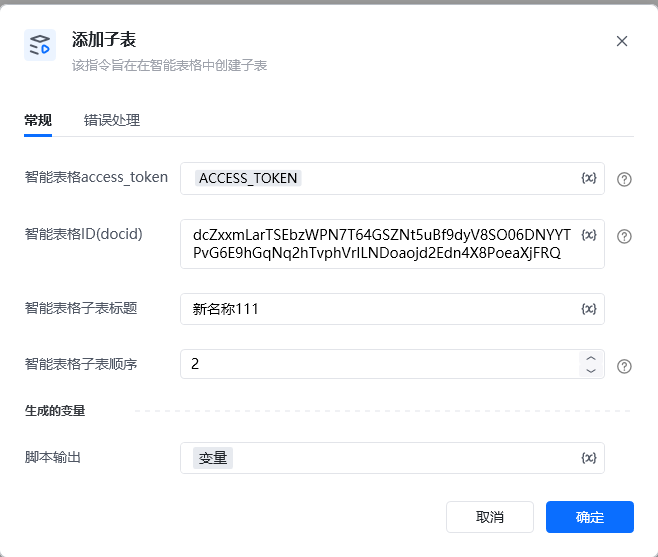
该指令旨在在智能表格中创建子表

## 参数配置

### 指令输入

<strong>智能表格access\_token：</strong>通过指令【建立智能表格连接】获取

<strong>智能表格ID(docid)：</strong>字符串;可通过【新建智能表格】指令获取，注意新建表格后生成的docid要自己保存，后续遗忘无法找回

<strong>智能表格子表标题：</strong>字符串;子表名称

<strong>智能表格子表顺序 ：整数</strong>串;添加子表后，子表所在的第几个位置(添加后表格想显示在第3个位置，则填写数字3)

### 指令输出

<strong>响应内容</strong>：字典；返回响应内容

<img src="https://mintcdn.com/bazhuayu-rpa-docs/3T28-M3CPw0yKoKf/helpcenter/commands/custom-commands/JB70O3jQ/images/100KPBq1-01.png?fit=max&auto=format&n=3T28-M3CPw0yKoKf&q=85&s=95c83ad0bf512d5a4f7fffe74c5c83c3" alt="image" width="658" height="557" data-path="helpcenter/commands/custom-commands/JB70O3jQ/images/100KPBq1-01.png" />

<img src="https://mintcdn.com/bazhuayu-rpa-docs/3T28-M3CPw0yKoKf/helpcenter/commands/custom-commands/JB70O3jQ/images/100KPBq1-02.png?fit=max&auto=format&n=3T28-M3CPw0yKoKf&q=85&s=26c4c0d7501abb6b349aa348e038ad60" alt="image" width="1205" height="240" data-path="helpcenter/commands/custom-commands/JB70O3jQ/images/100KPBq1-02.png" />

<Info>
  使用指令过程中遇到问题？前往 [八爪鱼RPA 开发者社区问答板块](https://rpa.bazhuayu.com/community/questions) 提问，获取官方与社区帮助。
</Info>