> ## Documentation Index
> Fetch the complete documentation index at: https://rpa.bazhuayu.com/helpcenter/llms.txt
> Use this file to discover all available pages before exploring further.
# 添加记录
# 添加记录注意!!!
不能通过添加记录接口给文件、创建时间、最后编辑时间、创建人和最后编辑人五种类型的字段添加记录。
该指令旨在通过智能表格API添加记录
## 参数配置
### 指令输入
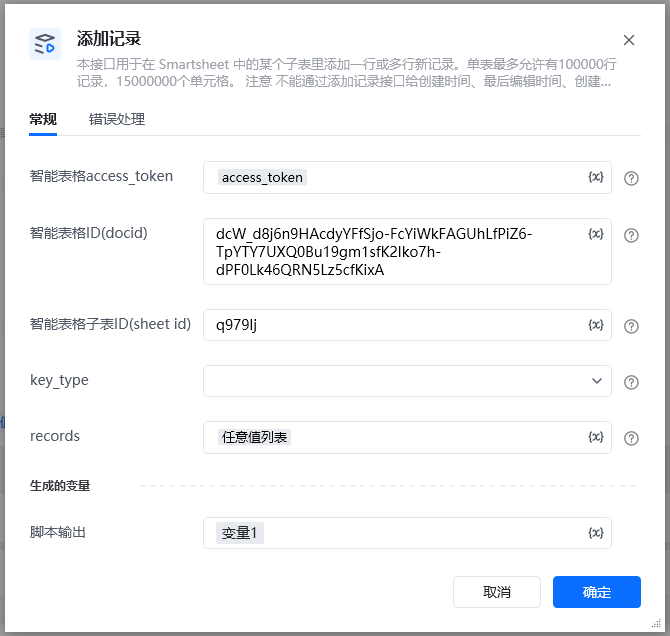
### 常规
智能表格access\_token:通过指令【建立智能表格连接】获取
智能表格ID(docid):字符串;可通过【新建智能表格】指令获取,注意新建表格后生成的docid要自己保存,后续遗忘无法找回
智能表格子表ID(sheet\_id):字符串;通过指令【查询子表】查找智能表格子表ID(sheet\_id)
key\_type:下拉框;key类型,默认用标题(key用字段标题表示), 字段 ID (key用字段ID表示)
记录列表:任意值列表类型, 每个记录是一个字典,包含字段类型和对应的值
 ### 指令输出
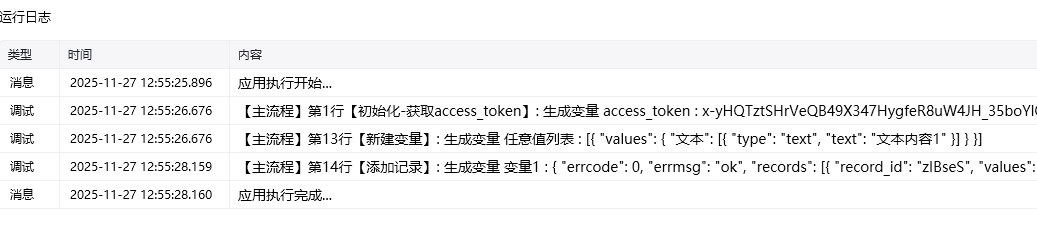
响应内容:字典;返回响应内容
### 指令输出
响应内容:字典;返回响应内容
 ## 基础概念
关于字段节点结构详情请看 添加记录[添加记录](https://developer.work.weixin.qq.com/document/path/99907)
文本类型:str, \{"文本": "内容"}
数字类型:float, \{"数字": 123.0}
复选框类型:bool, \{"复选框": True}
日期时间类型:str,格式为 YYYY-MM-DD HH:mm:ss,\{"日期": "2025-10-01 12:00:00"}
图片上传:str,上传图片地址,\{"图片":r"D:\001.png"}
成员类型:str,上传成员id,\{"成员":"xxxxx"}
超链接类型:str,\{"超链接":"[www.baidu.com](http://www.baidu.com)"}
电话或邮件类型:str,\{"电话": "1231231231123", "邮箱":"xxxxxxx"}
单选或多选类型:str or list,当为字符串类型时是单选,为列表时是多选,当选项不存在时自动创建选项,\{"单选": "3","多选": \["2", "3"]}
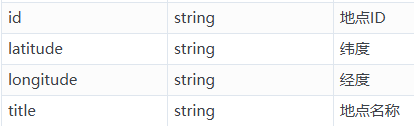
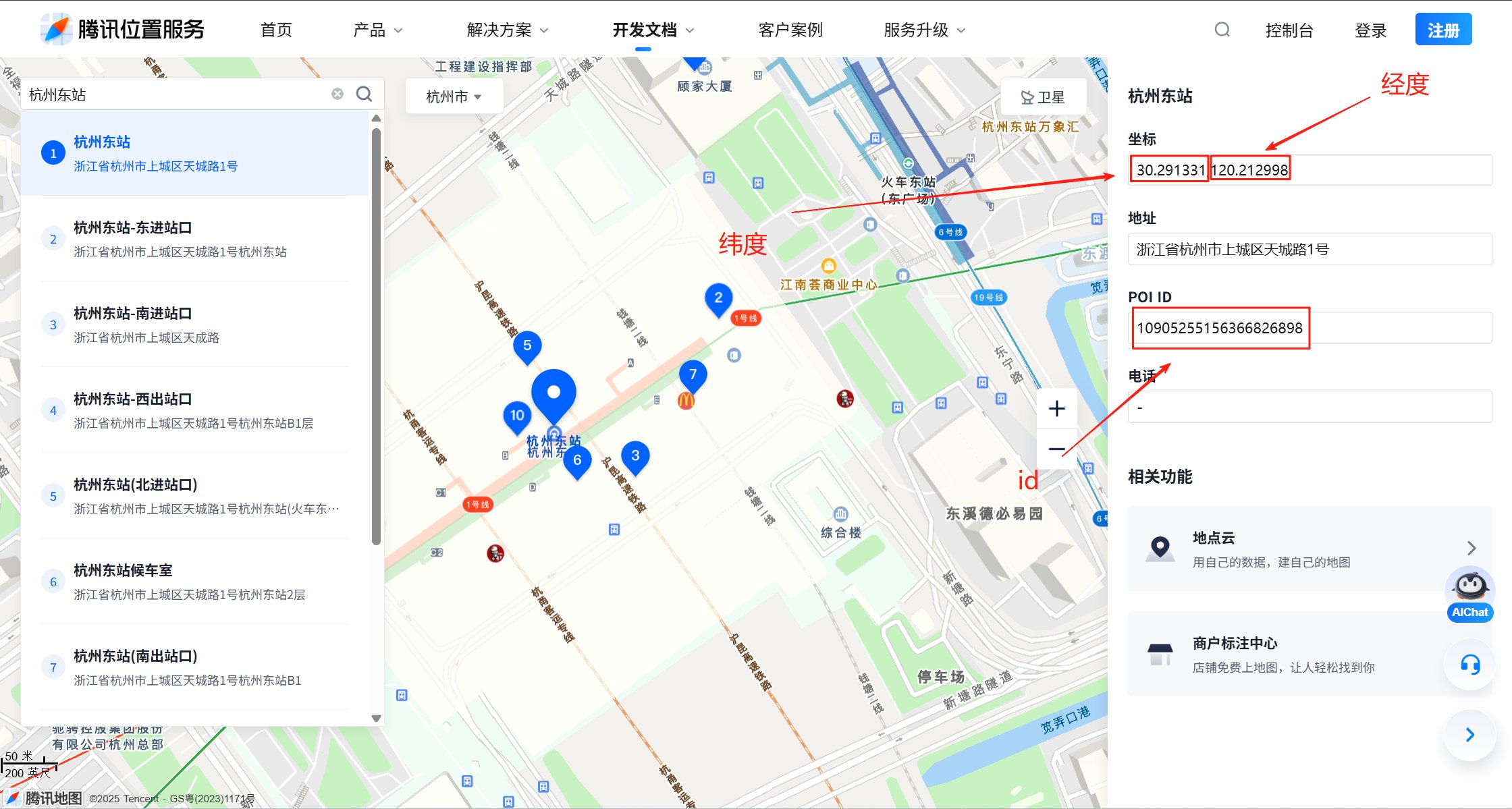
地理位置类型:dict,来源为腾讯地图。目前只支持腾讯地图来源,\{"地理位置":\{"id": "10905255156366826898", "latitude": "30.291331", "longitude": "120.212998", "title": "杭州东站"}}
文件类型:参数名类型描述namestring文件名sizeint32文件大小file\_extstring文件扩展名。文件夹为空,文件为对应文件拓展名,收集表为FORM,文档为DOC,表格为SHEET,幻灯片为SLIDE,思维导图为MIND,流程图为FLOWCHART,智能表为SMARTSHEETfile\_idstring文件IDfile\_urlstring文件url ,如果是微盘文档则通过获取分享链接[获取分享链接](https://developer.work.weixin.qq.com/document/path/99907#44667)获得,如果是文档,则为文档urlfile\_typestring文件类型。文件夹为Folder,微盘文件为Wedrive,收集表为30,文档为50,表格是51,幻灯片为52,思维导图为54,流程图为55,智能表为70doc\_typestring文件类型,用于区分文件夹和文件
\{ "文件": \[ \{ "file\_id": "s.ww8156d878fdf6f8d3.766540748uYa\_f.766546853oWXD", "name": "测试表格23.txt", "size": 11131, "file\_type": "70", "file\_ext": "txt", "doc\_type": 2, "file\_url": "[https://work.weixin.qq.com/wework\_admin/frame#/wedrive/file/s.ww8156d878fdf6f8d3.766540748uYa\_f.766546853oWXD](https://work.weixin.qq.com/wework_admin/frame#/wedrive/file/s.ww8156d878fdf6f8d3.766540748uYa_f.766546853oWXD)" } ]}
## 基础概念
关于字段节点结构详情请看 添加记录[添加记录](https://developer.work.weixin.qq.com/document/path/99907)
文本类型:str, \{"文本": "内容"}
数字类型:float, \{"数字": 123.0}
复选框类型:bool, \{"复选框": True}
日期时间类型:str,格式为 YYYY-MM-DD HH:mm:ss,\{"日期": "2025-10-01 12:00:00"}
图片上传:str,上传图片地址,\{"图片":r"D:\001.png"}
成员类型:str,上传成员id,\{"成员":"xxxxx"}
超链接类型:str,\{"超链接":"[www.baidu.com](http://www.baidu.com)"}
电话或邮件类型:str,\{"电话": "1231231231123", "邮箱":"xxxxxxx"}
单选或多选类型:str or list,当为字符串类型时是单选,为列表时是多选,当选项不存在时自动创建选项,\{"单选": "3","多选": \["2", "3"]}
地理位置类型:dict,来源为腾讯地图。目前只支持腾讯地图来源,\{"地理位置":\{"id": "10905255156366826898", "latitude": "30.291331", "longitude": "120.212998", "title": "杭州东站"}}
文件类型:参数名类型描述namestring文件名sizeint32文件大小file\_extstring文件扩展名。文件夹为空,文件为对应文件拓展名,收集表为FORM,文档为DOC,表格为SHEET,幻灯片为SLIDE,思维导图为MIND,流程图为FLOWCHART,智能表为SMARTSHEETfile\_idstring文件IDfile\_urlstring文件url ,如果是微盘文档则通过获取分享链接[获取分享链接](https://developer.work.weixin.qq.com/document/path/99907#44667)获得,如果是文档,则为文档urlfile\_typestring文件类型。文件夹为Folder,微盘文件为Wedrive,收集表为30,文档为50,表格是51,幻灯片为52,思维导图为54,流程图为55,智能表为70doc\_typestring文件类型,用于区分文件夹和文件
\{ "文件": \[ \{ "file\_id": "s.ww8156d878fdf6f8d3.766540748uYa\_f.766546853oWXD", "name": "测试表格23.txt", "size": 11131, "file\_type": "70", "file\_ext": "txt", "doc\_type": 2, "file\_url": "[https://work.weixin.qq.com/wework\_admin/frame#/wedrive/file/s.ww8156d878fdf6f8d3.766540748uYa\_f.766546853oWXD](https://work.weixin.qq.com/wework_admin/frame#/wedrive/file/s.ww8156d878fdf6f8d3.766540748uYa_f.766546853oWXD)" } ]}
 可以在腾讯地图中获取(腾讯地图[腾讯地图](https://lbs.qq.com/getPoint/))
 ### 记录列表例子
key用字段标题表示 \{ "名称1": "张三1", "数字字段": 1213, "图片": r"D:\00.jpg", "日期时间": "2025-10-01 12:50:00", "单选": "3", "多选": \["2", "3"], "成员": "lifei", "邮箱": "[123456789@qq.com](mailto:123456789@qq.com)", "电话": "12345678901", "复选框": true, "链接": "[https://www.example.com](https://www.example.com)", "地理位置": \{"id": "10905255156366826898", "latitude": "30.291331", "longitude": "120.212998", "title": "北京东站", "source\_type": 1}}
使用指令过程中遇到问题?前往 [八爪鱼RPA 开发者社区问答板块](https://rpa.bazhuayu.com/community/questions) 提问,获取官方与社区帮助。
### 记录列表例子
key用字段标题表示 \{ "名称1": "张三1", "数字字段": 1213, "图片": r"D:\00.jpg", "日期时间": "2025-10-01 12:50:00", "单选": "3", "多选": \["2", "3"], "成员": "lifei", "邮箱": "[123456789@qq.com](mailto:123456789@qq.com)", "电话": "12345678901", "复选框": true, "链接": "[https://www.example.com](https://www.example.com)", "地理位置": \{"id": "10905255156366826898", "latitude": "30.291331", "longitude": "120.212998", "title": "北京东站", "source\_type": 1}}
使用指令过程中遇到问题?前往 [八爪鱼RPA 开发者社区问答板块](https://rpa.bazhuayu.com/community/questions) 提问,获取官方与社区帮助。