> ## Documentation Index
> Fetch the complete documentation index at: https://rpa.bazhuayu.com/helpcenter/llms.txt
> Use this file to discover all available pages before exploring further.

# 建立智能表格连接

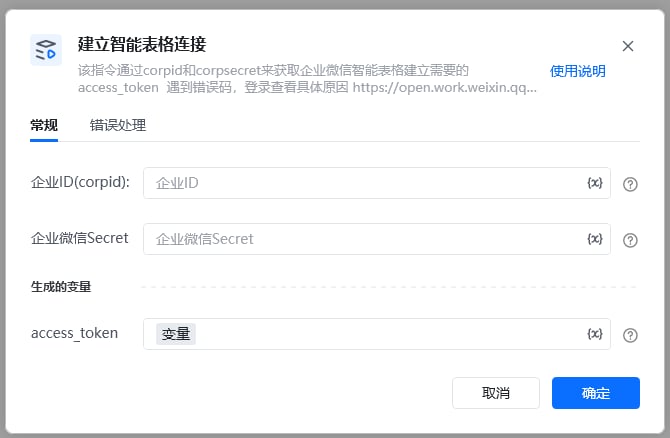
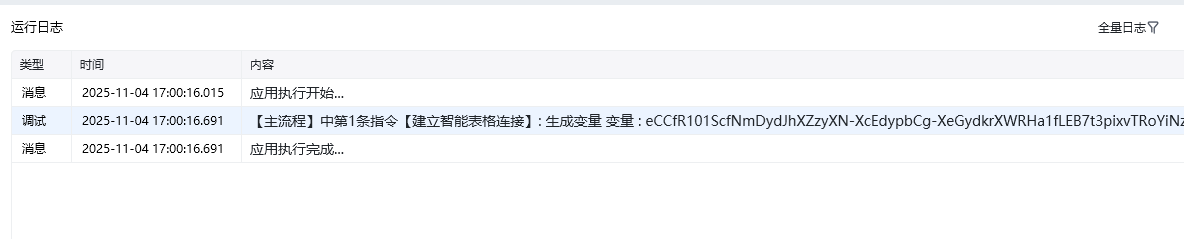
该指令通过corpid和corpsecret来与企业微信智能表格建立链接获取【智能表格access\_token】

### 指令输入

### 常规

<strong>企业ID</strong>：字符串；企微应用的ID，获取方式见文档末尾

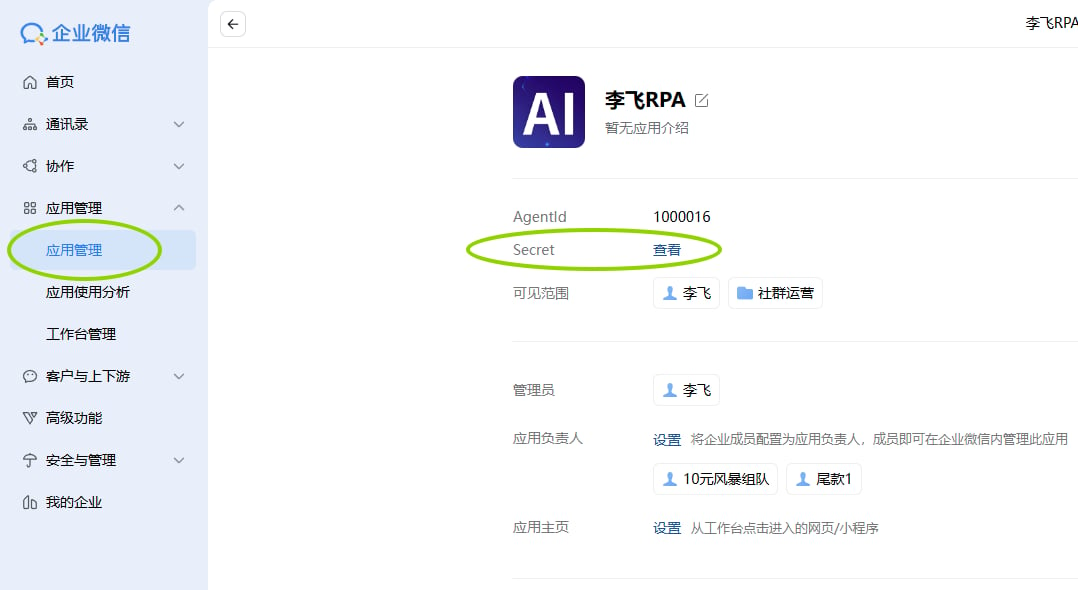
<strong>企业微信的Secret</strong>：字符串；企业微信的Secret

登录企业微信后台 [https://work.weixin.qq.com/\[https://work.weixin.qq.com/](https://work.weixin.qq.com/\[https://work.weixin.qq.com/)]\([https://work.weixin.qq.com/](https://work.weixin.qq.com/))

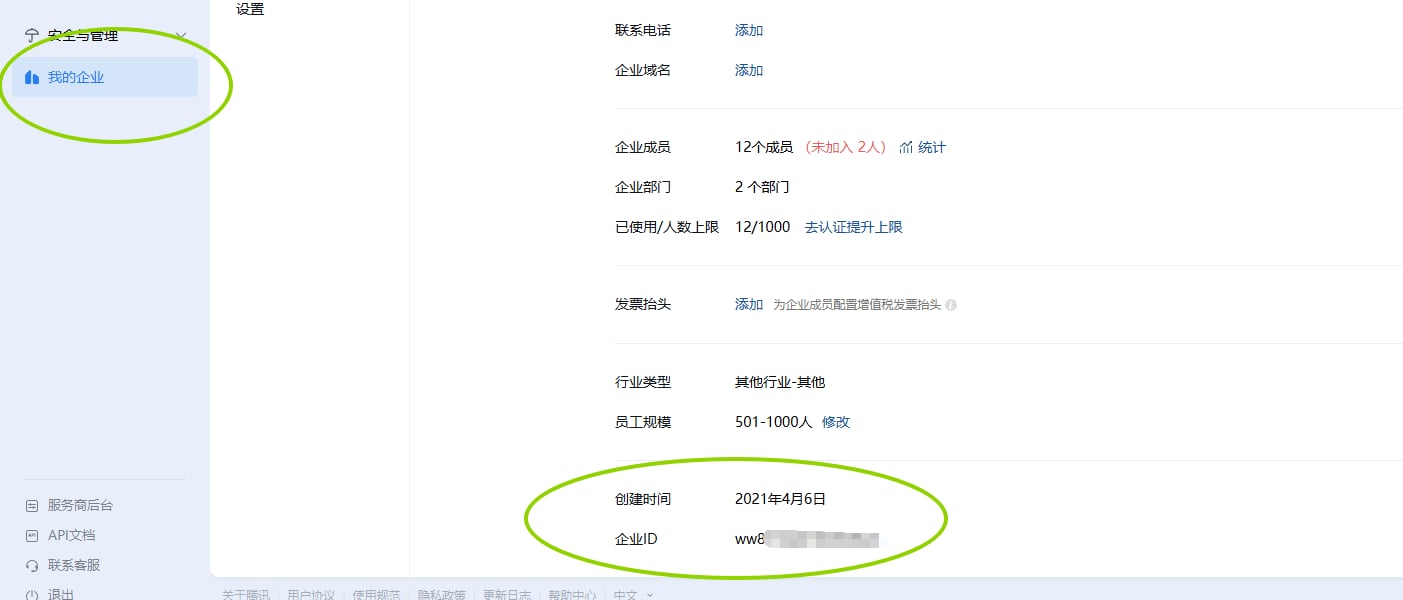
1.登录企业微信管理后台

进入「我的企业」→「企业信息」

查看并复制「企业ID」
<img src="https://mintcdn.com/bazhuayu-rpa-docs/3T28-M3CPw0yKoKf/helpcenter/commands/custom-commands/JB70O3jQ/images/JvyTKnXv-01.png?fit=max&auto=format&n=3T28-M3CPw0yKoKf&q=85&s=e79e90caa92cddb5f825aade26041434" alt="image" width="1403" height="600" data-path="helpcenter/commands/custom-commands/JB70O3jQ/images/JvyTKnXv-01.png" />

3.选择 创建好的应用，获取 corpsecret

<img src="https://mintcdn.com/bazhuayu-rpa-docs/3T28-M3CPw0yKoKf/helpcenter/commands/custom-commands/JB70O3jQ/images/JvyTKnXv-02.png?fit=max&auto=format&n=3T28-M3CPw0yKoKf&q=85&s=f5de809df54e2736ca56a4dd34cb97f5" alt="image" width="1078" height="590" data-path="helpcenter/commands/custom-commands/JB70O3jQ/images/JvyTKnXv-02.png" />

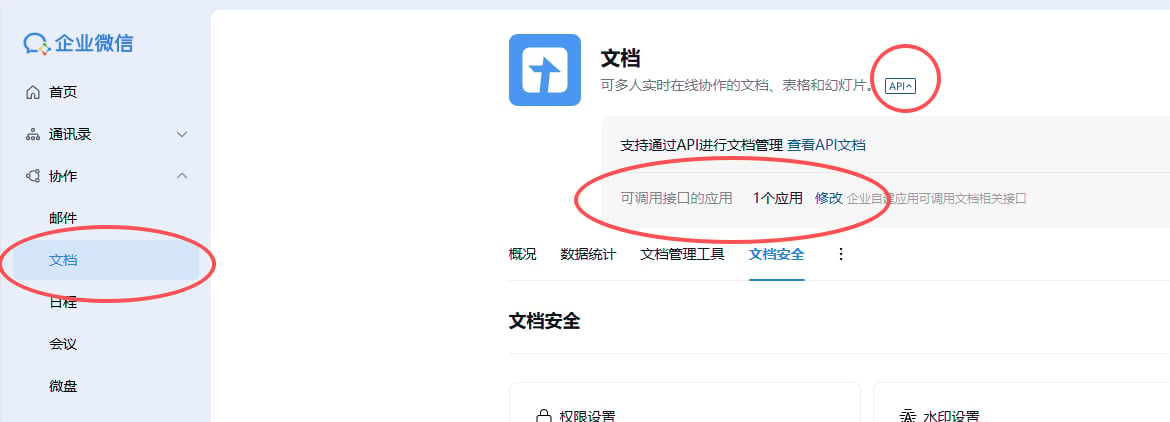
3.文档api设置，可调用接口的应用，否则没有权限

<img src="https://mintcdn.com/bazhuayu-rpa-docs/3T28-M3CPw0yKoKf/helpcenter/commands/custom-commands/JB70O3jQ/images/JvyTKnXv-03.png?fit=max&auto=format&n=3T28-M3CPw0yKoKf&q=85&s=d4666b8db3556656512de039a700c0ca" alt="image" width="1170" height="422" data-path="helpcenter/commands/custom-commands/JB70O3jQ/images/JvyTKnXv-03.png" />

<img src="https://mintcdn.com/bazhuayu-rpa-docs/3T28-M3CPw0yKoKf/helpcenter/commands/custom-commands/JB70O3jQ/images/JvyTKnXv-04.png?fit=max&auto=format&n=3T28-M3CPw0yKoKf&q=85&s=a63ce1186b8867dfa13efcefbad8e479" alt="image" width="670" height="438" data-path="helpcenter/commands/custom-commands/JB70O3jQ/images/JvyTKnXv-04.png" />

<img src="https://mintcdn.com/bazhuayu-rpa-docs/3T28-M3CPw0yKoKf/helpcenter/commands/custom-commands/JB70O3jQ/images/JvyTKnXv-05.png?fit=max&auto=format&n=3T28-M3CPw0yKoKf&q=85&s=dcda2004f92fdf8f2e4bc0a1620af9dd" alt="image" width="1184" height="239" data-path="helpcenter/commands/custom-commands/JB70O3jQ/images/JvyTKnXv-05.png" />

<Info>
  使用指令过程中遇到问题？前往 [八爪鱼RPA 开发者社区问答板块](https://rpa.bazhuayu.com/community/questions) 提问，获取官方与社区帮助。
</Info>