> ## Documentation Index
> Fetch the complete documentation index at: https://rpa.bazhuayu.com/helpcenter/llms.txt
> Use this file to discover all available pages before exploring further.
# 删除记录
# 删除记录
## 描述
该指令旨在在智能表格中删除记录
## 参数配置
### 指令输入
### 常规
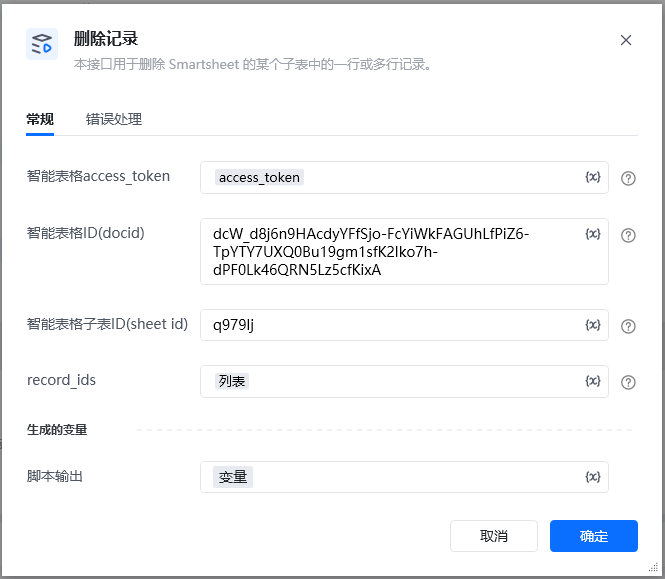
智能表格access\_token:通过指令【建立智能表格连接】获取
智能表格ID(docid):字符串;可通过【新建智能表格】指令获取,注意新建表格后生成的docid要自己保存,后续遗忘无法找回
智能表格子表ID(sheet\_id):字符串;通过指令【查询子表】查找智能表格子表ID(sheet\_id)
记录ID列表:列表;要删除的记录ID列表
可以通过在线表格里面添加公式RECORD\_ID() 获取record\_id
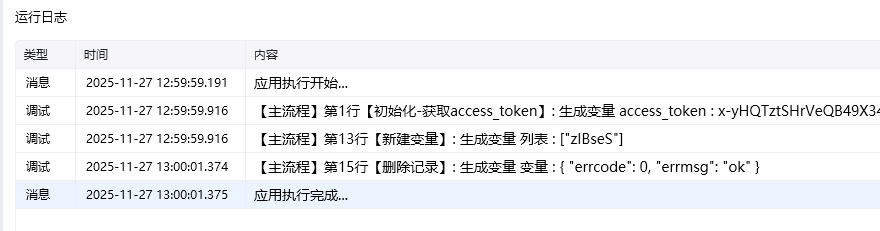 ### 指令输出
使用指令过程中遇到问题?前往 [八爪鱼RPA 开发者社区问答板块](https://rpa.bazhuayu.com/community/questions) 提问,获取官方与社区帮助。
### 指令输出
使用指令过程中遇到问题?前往 [八爪鱼RPA 开发者社区问答板块](https://rpa.bazhuayu.com/community/questions) 提问,获取官方与社区帮助。