> ## Documentation Index
> Fetch the complete documentation index at: https://rpa.bazhuayu.com/helpcenter/llms.txt
> Use this file to discover all available pages before exploring further.

# 新建智能表格

新建企业微信智能表格

<strong>1.注意新建表格后生成的docid要自己保存，后续遗忘无法找回</strong>

<strong>2.客户端新建智能表不能通过api修改</strong>

## 描述

该指令通过调用智能表格api来创建智能表格

## 参数配置

### 指令输入

### 常规

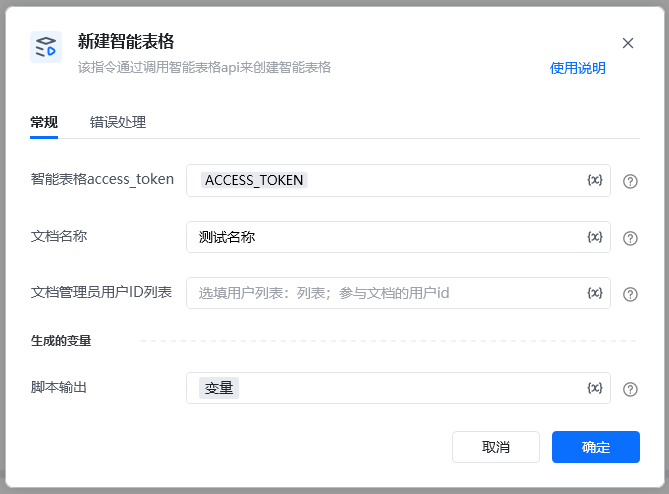
<strong>智能表格access\_token：</strong>通过指令【建立智能表格连接】获取

<strong>文档名字</strong>：字符串；自定义文档名称

<strong>管理员用户id</strong>：选填列表；参与文档的用户id

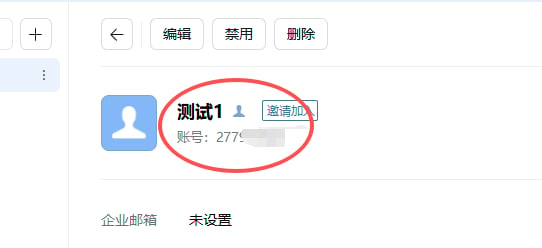
如何获取用户id

企业微信后台——通讯录——组织架构——点击某个成员——账号就是用户id
<img src="https://mintcdn.com/bazhuayu-rpa-docs/OQM0dIvQQ9sYEUaI/helpcenter/commands/custom-commands/JB70O3jQ/images/vj8UqVqJ-01.png?fit=max&auto=format&n=OQM0dIvQQ9sYEUaI&q=85&s=f99a8043c7a0d93b4d26ea77a3cf112d" alt="image" width="542" height="248" data-path="helpcenter/commands/custom-commands/JB70O3jQ/images/vj8UqVqJ-01.png" />

### 指令输出

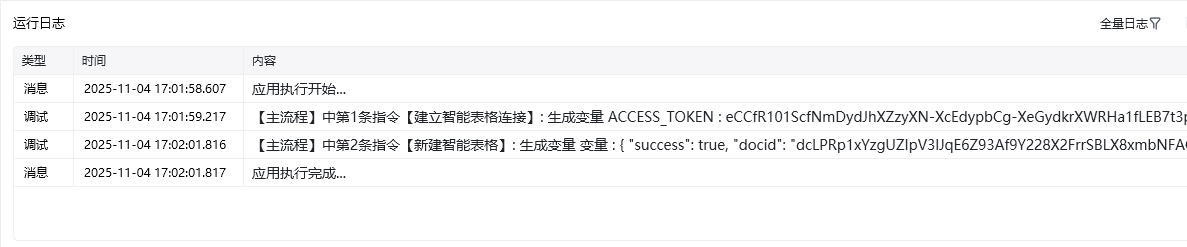
<strong>响应内容</strong>：字典；返回响应内容

<img src="https://mintcdn.com/bazhuayu-rpa-docs/OQM0dIvQQ9sYEUaI/helpcenter/commands/custom-commands/JB70O3jQ/images/vj8UqVqJ-02.png?fit=max&auto=format&n=OQM0dIvQQ9sYEUaI&q=85&s=327daee365345b9d0c2ee683491b2f41" alt="image" width="669" height="494" data-path="helpcenter/commands/custom-commands/JB70O3jQ/images/vj8UqVqJ-02.png" />

<img src="https://mintcdn.com/bazhuayu-rpa-docs/OQM0dIvQQ9sYEUaI/helpcenter/commands/custom-commands/JB70O3jQ/images/vj8UqVqJ-03.png?fit=max&auto=format&n=OQM0dIvQQ9sYEUaI&q=85&s=8cdeb2c522edfccd9a5d69cf084c9894" alt="image" width="1187" height="247" data-path="helpcenter/commands/custom-commands/JB70O3jQ/images/vj8UqVqJ-03.png" />

<Info>
  使用指令过程中遇到问题？前往 [八爪鱼RPA 开发者社区问答板块](https://rpa.bazhuayu.com/community/questions) 提问，获取官方与社区帮助。
</Info>