> ## Documentation Index
> Fetch the complete documentation index at: https://rpa.bazhuayu.com/helpcenter/llms.txt
> Use this file to discover all available pages before exploring further.

# 实时-实时来源

# 描述

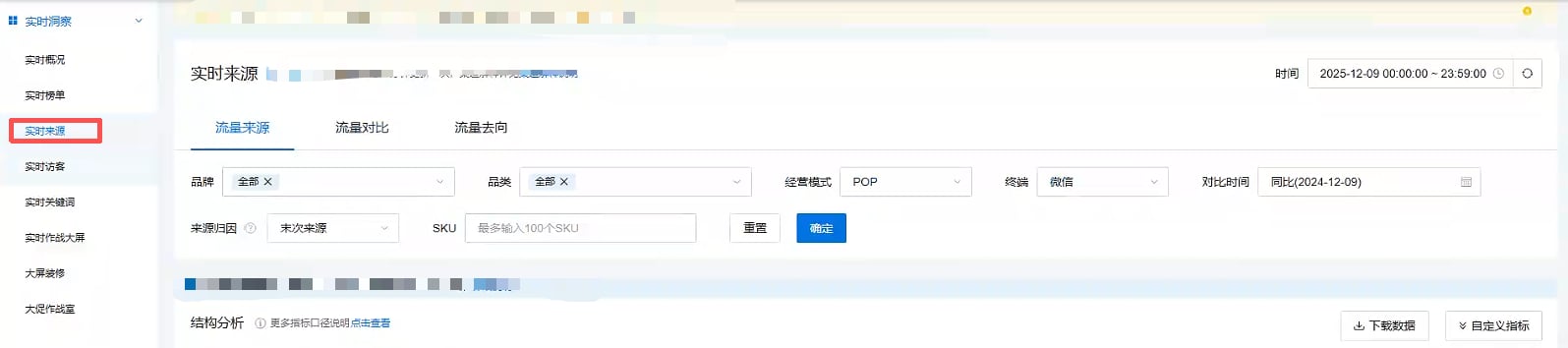
该指令实现获取实时-实时来源页面全部流量分析维度的数据，并写入Excel保存到指定位置

<img src="https://mintcdn.com/bazhuayu-rpa-docs/OQM0dIvQQ9sYEUaI/helpcenter/commands/custom-commands/JIoEqoH7/images/2XUPWUKk-01.png?fit=max&auto=format&n=OQM0dIvQQ9sYEUaI&q=85&s=b4dbbfc74fb38d348cdfc81a7f3f9337" alt="image" width="1595" height="354" data-path="helpcenter/commands/custom-commands/JIoEqoH7/images/2XUPWUKk-01.png" />

# 配置项说明

## 指令输入

#### 网页对象：

任意一个已登录京东商智品牌版后台的网页对象

<strong>具体日期:</strong>

下拉框，可选：今日累计、昨日累计

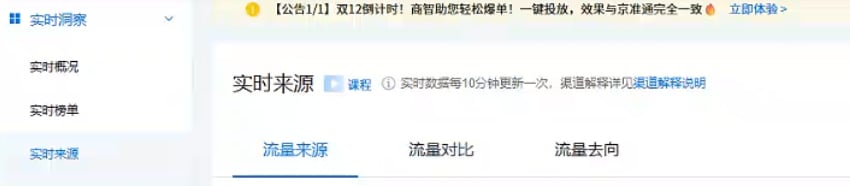
<strong>流量分析维度:</strong>

下拉框，可选：流量来源、流量对比、流量去向

<img src="https://mintcdn.com/bazhuayu-rpa-docs/OQM0dIvQQ9sYEUaI/helpcenter/commands/custom-commands/JIoEqoH7/images/2XUPWUKk-02.png?fit=max&auto=format&n=OQM0dIvQQ9sYEUaI&q=85&s=e32f2a1b6eb575f58503fd2e54de0919" alt="image" width="850" height="186" data-path="helpcenter/commands/custom-commands/JIoEqoH7/images/2XUPWUKk-02.png" />

<strong>品牌:</strong>

数据类型:文本值列表，填写自己网页中展示的品牌名称,例如:\["全部"]，支持多选

<img src="https://mintcdn.com/bazhuayu-rpa-docs/OQM0dIvQQ9sYEUaI/helpcenter/commands/custom-commands/JIoEqoH7/images/2XUPWUKk-03.png?fit=max&auto=format&n=OQM0dIvQQ9sYEUaI&q=85&s=8eff8b3a655d2e868c124b4c970c0fc6" alt="image" width="358" height="54" data-path="helpcenter/commands/custom-commands/JIoEqoH7/images/2XUPWUKk-03.png" />

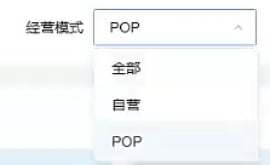
<strong>经营模式:</strong>

填写自己网页中展示的经营模式,例如:全部

<img src="https://mintcdn.com/bazhuayu-rpa-docs/OQM0dIvQQ9sYEUaI/helpcenter/commands/custom-commands/JIoEqoH7/images/2XUPWUKk-04.png?fit=max&auto=format&n=OQM0dIvQQ9sYEUaI&q=85&s=89475a448054f9e8a036276ece5cf0a8" alt="image" width="270" height="165" data-path="helpcenter/commands/custom-commands/JIoEqoH7/images/2XUPWUKk-04.png" />

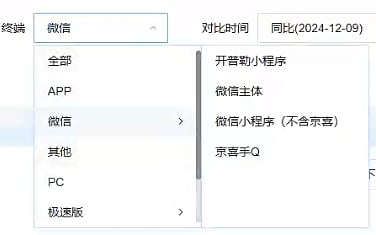
一级终端类目名称：

输入具体类目。若选择一级类目，直接输入一级类目名称，例如：全部

二级终端类目名称：

输入具体类目。若选择二级类目，直接输入二级类目名称，例如：APP。类目名称需要与网站显示的名称一致，否则可能导致无法选择，二级终端类目名称选填

<img src="https://mintcdn.com/bazhuayu-rpa-docs/OQM0dIvQQ9sYEUaI/helpcenter/commands/custom-commands/JIoEqoH7/images/2XUPWUKk-05.png?fit=max&auto=format&n=OQM0dIvQQ9sYEUaI&q=85&s=e5f7cc997b6c8f4bc7a92f411ab18df5" alt="image" width="376" height="235" data-path="helpcenter/commands/custom-commands/JIoEqoH7/images/2XUPWUKk-05.png" />

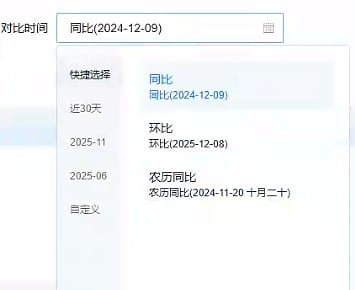
<strong>对比时间：</strong>

填写网页中展示的对比时间，可填写：同比、环比、农历同比、自定义

<strong>具体时间：</strong>

当选择自定义时填写

<img src="https://mintcdn.com/bazhuayu-rpa-docs/OQM0dIvQQ9sYEUaI/helpcenter/commands/custom-commands/JIoEqoH7/images/2XUPWUKk-06.png?fit=max&auto=format&n=OQM0dIvQQ9sYEUaI&q=85&s=06093112854c3655c7af63c88bd13a9d" alt="image" width="355" height="290" data-path="helpcenter/commands/custom-commands/JIoEqoH7/images/2XUPWUKk-06.png" />

<strong>来源归因：</strong>

当流量分析维度不等于流量对比时需要填写，例如：末次来源、首次来源

<img src="https://mintcdn.com/bazhuayu-rpa-docs/OQM0dIvQQ9sYEUaI/helpcenter/commands/custom-commands/JIoEqoH7/images/2XUPWUKk-07.png?fit=max&auto=format&n=OQM0dIvQQ9sYEUaI&q=85&s=35c4bc19ece3b8a198ffb6f98f2c82f3" alt="image" width="1849" height="334" data-path="helpcenter/commands/custom-commands/JIoEqoH7/images/2XUPWUKk-07.png" />

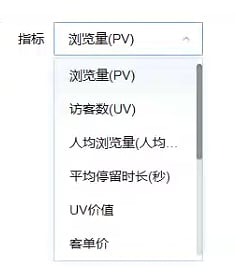
<strong>指标：</strong>

当流量分析维度等于流量对比时需要填写

<img src="https://mintcdn.com/bazhuayu-rpa-docs/OQM0dIvQQ9sYEUaI/helpcenter/commands/custom-commands/JIoEqoH7/images/2XUPWUKk-08.png?fit=max&auto=format&n=OQM0dIvQQ9sYEUaI&q=85&s=5d09d8989a9264e820553b9206a3d0f4" alt="image" width="235" height="271" data-path="helpcenter/commands/custom-commands/JIoEqoH7/images/2XUPWUKk-08.png" />

<strong>渠道：</strong>

当流量分析维度不等于流量去向时显示，填写网页中展示的渠道

<strong>自定义路径:</strong>

选择下载文件保存的文件夹路径，必填项

## 高级

#### 自定义文件名:

输入文件下载的名称，选填，若不填则使用平台默认名称

## 指令输出

#### 生成路径：

输出文本类型，下载的文件路径

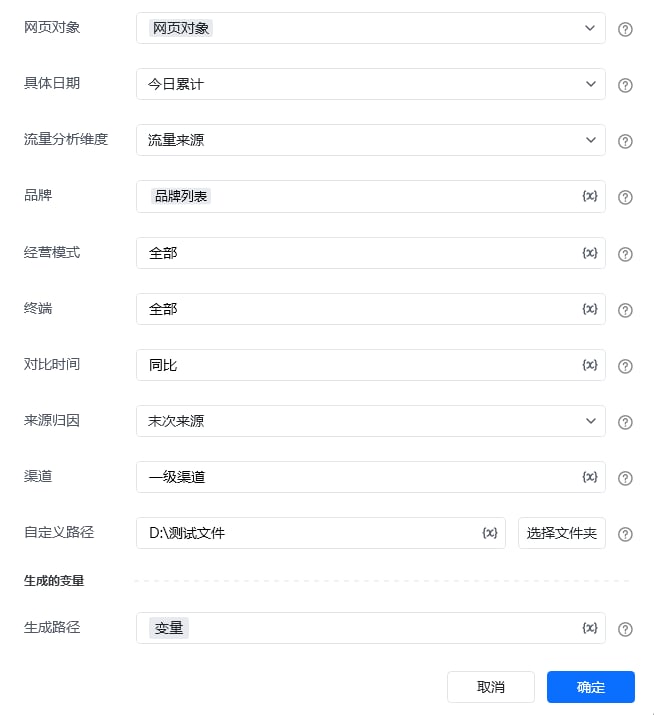
# 使用说明

<img src="https://mintcdn.com/bazhuayu-rpa-docs/OQM0dIvQQ9sYEUaI/helpcenter/commands/custom-commands/JIoEqoH7/images/2XUPWUKk-09.png?fit=max&auto=format&n=OQM0dIvQQ9sYEUaI&q=85&s=a32dd981530d847e7b514725957bfee7" alt="image" width="654" height="715" data-path="helpcenter/commands/custom-commands/JIoEqoH7/images/2XUPWUKk-09.png" />

<Info>
  使用指令过程中遇到问题？前往 [八爪鱼RPA 开发者社区问答板块](https://rpa.bazhuayu.com/community/questions) 提问，获取官方与社区帮助。
</Info>