> ## Documentation Index
> Fetch the complete documentation index at: https://rpa.bazhuayu.com/helpcenter/llms.txt
> Use this file to discover all available pages before exploring further.

# 快手小店登录

## 指令描述

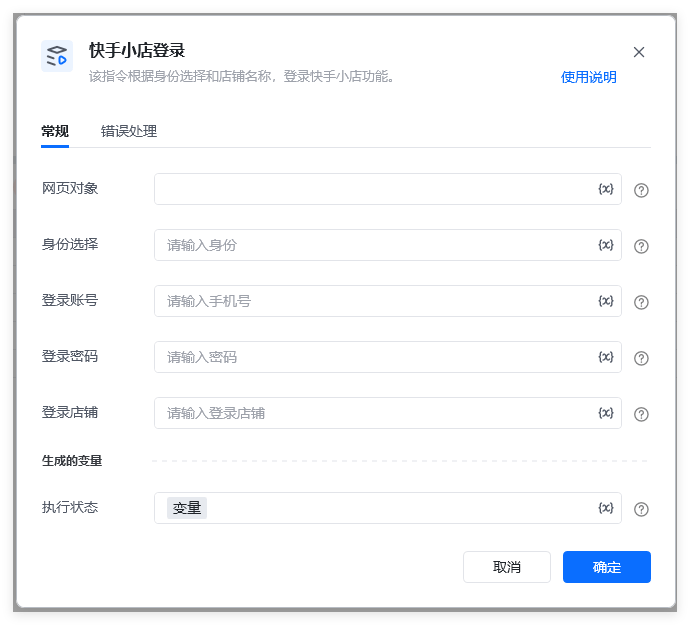
该指令根据<strong>身份选择</strong>￱、￰<strong>登录账号</strong>￱、<strong>￰登录密码</strong>￱和<strong>￰登录店铺</strong>￱的选项，使用<strong>网页对象￱</strong>实现登录快手小店。

<img src="https://mintcdn.com/bazhuayu-rpa-docs/_0ncJVuvn2vLb0nP/helpcenter/commands/custom-commands/LkbkmUwS/images/5zDn5HpM-01.png?fit=max&auto=format&n=_0ncJVuvn2vLb0nP&q=85&s=15bde7d76cdc319d0cbda85e01110ff9" alt="image" width="690" height="625" data-path="helpcenter/commands/custom-commands/LkbkmUwS/images/5zDn5HpM-01.png" />

## 参数配置

### 指令输入

<strong>网页对象: </strong>网页对象，使用【打开网页】或者【获取已打开的网页对象】指令获取快手小店登录页面的返回值（生成变量）

<strong>身份选择: </strong>字符串，快手登录的时候需要选择身份（店主或者员工），必须是【我是店主】或者【我是员工】

<strong>登录账号: </strong>字符串，账号

<strong>登录密码: </strong>字符串，密码

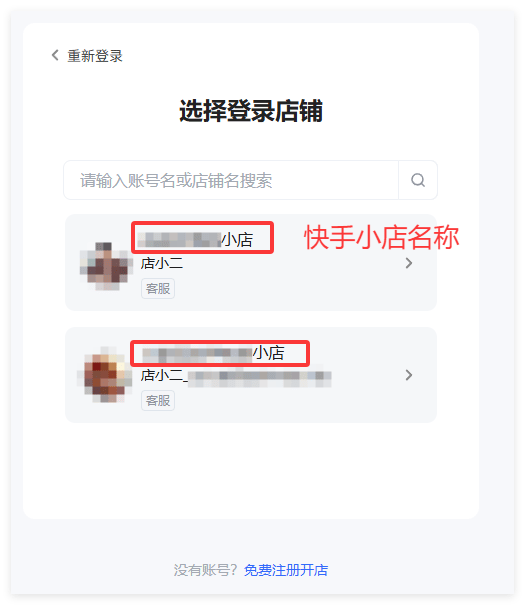
<strong>登录店铺：</strong>字符串 ，需要登录的快手小店名称。

如果只有一个店铺，可为空。

如有账号名下有多个店铺，登录过程需要选择指定具体店铺名称，如下图所示：

<img src="https://mintcdn.com/bazhuayu-rpa-docs/_0ncJVuvn2vLb0nP/helpcenter/commands/custom-commands/LkbkmUwS/images/5zDn5HpM-02.png?fit=max&auto=format&n=_0ncJVuvn2vLb0nP&q=85&s=3e05df180a3d8008a637fcfc4b24b9a8" alt="image" width="525" height="605" data-path="helpcenter/commands/custom-commands/LkbkmUwS/images/5zDn5HpM-02.png" />

### 指令输出

<strong>执行状态：</strong>指令执行结果，用于指示和判断指令执行结果，返回值如下。登录成功返回：登录成功登录失败返回：登录失败，XXXX

备注：XXXX，可能是【账号密码不符】、【登录店铺未找到】等提示。

## 流程说明

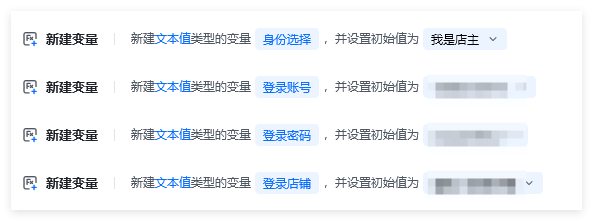
1、创建和赋值相关变量：

<img src="https://mintcdn.com/bazhuayu-rpa-docs/_0ncJVuvn2vLb0nP/helpcenter/commands/custom-commands/LkbkmUwS/images/5zDn5HpM-03.png?fit=max&auto=format&n=_0ncJVuvn2vLb0nP&q=85&s=fc6b41b7dcf2689ddad8605c391ba82f" alt="image" width="593" height="221" data-path="helpcenter/commands/custom-commands/LkbkmUwS/images/5zDn5HpM-03.png" />

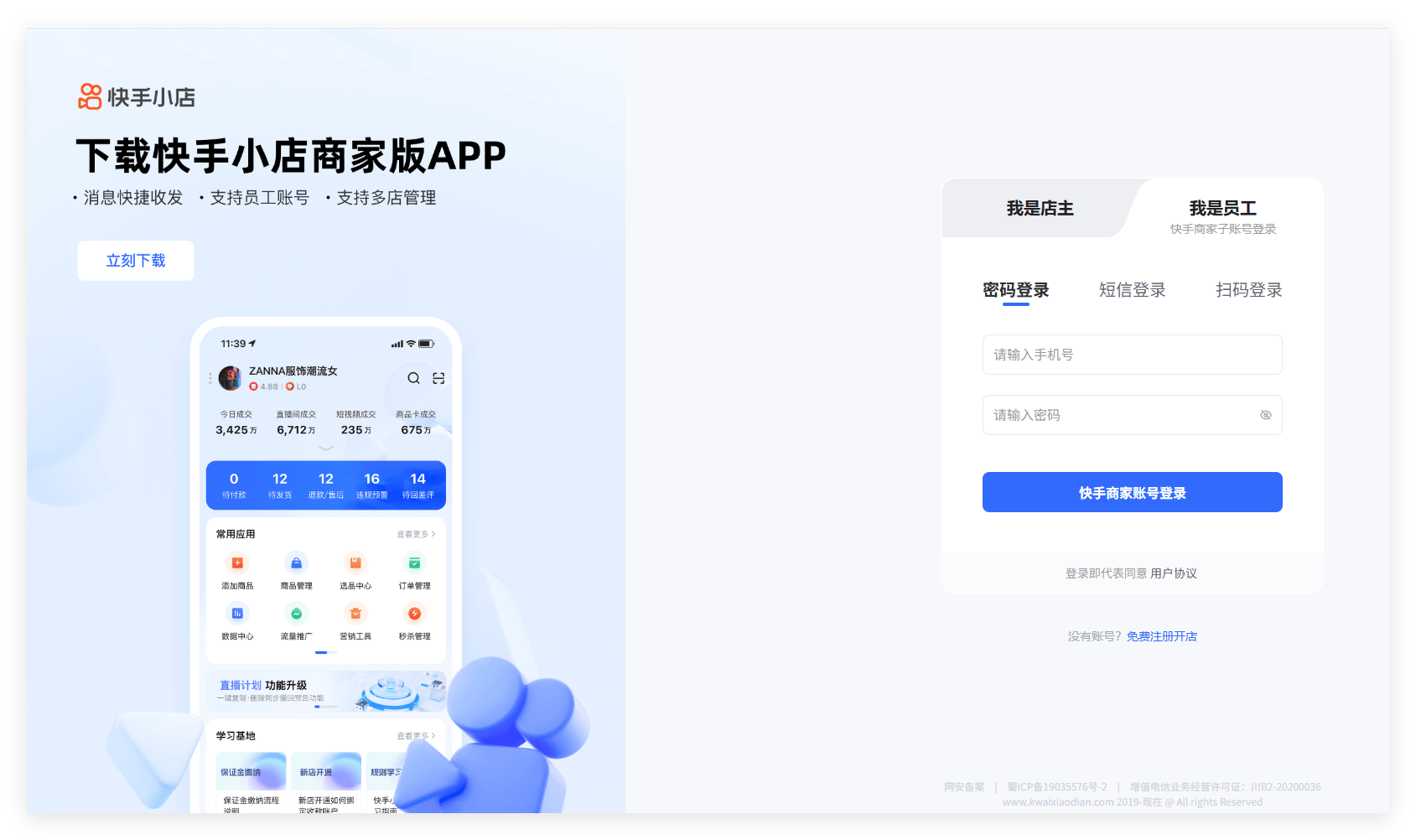
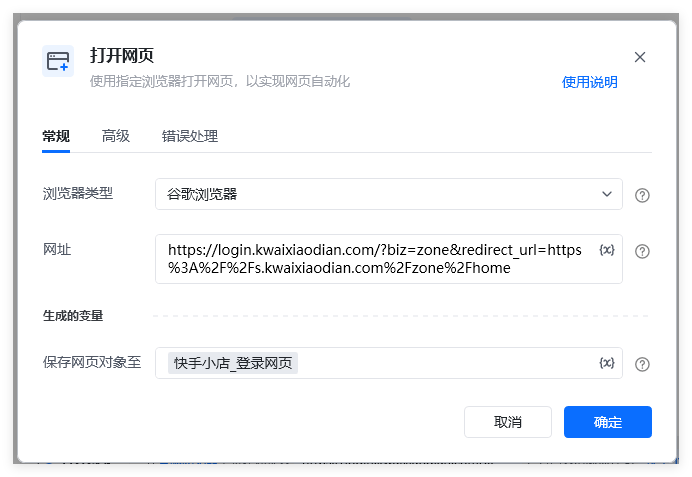
2、使用快手小店的网页（如下图所示）【 [https://login.kwaixiaodian.com/?biz=zone\&redirect\_url=https%3A%2F%2Fs.kwaixiaodian.com%2Fzone%2Fhome](https://login.kwaixiaodian.com/?biz=zone\&redirect_url=https%3A%2F%2Fs.kwaixiaodian.com%2Fzone%2Fhome) 】作为参数，

<img src="https://mintcdn.com/bazhuayu-rpa-docs/_0ncJVuvn2vLb0nP/helpcenter/commands/custom-commands/LkbkmUwS/images/5zDn5HpM-04.png?fit=max&auto=format&n=_0ncJVuvn2vLb0nP&q=85&s=0fb75970b853d46443f8c6199ae05a31" alt="image" width="1689" height="1002" data-path="helpcenter/commands/custom-commands/LkbkmUwS/images/5zDn5HpM-04.png" />

使用【打开网页】指令打开快手小店登录网页，

<img src="https://mintcdn.com/bazhuayu-rpa-docs/_0ncJVuvn2vLb0nP/helpcenter/commands/custom-commands/LkbkmUwS/images/5zDn5HpM-05.png?fit=max&auto=format&n=_0ncJVuvn2vLb0nP&q=85&s=1e87ba827ea855e4f3af7f8ff6f067b9" alt="image" width="692" height="477" data-path="helpcenter/commands/custom-commands/LkbkmUwS/images/5zDn5HpM-05.png" />

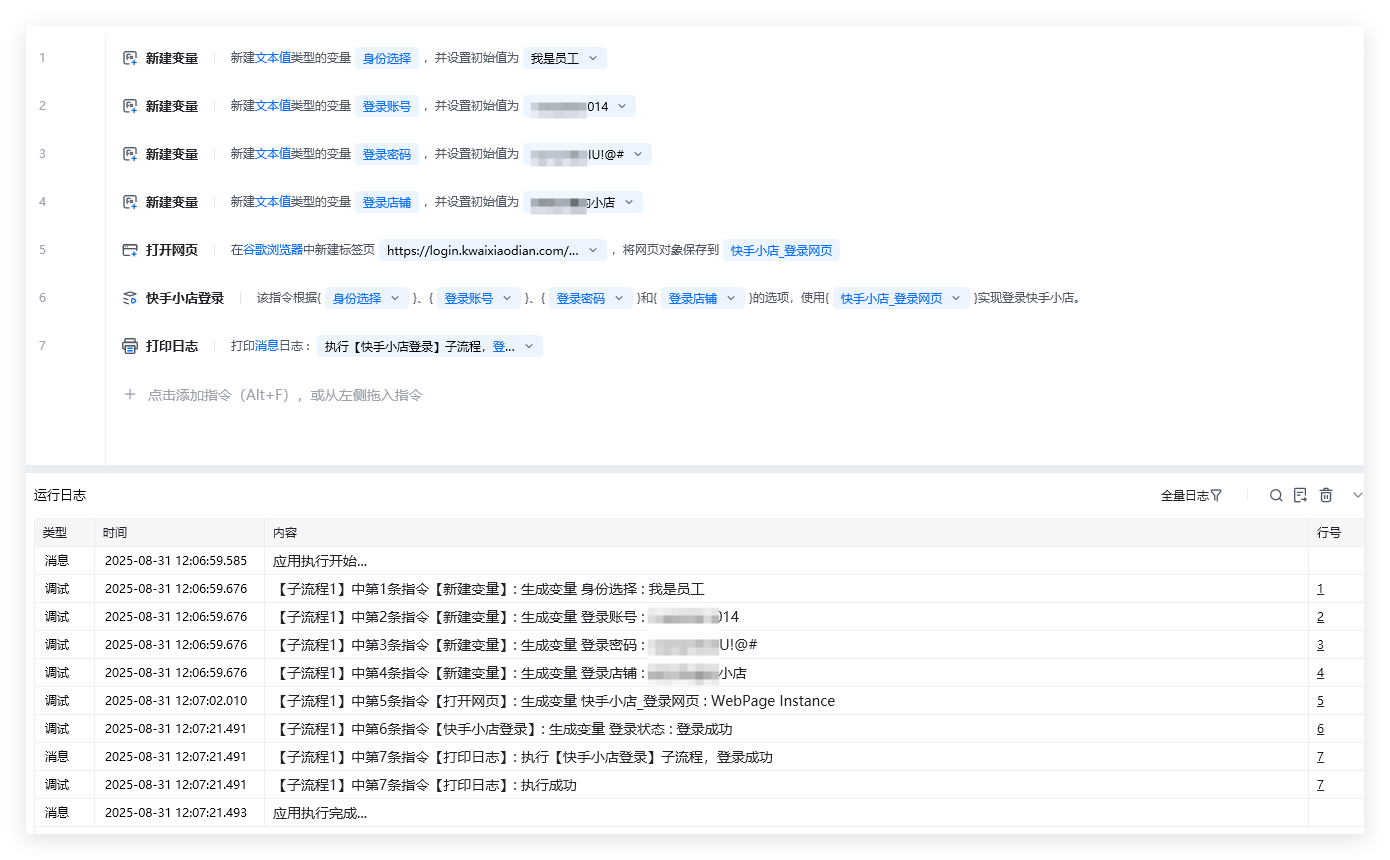
3、示例流程代码和运行结果，如下图所示：

<img src="https://mintcdn.com/bazhuayu-rpa-docs/_0ncJVuvn2vLb0nP/helpcenter/commands/custom-commands/LkbkmUwS/images/5zDn5HpM-06.png?fit=max&auto=format&n=_0ncJVuvn2vLb0nP&q=85&s=5072ad7f564f938bcf1b3ae11970d57e" alt="image" width="1390" height="860" data-path="helpcenter/commands/custom-commands/LkbkmUwS/images/5zDn5HpM-06.png" />

## 注意事项

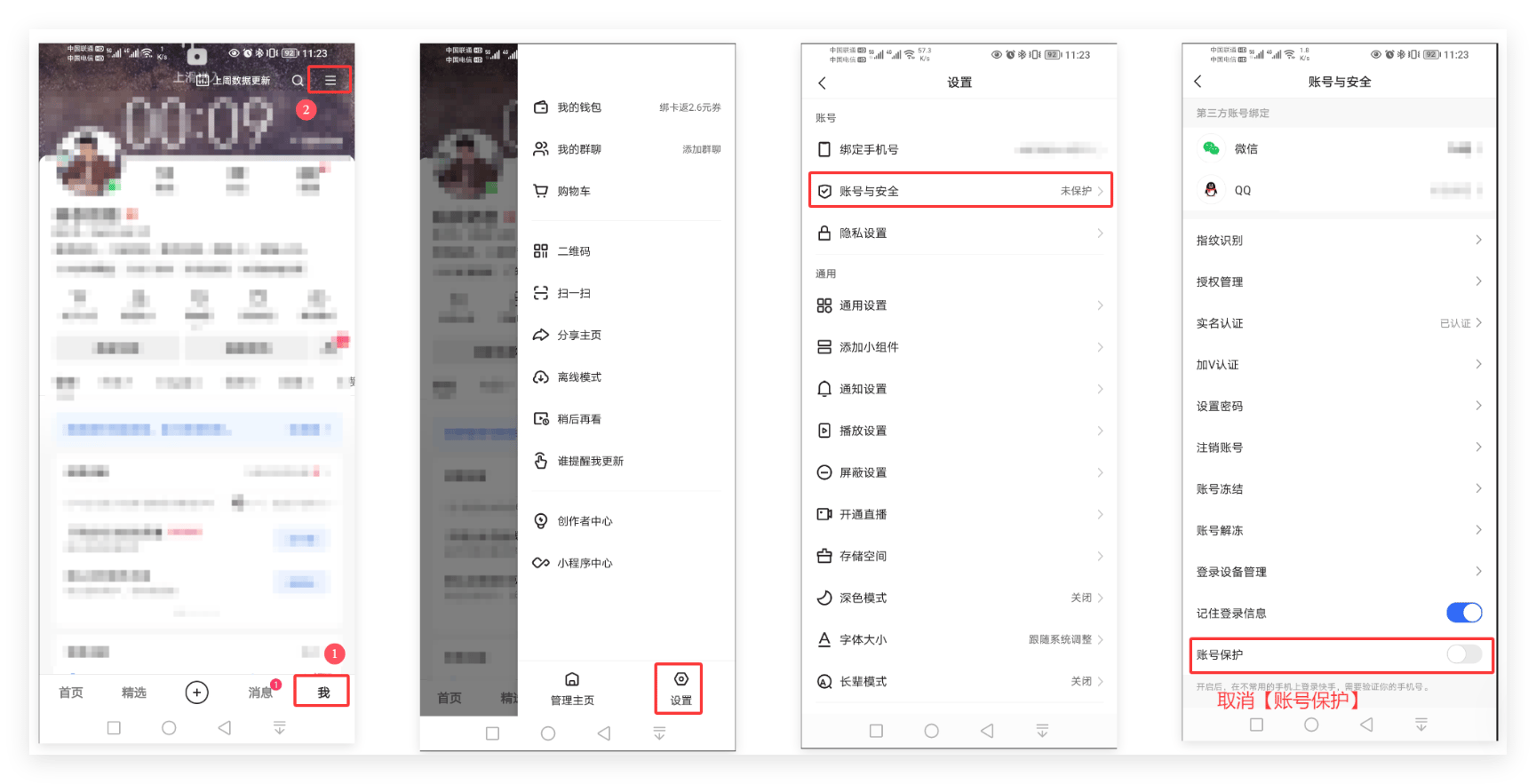
### 1.快手小店登录中会出现账号保护的提示

<img src="https://mintcdn.com/bazhuayu-rpa-docs/_0ncJVuvn2vLb0nP/helpcenter/commands/custom-commands/LkbkmUwS/images/5zDn5HpM-07.png?fit=max&auto=format&n=_0ncJVuvn2vLb0nP&q=85&s=22840ed2dcd4ec92acf72e40736c306b" alt="image" width="503" height="63" data-path="helpcenter/commands/custom-commands/LkbkmUwS/images/5zDn5HpM-07.png" />

解决方法：在 <strong>手机快手APP </strong>中 【我】->【设置】->【账号与安全】->【账号保护】中关闭账号保护功能，如下图所示操作：<img src="https://mintcdn.com/bazhuayu-rpa-docs/_0ncJVuvn2vLb0nP/helpcenter/commands/custom-commands/LkbkmUwS/images/5zDn5HpM-08.png?fit=max&auto=format&n=_0ncJVuvn2vLb0nP&q=85&s=1ec1e5fe57ad6263c5c6b76bc21e5249" alt="image" width="1729" height="883" data-path="helpcenter/commands/custom-commands/LkbkmUwS/images/5zDn5HpM-08.png" />

<Info>
  使用指令过程中遇到问题？前往 [八爪鱼RPA 开发者社区问答板块](https://rpa.bazhuayu.com/community/questions) 提问，获取官方与社区帮助。
</Info>