> ## Documentation Index
> Fetch the complete documentation index at: https://rpa.bazhuayu.com/helpcenter/llms.txt
> Use this file to discover all available pages before exploring further.
# 基础报表—地域报表下载
# 基础报表-地域报表下载
# 描述
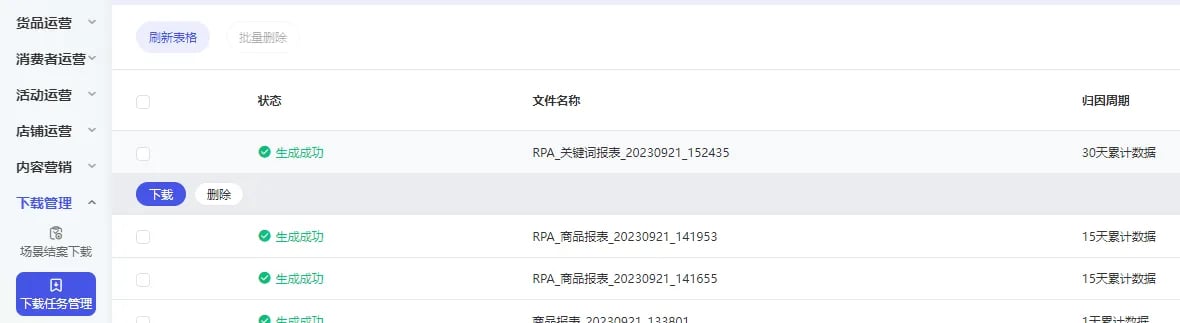
点击【下载报表】,在下载任务管理中点击【下载】


 # 配置说明
适用的浏览器类型Google Chrome浏览器
## 输入
网页对象:已打开的浏览器对象
日期类型:可选择页面上的快捷日期或者自定义日期
自定义 / 昨日 / 上周 / 本月 / 上月 / 过去7天 / 过去15天 / 过去30天
归因模型\_转化统计方式:可选择想要的转化统计方式
末日点击归因 / 按转化时间 / MTA归因
归因周期\_转化统计周期:可选择想要的转化统计周期
1天累计数据 / 3天累计数据 / 7天累计数据 / 15天累计数据 / 30天累计数据
时间粒度:可选择想要的时间粒度
汇总 / 分天 / 分周 / 分月 / 分自然月
报表模版:可选择想要的报表模版
全部计划 / 关键词推广 / 人群推广 / 货品运营 / 店铺直达 / 内容场景 / 货品全站推
开始时间:选择想要取数的自定义时间开始点
结束时间:选择想要取数的自定义时间结束点
保存文件夹:请输入数据文件保存的文件夹路径
## 输出
下载文件完整路径:输出数据文件的路径
使用指令过程中遇到问题?前往 [八爪鱼RPA 开发者社区问答板块](https://rpa.bazhuayu.com/community/questions) 提问,获取官方与社区帮助。
# 配置说明
适用的浏览器类型Google Chrome浏览器
## 输入
网页对象:已打开的浏览器对象
日期类型:可选择页面上的快捷日期或者自定义日期
自定义 / 昨日 / 上周 / 本月 / 上月 / 过去7天 / 过去15天 / 过去30天
归因模型\_转化统计方式:可选择想要的转化统计方式
末日点击归因 / 按转化时间 / MTA归因
归因周期\_转化统计周期:可选择想要的转化统计周期
1天累计数据 / 3天累计数据 / 7天累计数据 / 15天累计数据 / 30天累计数据
时间粒度:可选择想要的时间粒度
汇总 / 分天 / 分周 / 分月 / 分自然月
报表模版:可选择想要的报表模版
全部计划 / 关键词推广 / 人群推广 / 货品运营 / 店铺直达 / 内容场景 / 货品全站推
开始时间:选择想要取数的自定义时间开始点
结束时间:选择想要取数的自定义时间结束点
保存文件夹:请输入数据文件保存的文件夹路径
## 输出
下载文件完整路径:输出数据文件的路径
使用指令过程中遇到问题?前往 [八爪鱼RPA 开发者社区问答板块](https://rpa.bazhuayu.com/community/questions) 提问,获取官方与社区帮助。