> ## Documentation Index
> Fetch the complete documentation index at: https://rpa.bazhuayu.com/helpcenter/llms.txt
> Use this file to discover all available pages before exploring further.

# 服务-物流洞察-总览-核心指标-数据获取

# 描述

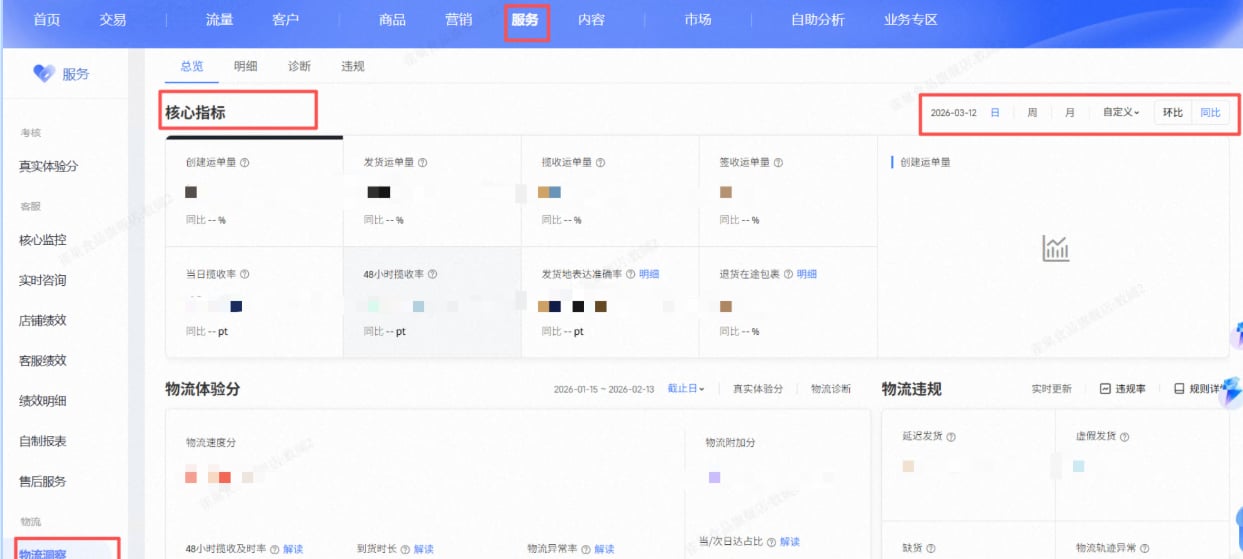
获取服务-物流洞察-总览-核心指标数据，保存到指定位置

<img src="https://mintcdn.com/bazhuayu-rpa-docs/AQoj0la5o3OJK8xY/helpcenter/commands/custom-commands/ocRRBq0s/images/RKOVd1Y6-01.png?fit=max&auto=format&n=AQoj0la5o3OJK8xY&q=85&s=bc7e1671b7f9951fe6973531fab6ec4f" alt="image" width="1243" height="559" data-path="helpcenter/commands/custom-commands/ocRRBq0s/images/RKOVd1Y6-01.png" />

# 配置说明

## 输入

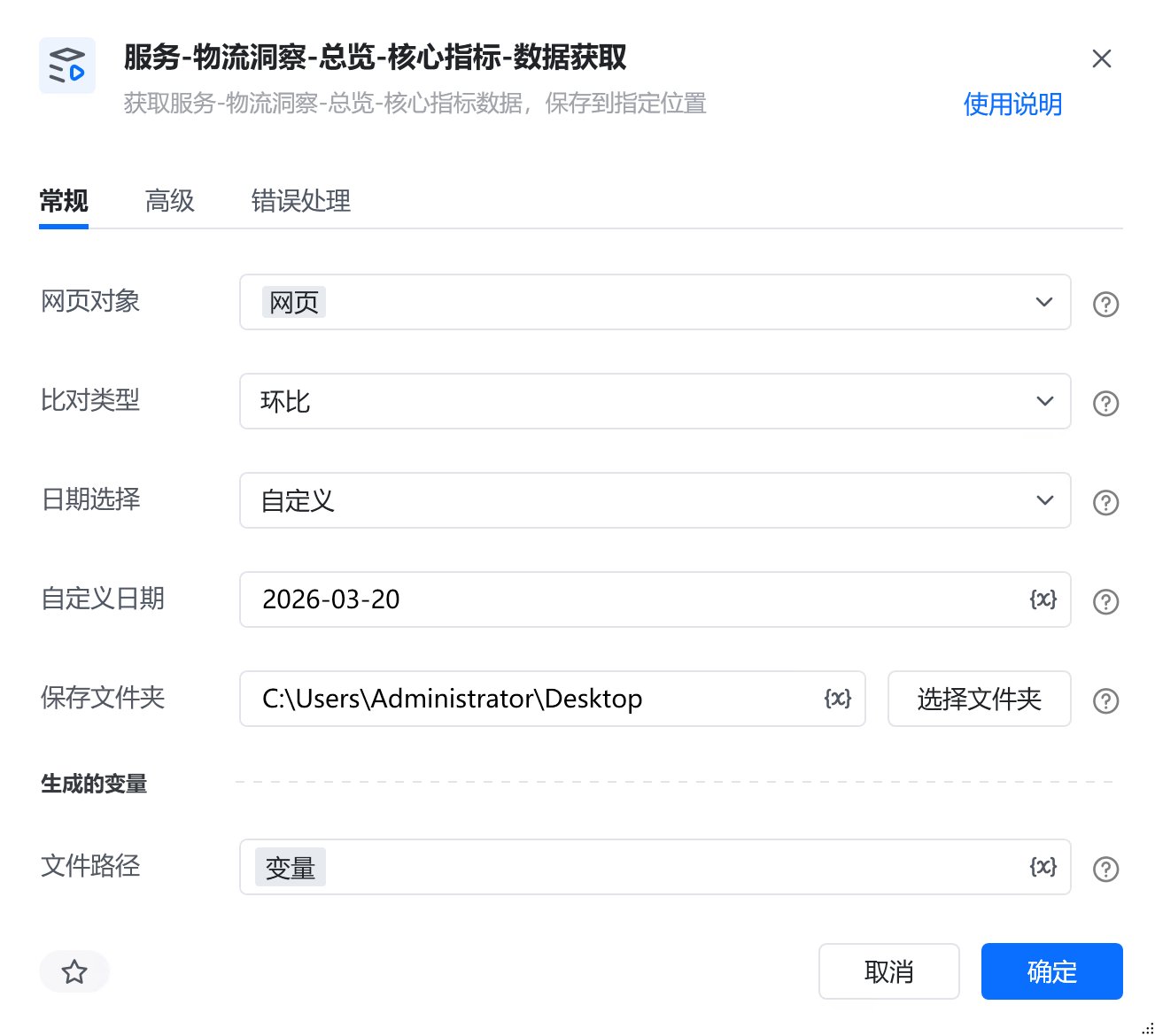
<strong>网页对象:</strong>

任意一个已登录生意参谋的网页对象

<strong>比对类型:</strong>

选择比对类型，环比或同比

<strong>日期选择:</strong>

选择日期范围

<strong>自定义日期:</strong>

格式必须为：YYYY-MM-DD

<strong>保存文件夹：</strong>

选择文件保存路径

<strong>自定义文件名称：</strong>

自定义文件名称，若不填则使用默认文件名

## 输出

<strong>文件路径：</strong>

输出完整的文件路径，文本类型

# 使用示例

<img src="https://mintcdn.com/bazhuayu-rpa-docs/AQoj0la5o3OJK8xY/helpcenter/commands/custom-commands/ocRRBq0s/images/RKOVd1Y6-02.png?fit=max&auto=format&n=AQoj0la5o3OJK8xY&q=85&s=cb6b21abec7ab759cba6e07d66313ab6" alt="image" width="1304" height="1170" data-path="helpcenter/commands/custom-commands/ocRRBq0s/images/RKOVd1Y6-02.png" />

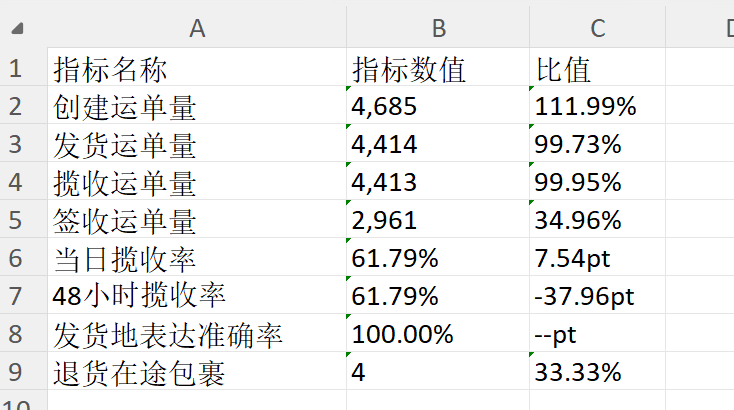
# 运行结果

<img src="https://mintcdn.com/bazhuayu-rpa-docs/AQoj0la5o3OJK8xY/helpcenter/commands/custom-commands/ocRRBq0s/images/RKOVd1Y6-03.png?fit=max&auto=format&n=AQoj0la5o3OJK8xY&q=85&s=65b4beb787e91abc02fe59f815d8333e" alt="image" width="1848" height="356" data-path="helpcenter/commands/custom-commands/ocRRBq0s/images/RKOVd1Y6-03.png" />

<img src="https://mintcdn.com/bazhuayu-rpa-docs/AQoj0la5o3OJK8xY/helpcenter/commands/custom-commands/ocRRBq0s/images/RKOVd1Y6-04.png?fit=max&auto=format&n=AQoj0la5o3OJK8xY&q=85&s=e85902658cbee36fac930ebb53a82ed7" alt="image" width="734" height="410" data-path="helpcenter/commands/custom-commands/ocRRBq0s/images/RKOVd1Y6-04.png" />

<Info>
  使用指令过程中遇到问题？前往 [八爪鱼RPA 开发者社区问答板块](https://rpa.bazhuayu.com/community/questions) 提问，获取官方与社区帮助。
</Info>