> ## Documentation Index
> Fetch the complete documentation index at: https://rpa.bazhuayu.com/helpcenter/llms.txt
> Use this file to discover all available pages before exploring further.
# 获取会话列表
# 描述
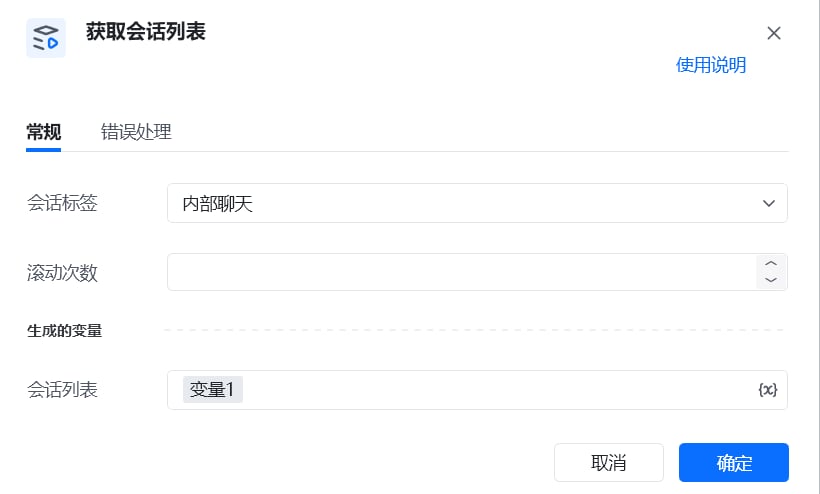
该指令实现了在企业微信根据会话标签获取会话列表的操作
 # 参数配置
## 指令输入
### 常规
会话标签:下拉框{即企业微信分组会话列表}未读@我单聊群聊内部聊天外部聊天标记滚动次数: 整数, 每次滚动鼠标的次数,用于滚动会话列表. 请根据实际情况调整大小,避免滚动太多导致抓漏的情况。{当分组的会话列表过多的时候,需要做混动操作。}
### 高级
无
## 指令输出
会话列表: 列表, 抓取到的会话名称列表。
\['指令开发测试群', '陈奇志', '萝卜哥哥、陈进连、罗波']
# 注意事项
请确保左侧导航栏有 分组 按钮, 如果没有,可以尝试升级企业微信
使用指令过程中遇到问题?前往 [八爪鱼RPA 开发者社区问答板块](https://rpa.bazhuayu.com/community/questions) 提问,获取官方与社区帮助。
# 参数配置
## 指令输入
### 常规
会话标签:下拉框{即企业微信分组会话列表}未读@我单聊群聊内部聊天外部聊天标记滚动次数: 整数, 每次滚动鼠标的次数,用于滚动会话列表. 请根据实际情况调整大小,避免滚动太多导致抓漏的情况。{当分组的会话列表过多的时候,需要做混动操作。}
### 高级
无
## 指令输出
会话列表: 列表, 抓取到的会话名称列表。
\['指令开发测试群', '陈奇志', '萝卜哥哥、陈进连、罗波']
# 注意事项
请确保左侧导航栏有 分组 按钮, 如果没有,可以尝试升级企业微信
使用指令过程中遇到问题?前往 [八爪鱼RPA 开发者社区问答板块](https://rpa.bazhuayu.com/community/questions) 提问,获取官方与社区帮助。