> ## Documentation Index
> Fetch the complete documentation index at: https://rpa.bazhuayu.com/helpcenter/llms.txt
> Use this file to discover all available pages before exploring further.

# 数据库批量插入数据

## 指令说明

**描述：** 将数据表格中的数据批量插入到数据库

## 参数说明

<Tabs>
  <Tab title="常规">
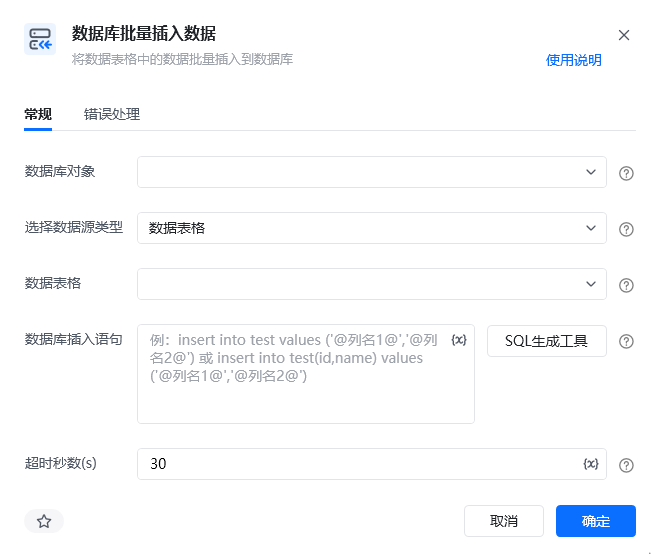
    <img src="https://mintcdn.com/bazhuayu-rpa-docs/QLw4prvAN-mejJU5/helpcenter/commands/database/images/batchinserttodatabasecommand-09.png?fit=max&auto=format&n=QLw4prvAN-mejJU5&q=85&s=2416748e31705571587436b270c2a2b1" alt="数据库批量插入数据指令参数面板" width="651" height="555" data-path="helpcenter/commands/database/images/batchinserttodatabasecommand-09.png" />

    | 参数             | 说明                                                                                                                    |
    | -------------- | --------------------------------------------------------------------------------------------------------------------- |
    | **数据库对象**      | 选择已经创建好的数据库对象                                                                                                         |
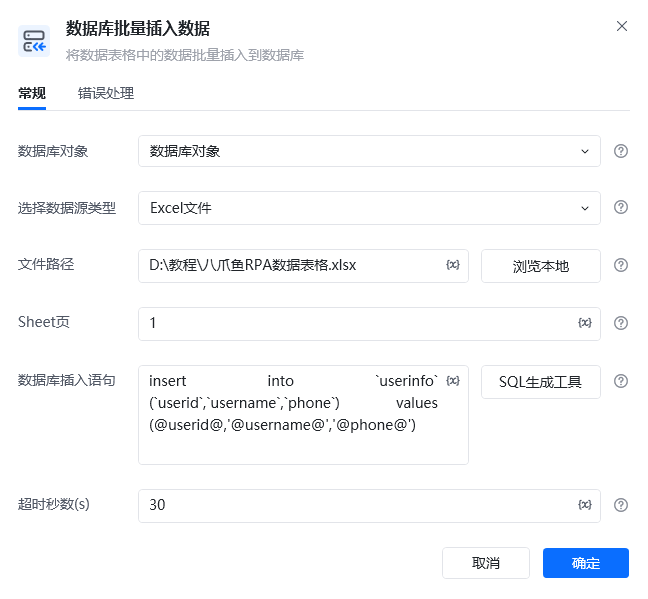
    | **选择数据源类型**    | 1、数据表格 选择一个数据表格对象或者通过“导入excel/csv至数据表格”创建的数据表格对象、 2、Excel文件 文件路径：输入/选择 文件的绝对路径；、 Sheet页：输入Sheet页的名称或序号，第一个Sheet页的序号为1 |
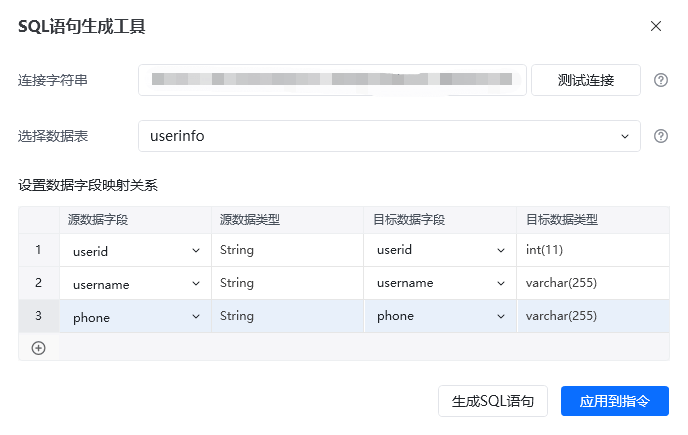
    | **数据库插入语句**    | 输入数据库插入SQL语句，支持使用变量，并以@作为匹配标识符，可通过【SQL生成工具】生成                                                                         |
    | **超时秒数（s）**    | 设置数据库查询最大超时秒数                                                                                                         |
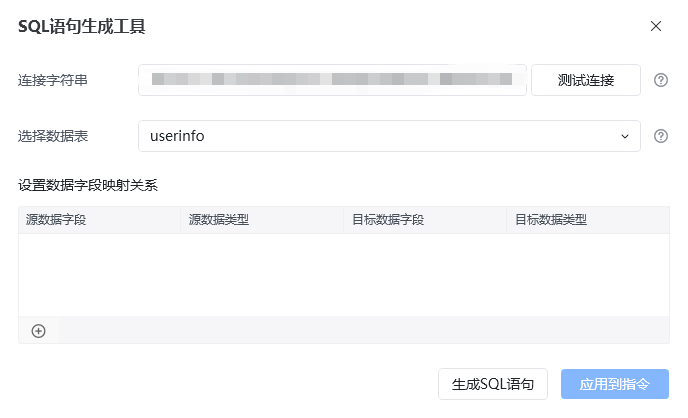
    | **连接字符串**      | 输入连接数据库的字符串（数据库地址、账号、密码、端口等）                                                                                          |
    | **选择数据表**      | 选择所需连接的数据库表                                                                                                           |
    | **设置数据字段映射关系** | 源数据字段，源数据类型，目标数据字段，目标数据类型、 其中源数据字段，指Excel工作表中的列头字段、 目标数据字段，指写入数据库的字段                                                  |
  </Tab>

  <Tab title="高级" />
</Tabs>

## 使用示例

<img src="https://mintcdn.com/bazhuayu-rpa-docs/QLw4prvAN-mejJU5/helpcenter/commands/database/images/batchinserttodatabasecommand-05.png?fit=max&auto=format&n=QLw4prvAN-mejJU5&q=85&s=c600f1ae0c72010adbab70917181270b" alt="数据库批量插入数据使用示例" width="845" height="285" data-path="helpcenter/commands/database/images/batchinserttodatabasecommand-05.png" />

<img src="https://mintcdn.com/bazhuayu-rpa-docs/QLw4prvAN-mejJU5/helpcenter/commands/database/images/batchinserttodatabasecommand-04.png?fit=max&auto=format&n=QLw4prvAN-mejJU5&q=85&s=bc8803fbe9e4b029a4f1df16f973d21a" alt="数据库批量插入数据使用示例" width="648" height="599" data-path="helpcenter/commands/database/images/batchinserttodatabasecommand-04.png" />

<img src="https://mintcdn.com/bazhuayu-rpa-docs/QLw4prvAN-mejJU5/helpcenter/commands/database/images/batchinserttodatabasecommand-02.png?fit=max&auto=format&n=QLw4prvAN-mejJU5&q=85&s=aa7187d3c415f334809f66ff3a1aea1f" alt="数据库批量插入数据使用示例" width="688" height="418" data-path="helpcenter/commands/database/images/batchinserttodatabasecommand-02.png" />

<img src="https://mintcdn.com/bazhuayu-rpa-docs/QLw4prvAN-mejJU5/helpcenter/commands/database/images/batchinserttodatabasecommand-03.png?fit=max&auto=format&n=QLw4prvAN-mejJU5&q=85&s=d6efc9451f5fb9d3efb6684d3d093ee5" alt="数据库批量插入数据使用示例" width="688" height="435" data-path="helpcenter/commands/database/images/batchinserttodatabasecommand-03.png" />

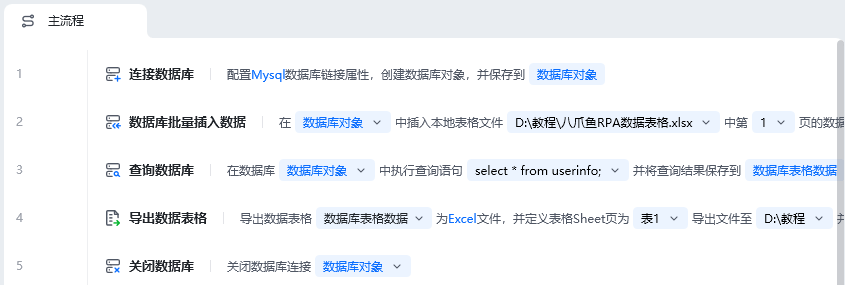
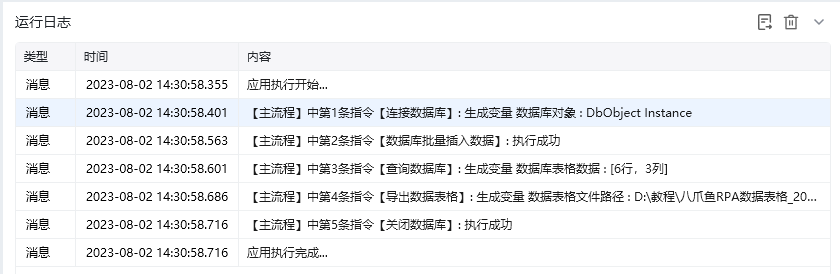
**该流程执行逻辑：**

使用【连接数据库】配置Mysql连接，创建数据库对象，并保存到数据库对象

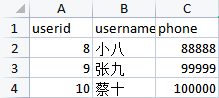
使用【数据库批量插入数据】在数据库对象中插入本地表格文件第1页数据

使用【查询数据库】执行查询语句"select \* from userinfo;"，将结果保存到数据库表格数据

使用【导出数据表格】导出数据库表格为Excel文件，并定义表格Sheet页为表1

使用【关闭数据库】指令关闭数据库连接

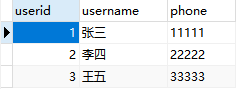
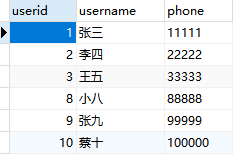
### 效果展示
<img src="https://mintcdn.com/bazhuayu-rpa-docs/QLw4prvAN-mejJU5/helpcenter/commands/database/images/batchinserttodatabasecommand-06.png?fit=max&auto=format&n=QLw4prvAN-mejJU5&q=85&s=8c65ec79e88705fbffd6b938075c4079" alt="数据库批量插入数据效果展示" width="219" height="98" data-path="helpcenter/commands/database/images/batchinserttodatabasecommand-06.png" />

<img src="https://mintcdn.com/bazhuayu-rpa-docs/QLw4prvAN-mejJU5/helpcenter/commands/database/images/batchinserttodatabasecommand-07.png?fit=max&auto=format&n=QLw4prvAN-mejJU5&q=85&s=b0cbf9d1c98f77cf278efbe516942db3" alt="数据库批量插入数据效果展示" width="238" height="89" data-path="helpcenter/commands/database/images/batchinserttodatabasecommand-07.png" />

<img src="https://mintcdn.com/bazhuayu-rpa-docs/QLw4prvAN-mejJU5/helpcenter/commands/database/images/batchinserttodatabasecommand-08.png?fit=max&auto=format&n=QLw4prvAN-mejJU5&q=85&s=4efa00e7951ea921be721f3f40874c58" alt="数据库批量插入数据效果展示" width="233" height="157" data-path="helpcenter/commands/database/images/batchinserttodatabasecommand-08.png" />

<img src="https://mintcdn.com/bazhuayu-rpa-docs/QLw4prvAN-mejJU5/helpcenter/commands/database/images/batchinserttodatabasecommand-01.png?fit=max&auto=format&n=QLw4prvAN-mejJU5&q=85&s=508825ecc25e555839bf0f66b99fbec1" alt="数据库批量插入数据效果展示" width="840" height="274" data-path="helpcenter/commands/database/images/batchinserttodatabasecommand-01.png" />

<Info>
  使用指令过程中遇到问题？前往 [八爪鱼RPA 开发者社区问答板块](https://rpa.bazhuayu.com/community/questions) 提问，获取官方与社区帮助。
</Info>