> ## Documentation Index
> Fetch the complete documentation index at: https://rpa.bazhuayu.com/helpcenter/llms.txt
> Use this file to discover all available pages before exploring further.

# 元素截图(win)

## 指令说明

**描述：** 对桌面软件中指定元素进行截图，并将图片保存至指定文件夹。

## 参数说明

<Tabs>
  <Tab title="常规">
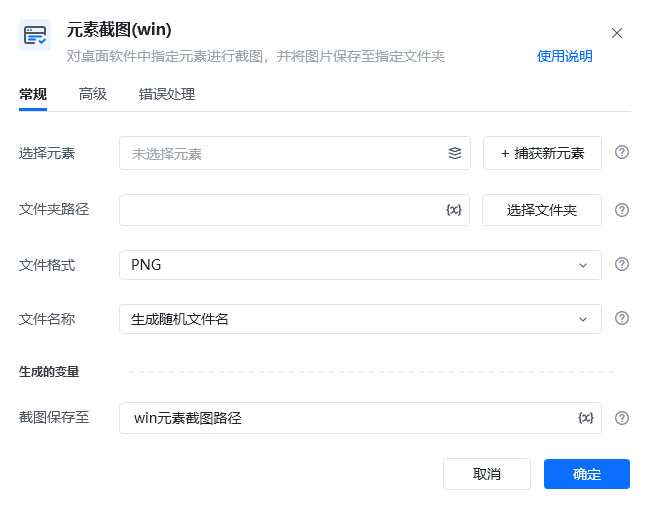
    <img src="https://mintcdn.com/bazhuayu-rpa-docs/At1Bhn6G7IYQARg7/helpcenter/commands/desktop-automation/images/captureelementcommand-01.png?fit=max&auto=format&n=At1Bhn6G7IYQARg7&q=85&s=402efe2eeefe49b6d45f0956f0a2a5ed" alt="元素截图指令参数面板" width="651" height="511" data-path="helpcenter/commands/desktop-automation/images/captureelementcommand-01.png" />

    | 参数        | 说明                                       |
    | --------- | ---------------------------------------- |
    | **选择元素**  | 从元素库中选择一个已捕获的元素或通过「捕获新元素」来捕获新的桌面元素作为操作目标 |
    | **文件夹路径** | 选择存储截图文件夹路径或写入文件夹路径                      |
    | **文件格式**  | 选择保存图片文件的格式（JPEG，PNG）                    |
    | **文件名称**  | 生成随机文件名 / 自定义文件名                         |
  </Tab>

  <Tab title="高级">
    | 参数            | 说明            |
    | ------------- | ------------- |
    | **等待元素存在(s)** | 等待目标元素存在的超时时间 |
  </Tab>
</Tabs>

## 使用示例

<img src="https://mintcdn.com/bazhuayu-rpa-docs/At1Bhn6G7IYQARg7/helpcenter/commands/desktop-automation/images/captureelementcommand-02.png?fit=max&auto=format&n=At1Bhn6G7IYQARg7&q=85&s=e018bce0aebd3c613bfaefafebfbb787" alt="元素截图使用示例 - 流程搭建" width="848" height="104" data-path="helpcenter/commands/desktop-automation/images/captureelementcommand-02.png" />

选择元素捕获桌面上的微信

<img src="https://mintcdn.com/bazhuayu-rpa-docs/At1Bhn6G7IYQARg7/helpcenter/commands/desktop-automation/images/captureelementcommand-05.png?fit=max&auto=format&n=At1Bhn6G7IYQARg7&q=85&s=15b089bd69bb77a35de06dc58da6b2e8" alt="元素截图使用示例 - 微信" width="80" height="103" data-path="helpcenter/commands/desktop-automation/images/captureelementcommand-05.png" />

**该流程执行逻辑：**

使用【元素截图（win）】指令对桌面元素截图，并保存图片路径至win元素截图路径。

### 效果展示

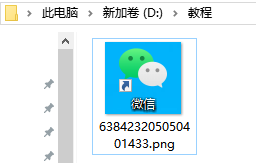
成功对指定桌面元素截图并保存至指定文件夹。
<img src="https://mintcdn.com/bazhuayu-rpa-docs/At1Bhn6G7IYQARg7/helpcenter/commands/desktop-automation/images/captureelementcommand-03.png?fit=max&auto=format&n=At1Bhn6G7IYQARg7&q=85&s=fc604717cca69dfab799ff17873c846d" alt="元素截图使用示例 - 文件夹" width="256" height="163" data-path="helpcenter/commands/desktop-automation/images/captureelementcommand-03.png" />

<img src="https://mintcdn.com/bazhuayu-rpa-docs/At1Bhn6G7IYQARg7/helpcenter/commands/desktop-automation/images/captureelementcommand-04.png?fit=max&auto=format&n=At1Bhn6G7IYQARg7&q=85&s=bac8de27e03bee8328e6577a4704b9db" alt="元素截图(win)使用示例 - 运行结果" width="839" height="164" data-path="helpcenter/commands/desktop-automation/images/captureelementcommand-04.png" />

<Info>
  使用指令过程中遇到问题？前往 [八爪鱼RPA 开发者社区问答板块](https://rpa.bazhuayu.com/community/questions) 提问，获取官方与社区帮助。
</Info>