> ## Documentation Index
> Fetch the complete documentation index at: https://rpa.bazhuayu.com/helpcenter/llms.txt
> Use this file to discover all available pages before exploring further.

# 获取窗口信息

## 指令说明

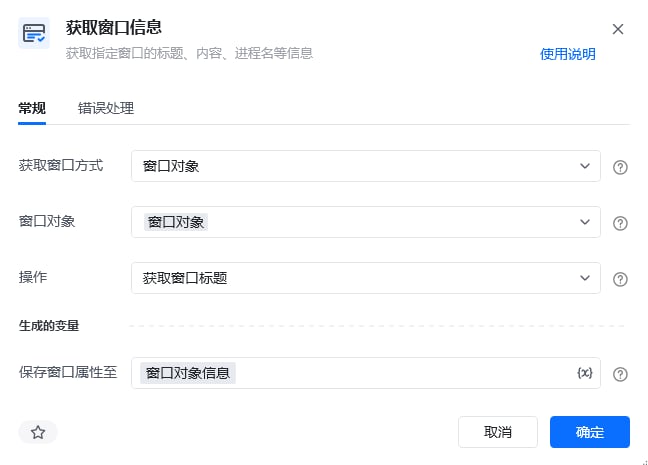
**描述：** 获取指定窗口的标题、内容、进程名等信息。

## 参数说明

<Tabs>
  <Tab title="常规">
    <img src="https://mintcdn.com/bazhuayu-rpa-docs/At1Bhn6G7IYQARg7/helpcenter/commands/desktop-automation/images/getwindowpropertycontentcommand-01.png?fit=max&auto=format&n=At1Bhn6G7IYQARg7&q=85&s=8723cabf5554ac6f84bfb22cc73dcfbe" alt="获取窗口信息指令参数面板" width="648" height="465" data-path="helpcenter/commands/desktop-automation/images/getwindowpropertycontentcommand-01.png" />

    | 参数         | 说明                                                                                                                                               |
    | ---------- | ------------------------------------------------------------------------------------------------------------------------------------------------ |
    | **获取窗口方式** | 窗口对象：选择界面已经存在的窗口。<br />窗口标题或类型名：根据窗口的名称去获取窗口及添加窗口的类型，也可根据正则匹配目标，如^abc(以abc开头)、\d+(匹配数字)、.\*.csv\$(匹配.csv结尾)等。<br />捕获窗口元素：手动捕获一个窗口元素，或选择已捕获的窗口元素 |
    | **窗口对象**   | 输入一个通过"获取窗口对象"获取的窗口对象                                                                                                                            |
    | **窗口标题**   | 输入窗口标题，可添加窗口类型、是否正则匹配                                                                                                                            |
    | **窗口类型**   | 输入窗口类型，窗口类型可借助工具FlaUInspect（自行从GitHub上拉取）获取，桌面软件的ClassName属性就是窗口类型                                                                               |
    | **选择元素**   | 选择要操作的目标元素或手动捕获一个窗口元素                                                                                                                            |
    | **操作**     | 选择一种对窗口的操作方式，如：获取窗口标题、获取窗口内容、获取窗口进程名                                                                                                             |
  </Tab>

  <Tab title="高级">
    本指令暂无高级参数。
  </Tab>
</Tabs>

## 使用示例

<img src="https://mintcdn.com/bazhuayu-rpa-docs/At1Bhn6G7IYQARg7/helpcenter/commands/desktop-automation/images/getwindowpropertycontentcommand-02.png?fit=max&auto=format&n=At1Bhn6G7IYQARg7&q=85&s=6efe92364c2c1e6d320933b2af78eaed" alt="获取窗口信息使用示例 - 流程搭建" width="918" height="114" data-path="helpcenter/commands/desktop-automation/images/getwindowpropertycontentcommand-02.png" />

**该流程执行逻辑：**

【获取窗口信息】根据窗口名称为"企业微信"获取这个窗口的标题保存到变量"窗口名称"中。

### 效果展示

成功获取指定窗口的信息并保存到变量中。

<img src="https://mintcdn.com/bazhuayu-rpa-docs/At1Bhn6G7IYQARg7/helpcenter/commands/desktop-automation/images/getwindowpropertycontentcommand-03.png?fit=max&auto=format&n=At1Bhn6G7IYQARg7&q=85&s=55d334aee44053b6c27179d21d40cf0d" alt="获取窗口信息使用示例 - 效果展示" width="902" height="166" data-path="helpcenter/commands/desktop-automation/images/getwindowpropertycontentcommand-03.png" />

<Info>
  使用指令过程中遇到问题？前往 [八爪鱼RPA 开发者社区问答板块](https://rpa.bazhuayu.com/community/questions) 提问，获取官方与社区帮助。
</Info>
