> ## Documentation Index
> Fetch the complete documentation index at: https://rpa.bazhuayu.com/helpcenter/llms.txt
> Use this file to discover all available pages before exploring further.
# 移动窗口位置
## 指令说明
**描述:** 移动窗口至指定位置。
## 参数说明
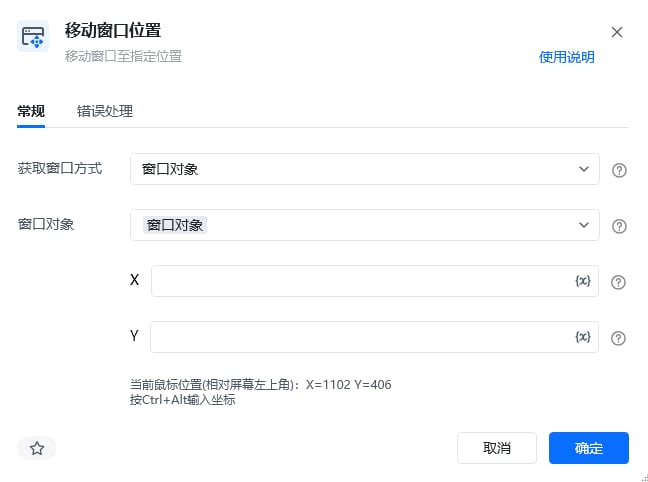 | 参数 | 说明 |
| ---------- | ------------------------------------------------------------------ |
| **获取窗口方式** | 选择获取窗口方式,窗口对象、窗口标题或类型名、捕获窗口元素 |
| **窗口对象** | 输入一个通过"获取窗口对象"获取的窗口对象 |
| **窗口标题** | 输入窗口标题,可添加窗口类型、是否正则匹配 |
| **窗口类型** | 输入窗口类型,窗口类型可借助工具FlaUInspect(自行从GitHub上拉取)获取,桌面软件的ClassName属性就是窗口类型 |
| **选择元素** | 选择要操作的目标元素 |
| **X** | 输入窗口移动到目标的横坐标X(按Ctrl+Alt输入坐标) |
| **Y** | 输入窗口移动到目标的纵坐标Y(按Ctrl+Alt输入坐标) |
本指令暂无高级参数。
## 使用示例
| 参数 | 说明 |
| ---------- | ------------------------------------------------------------------ |
| **获取窗口方式** | 选择获取窗口方式,窗口对象、窗口标题或类型名、捕获窗口元素 |
| **窗口对象** | 输入一个通过"获取窗口对象"获取的窗口对象 |
| **窗口标题** | 输入窗口标题,可添加窗口类型、是否正则匹配 |
| **窗口类型** | 输入窗口类型,窗口类型可借助工具FlaUInspect(自行从GitHub上拉取)获取,桌面软件的ClassName属性就是窗口类型 |
| **选择元素** | 选择要操作的目标元素 |
| **X** | 输入窗口移动到目标的横坐标X(按Ctrl+Alt输入坐标) |
| **Y** | 输入窗口移动到目标的纵坐标Y(按Ctrl+Alt输入坐标) |
本指令暂无高级参数。
## 使用示例
 **该流程执行逻辑:**
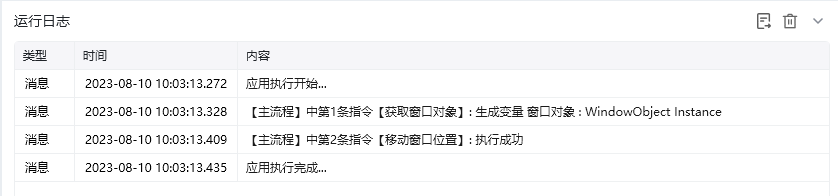
使用【获取窗口对象】获取标题为Excel.xlsx-WPS Office的窗口,将窗口对象保存到窗口对象 → 使用【移动窗口位置】设置窗口到指定位置。
### 效果展示
窗口已成功移动到指定坐标位置。
**该流程执行逻辑:**
使用【获取窗口对象】获取标题为Excel.xlsx-WPS Office的窗口,将窗口对象保存到窗口对象 → 使用【移动窗口位置】设置窗口到指定位置。
### 效果展示
窗口已成功移动到指定坐标位置。
 使用指令过程中遇到问题?前往 [八爪鱼RPA 开发者社区问答板块](https://rpa.bazhuayu.com/community/questions) 提问,获取官方与社区帮助。