> ## Documentation Index
> Fetch the complete documentation index at: https://rpa.bazhuayu.com/helpcenter/llms.txt
> Use this file to discover all available pages before exploring further.

# 设置下拉框(win)

## 指令说明

**描述：** 设置窗口中下拉框的选中项。

## 参数说明

<Tabs>
  <Tab title="常规">
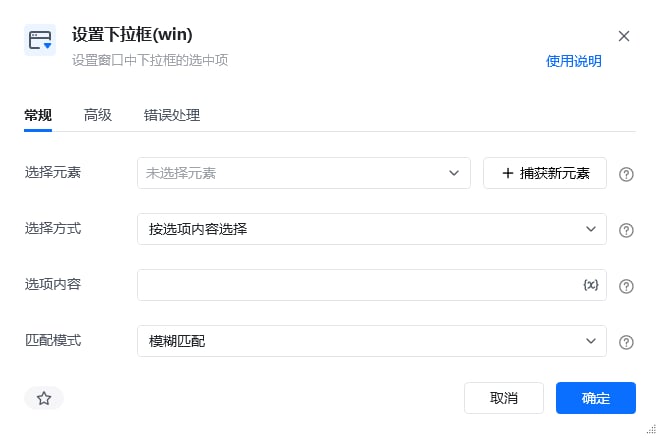
    <img src="https://mintcdn.com/bazhuayu-rpa-docs/At1Bhn6G7IYQARg7/helpcenter/commands/desktop-automation/images/setcomboboxcommand-01.png?fit=max&auto=format&n=At1Bhn6G7IYQARg7&q=85&s=0e57d123fac1dd52098dec6db9abc01c" alt="设置下拉框(win)指令参数面板" width="660" height="438" data-path="helpcenter/commands/desktop-automation/images/setcomboboxcommand-01.png" />

    | 参数       | 说明                                                              |
    | -------- | --------------------------------------------------------------- |
    | **选择元素** | 从元素库中选择已捕获过的下拉框元素，或直接捕获下拉框元素                                    |
    | **选择方式** | 按选项内容选择：输入选项内容后，有模糊匹配、精准匹配、正则匹配三种方式。按选项位置选择：填入选项的位置，比如第3个选项，填写3 |
    | **选项内容** | 当选择方式选择"按选项内容选择"时需要填写，请填写待选择选项的内容                               |
    | **选项位置** | 当选择方式选择"按选项位置选择"时需要填写，请填写待选择选项的位置                               |
    | **匹配模式** | 可选项，有模糊匹配、精准匹配、正则匹配三种方式                                         |
  </Tab>

  <Tab title="高级">
    <img src="https://mintcdn.com/bazhuayu-rpa-docs/At1Bhn6G7IYQARg7/helpcenter/commands/desktop-automation/images/setcomboboxcommand-02.png?fit=max&auto=format&n=At1Bhn6G7IYQARg7&q=85&s=f09d0b2f35178da906c9cdb9c0b04cb9" alt="设置下拉框(win)指令参数面板" width="188" height="63" data-path="helpcenter/commands/desktop-automation/images/setcomboboxcommand-02.png" />

    | 参数            | 说明            |
    | ------------- | ------------- |
    | **执行后延迟(s)**  | 指令执行完成后的等待时间  |
    | **等待元素存在(s)** | 等待目标元素存在的超时时间 |
  </Tab>
</Tabs>

## 使用示例

<img src="https://mintcdn.com/bazhuayu-rpa-docs/At1Bhn6G7IYQARg7/helpcenter/commands/desktop-automation/images/setcomboboxcommand-03.png?fit=max&auto=format&n=At1Bhn6G7IYQARg7&q=85&s=2bd685a1cefa160574b21ab8ba7fd70d" alt="设置下拉框使用示例 - 流程搭建" width="929" height="185" data-path="helpcenter/commands/desktop-automation/images/setcomboboxcommand-03.png" />

**此流程执行逻辑：**

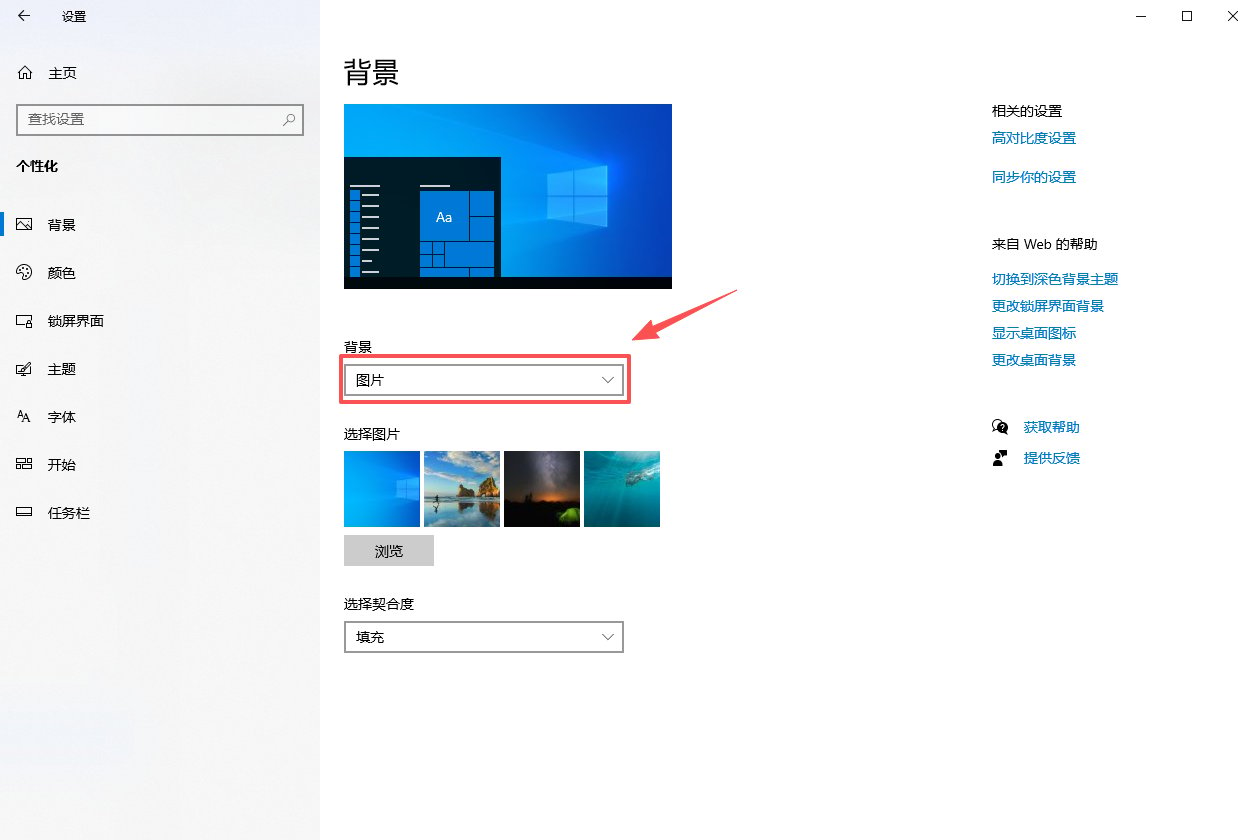
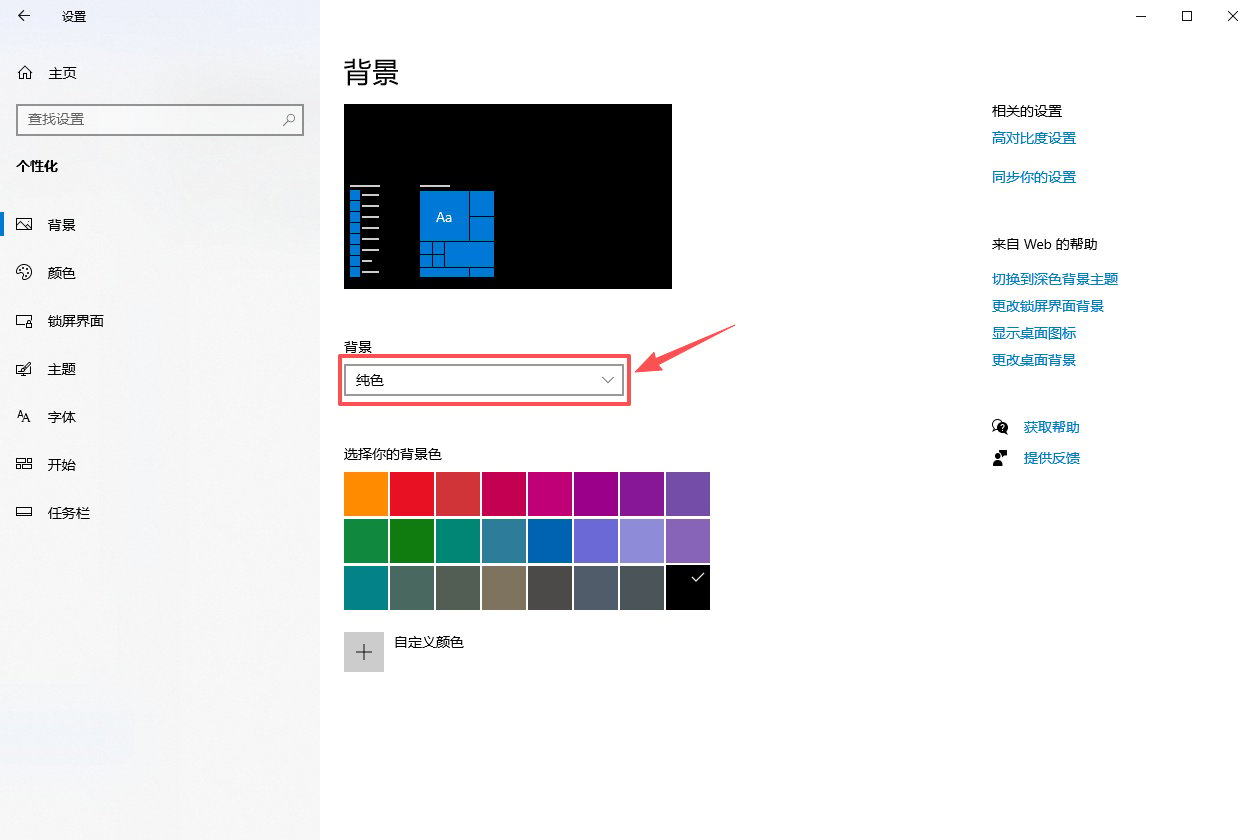
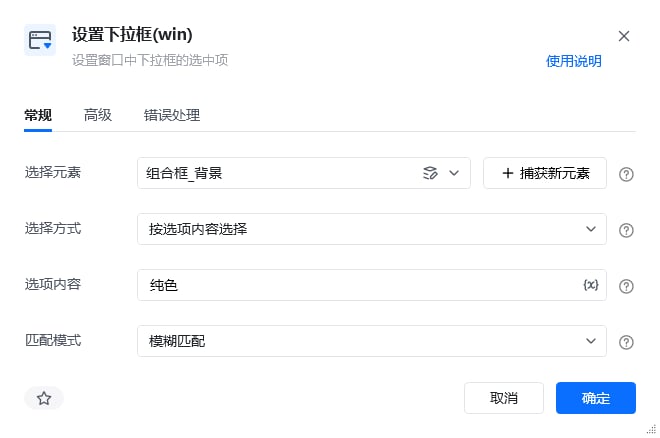
获取名称是设置的窗口对象 → 激活设置窗口对象 → 用【设置下拉框】设置选中下拉框中选项内容为纯色的选项。

### 效果展示

成功设置下拉框的选中项。
<img src="https://mintcdn.com/bazhuayu-rpa-docs/At1Bhn6G7IYQARg7/helpcenter/commands/desktop-automation/images/setcomboboxcommand-04.png?fit=max&auto=format&n=At1Bhn6G7IYQARg7&q=85&s=80fa37c42884356ee63b5bea15799389" alt="设置下拉框使用示例 - 效果展示" width="660" height="438" data-path="helpcenter/commands/desktop-automation/images/setcomboboxcommand-04.png" />

**RPA运行前**

<img src="https://mintcdn.com/bazhuayu-rpa-docs/At1Bhn6G7IYQARg7/helpcenter/commands/desktop-automation/images/setcomboboxcommand-05.png?fit=max&auto=format&n=At1Bhn6G7IYQARg7&q=85&s=6af58feb60396ff0344fa99927cfddb9" alt="设置下拉框(win)使用示例 - 运行结果" width="1256" height="840" data-path="helpcenter/commands/desktop-automation/images/setcomboboxcommand-05.png" />

**RPA运行后**

<img src="https://mintcdn.com/bazhuayu-rpa-docs/At1Bhn6G7IYQARg7/helpcenter/commands/desktop-automation/images/setcomboboxcommand-06.png?fit=max&auto=format&n=At1Bhn6G7IYQARg7&q=85&s=9b2761c78a29a29ad0c113cbc6191b14" alt="设置下拉框(win)使用示例 - 运行结果" width="1256" height="840" data-path="helpcenter/commands/desktop-automation/images/setcomboboxcommand-06.png" />

<Info>
  使用指令过程中遇到问题？前往 [八爪鱼RPA 开发者社区问答板块](https://rpa.bazhuayu.com/community/questions) 提问，获取官方与社区帮助。
</Info>