> ## Documentation Index
> Fetch the complete documentation index at: https://rpa.bazhuayu.com/helpcenter/llms.txt
> Use this file to discover all available pages before exploring further.

# 等待窗口元素

## 指令说明

**描述：** 等待窗口中的元素出现或者消失。

## 参数说明

<Tabs>
  <Tab title="常规">
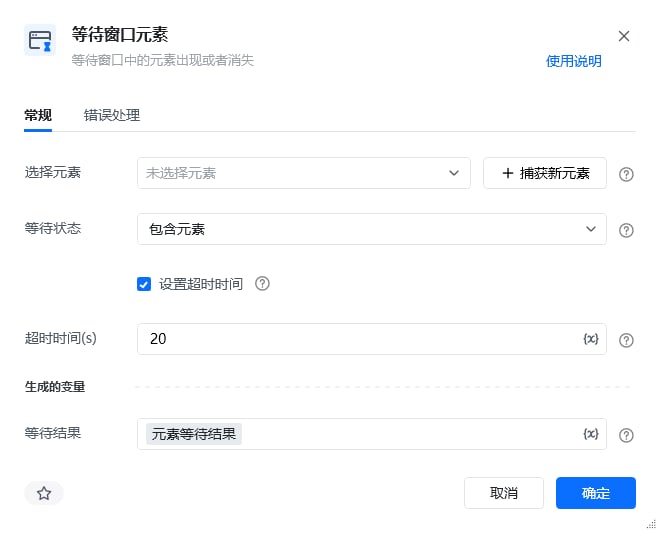
    <img src="https://mintcdn.com/bazhuayu-rpa-docs/W742rR5fGwXr1akA/helpcenter/commands/desktop-automation/images/waitwindowcontentcommand-01.png?fit=max&auto=format&n=W742rR5fGwXr1akA&q=85&s=119a1e0571be382817f5e4c0e1bf4c55" alt="等待窗口元素指令参数面板" width="660" height="533" data-path="helpcenter/commands/desktop-automation/images/waitwindowcontentcommand-01.png" />

    | 参数          | 说明                              |
    | ----------- | ------------------------------- |
    | **选择元素**    | 选择要操作的目标元素，可以是已存在的元素或直接"捕获新元素"  |
    | **等待状态**    | 选择等待状态，选项为包含元素、不包含元素            |
    | **设置超时时间**  | 勾选框，若勾选，需要设置等待超时时间，超时后流程将自动往下执行 |
    | **超过时间（s）** | 设置最大等待时间                        |
  </Tab>

  <Tab title="高级">
    本指令暂无高级参数。
  </Tab>
</Tabs>

## 使用示例

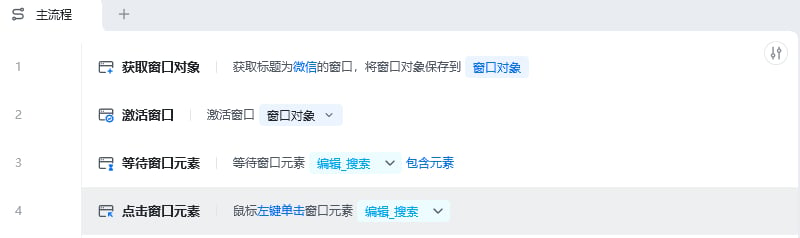
<img src="https://mintcdn.com/bazhuayu-rpa-docs/W742rR5fGwXr1akA/helpcenter/commands/desktop-automation/images/waitwindowcontentcommand-02.png?fit=max&auto=format&n=W742rR5fGwXr1akA&q=85&s=2073578227b7b73b0b673501ff2ebb77" alt="等待窗口元素使用示例 - 流程搭建" width="800" height="238" data-path="helpcenter/commands/desktop-automation/images/waitwindowcontentcommand-02.png" />

**此流程执行逻辑：**

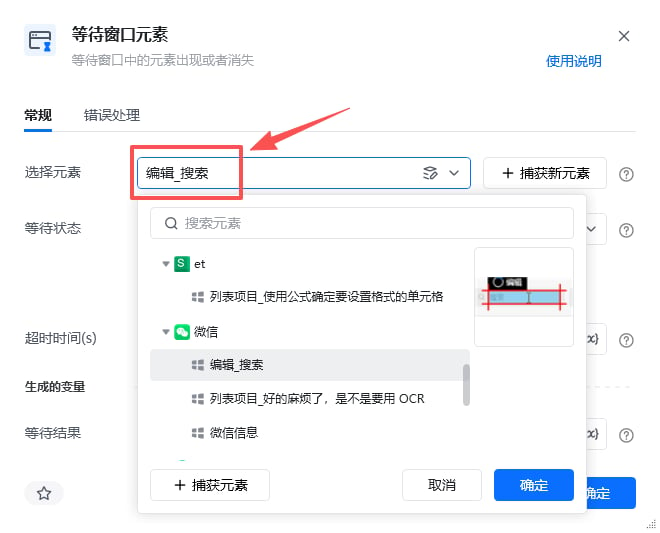
获取标题为微信的窗口对象 → 激活微信窗口对象 → 使用【等待窗口元素】等待微信窗口对象包含指定元素"编辑框" → 鼠标左键单击窗口元素"编辑框"。

### 效果展示

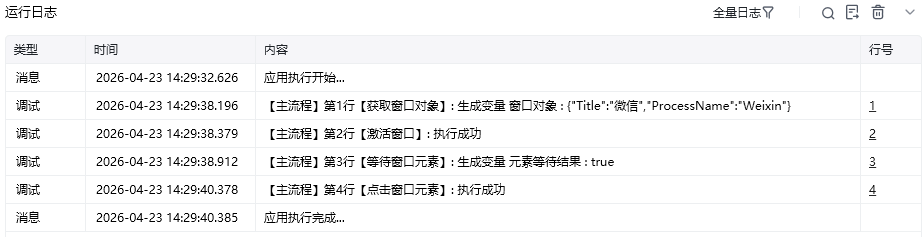
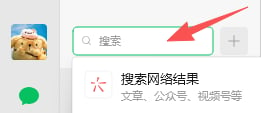
RPA 成功等待指定元素出现后继续执行后续操作。
<img src="https://mintcdn.com/bazhuayu-rpa-docs/W742rR5fGwXr1akA/helpcenter/commands/desktop-automation/images/waitwindowcontentcommand-03.png?fit=max&auto=format&n=W742rR5fGwXr1akA&q=85&s=84b58c503d88bc1ccc3fb26478562067" alt="等待窗口元素使用示例 - 效果展示" width="660" height="533" data-path="helpcenter/commands/desktop-automation/images/waitwindowcontentcommand-03.png" />

<img src="https://mintcdn.com/bazhuayu-rpa-docs/W742rR5fGwXr1akA/helpcenter/commands/desktop-automation/images/waitwindowcontentcommand-04.png?fit=max&auto=format&n=W742rR5fGwXr1akA&q=85&s=8edba2672f8528fe607010848c9e6aee" alt="等待窗口元素使用示例 - 运行结果" width="924" height="237" data-path="helpcenter/commands/desktop-automation/images/waitwindowcontentcommand-04.png" />

**RPA运行前**

<img src="https://mintcdn.com/bazhuayu-rpa-docs/W742rR5fGwXr1akA/helpcenter/commands/desktop-automation/images/waitwindowcontentcommand-05.png?fit=max&auto=format&n=W742rR5fGwXr1akA&q=85&s=f3fa61f63f18df027983a01891816ffb" alt="等待窗口元素使用示例 - 运行结果" width="256" height="67" data-path="helpcenter/commands/desktop-automation/images/waitwindowcontentcommand-05.png" />

**RPA运行后**

<img src="https://mintcdn.com/bazhuayu-rpa-docs/W742rR5fGwXr1akA/helpcenter/commands/desktop-automation/images/waitwindowcontentcommand-06.png?fit=max&auto=format&n=W742rR5fGwXr1akA&q=85&s=e0626d7c9b7b216bacf5609c38c5db81" alt="等待窗口元素使用示例 - 运行结果" width="261" height="113" data-path="helpcenter/commands/desktop-automation/images/waitwindowcontentcommand-06.png" />

<Info>
  使用指令过程中遇到问题？前往 [八爪鱼RPA 开发者社区问答板块](https://rpa.bazhuayu.com/community/questions) 提问，获取官方与社区帮助。
</Info>