> ## Documentation Index
> Fetch the complete documentation index at: https://rpa.bazhuayu.com/helpcenter/llms.txt
> Use this file to discover all available pages before exploring further.

# 获取窗口元素信息

## 指令说明

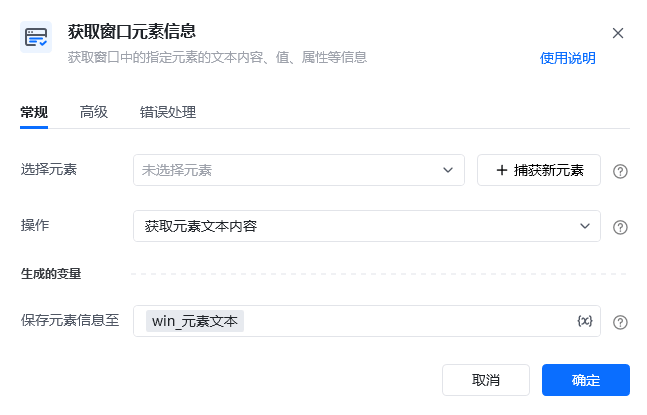
**描述：** 获取窗口中的指定元素的文本内容、值、属性等信息。

## 参数说明

<Tabs>
  <Tab title="常规">
    <img src="https://mintcdn.com/bazhuayu-rpa-docs/W742rR5fGwXr1akA/helpcenter/commands/desktop-automation/images/win_getelementcontentcommand-01.png?fit=max&auto=format&n=W742rR5fGwXr1akA&q=85&s=336df625da6d91413b74e5a25533df81" alt="获取窗口元素信息指令参数面板" width="647" height="415" data-path="helpcenter/commands/desktop-automation/images/win_getelementcontentcommand-01.png" />

    | 参数       | 说明                                    |
    | -------- | ------------------------------------- |
    | **选择元素** | 选择元素库里现有的元素，或捕获新元素：按住Ctrl键，在窗口中点中目标元素 |
    | **操作**   | 获取元素文本内容、获取元素值、获取元素属性、获取元素位置          |
  </Tab>

  <Tab title="高级">
    | 参数            | 说明            |
    | ------------- | ------------- |
    | **等待元素存在（S）** | 等待目标元素存在的超时时间 |
  </Tab>
</Tabs>

## 使用示例

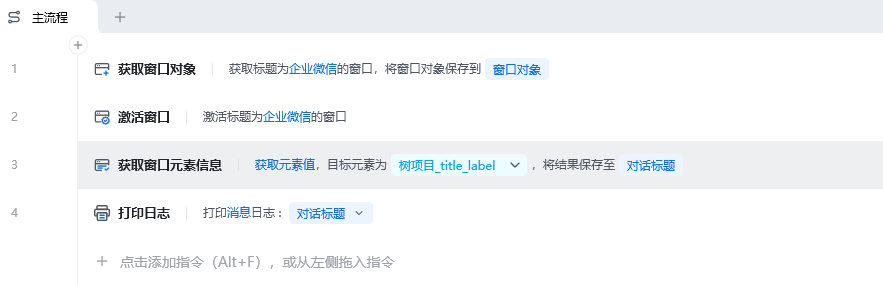
<img src="https://mintcdn.com/bazhuayu-rpa-docs/W742rR5fGwXr1akA/helpcenter/commands/desktop-automation/images/win_getelementcontentcommand-02.png?fit=max&auto=format&n=W742rR5fGwXr1akA&q=85&s=7193f1d3a876f87c3a023a201e715778" alt="获取窗口元素信息使用示例 - 流程搭建" width="883" height="285" data-path="helpcenter/commands/desktop-automation/images/win_getelementcontentcommand-02.png" />

**该流程执行逻辑：**

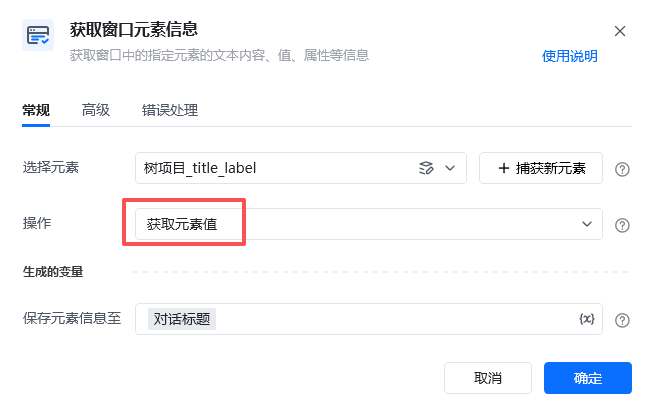
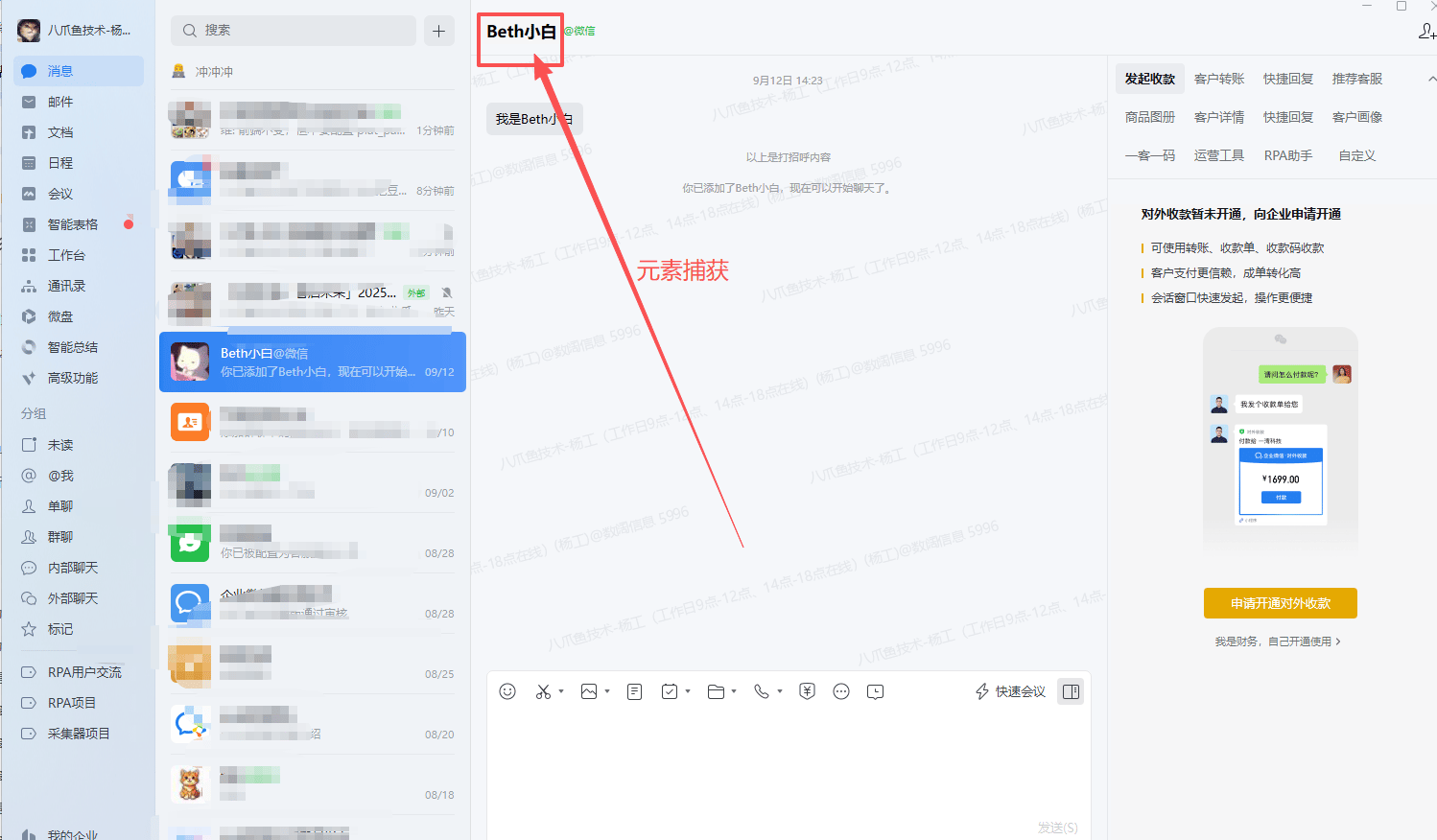
获取窗口对象：企业微信 → 激活「企业微信」窗口 → 使用指令【获取窗口元素信息】，在「企业微信」中捕获当前对话框的title元素，获取元素值，打印输出。

### 效果展示

成功获取窗口元素信息并打印输出。

<img src="https://mintcdn.com/bazhuayu-rpa-docs/W742rR5fGwXr1akA/helpcenter/commands/desktop-automation/images/win_getelementcontentcommand-03.png?fit=max&auto=format&n=W742rR5fGwXr1akA&q=85&s=9c7ce988579ccedff621ba0f48c6423b" alt="获取窗口元素信息使用示例 - 效果展示" width="645" height="413" data-path="helpcenter/commands/desktop-automation/images/win_getelementcontentcommand-03.png" />

<img src="https://mintcdn.com/bazhuayu-rpa-docs/W742rR5fGwXr1akA/helpcenter/commands/desktop-automation/images/win_getelementcontentcommand-04.png?fit=max&auto=format&n=W742rR5fGwXr1akA&q=85&s=a34f9164cc9d400f20bc1676aa8625d4" alt="获取窗口元素信息使用示例 - 运行结果" width="1498" height="876" data-path="helpcenter/commands/desktop-automation/images/win_getelementcontentcommand-04.png" />

<img src="https://mintcdn.com/bazhuayu-rpa-docs/W742rR5fGwXr1akA/helpcenter/commands/desktop-automation/images/win_getelementcontentcommand-05.png?fit=max&auto=format&n=W742rR5fGwXr1akA&q=85&s=2388d57899fb1dd14a151b5f8946db4d" alt="获取窗口元素信息使用示例 - 运行结果" width="1331" height="262" data-path="helpcenter/commands/desktop-automation/images/win_getelementcontentcommand-05.png" />

<Info>
  使用指令过程中遇到问题？前往 [八爪鱼RPA 开发者社区问答板块](https://rpa.bazhuayu.com/community/questions) 提问，获取官方与社区帮助。
</Info>