> ## Documentation Index
> Fetch the complete documentation index at: https://rpa.bazhuayu.com/helpcenter/llms.txt
> Use this file to discover all available pages before exploring further.

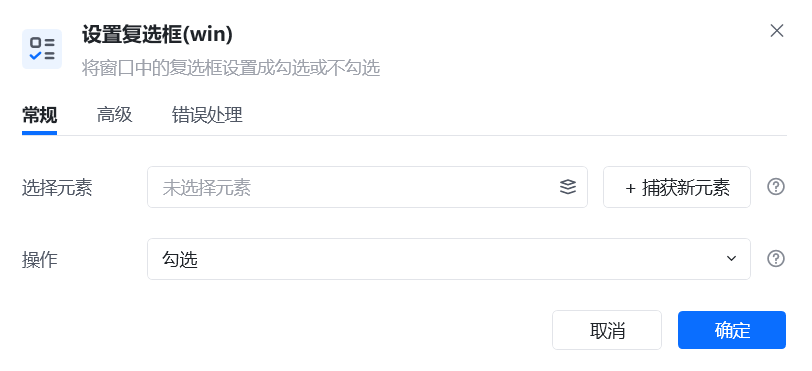
# 设置复选框(win)

## 指令说明

**描述：** 将窗口中的复选框设置为勾选或不勾选。

## 参数说明

<Tabs>
  <Tab title="常规">
    <img src="https://mintcdn.com/bazhuayu-rpa-docs/W742rR5fGwXr1akA/helpcenter/commands/desktop-automation/images/win_setcheckboxcommand-01.png?fit=max&auto=format&n=W742rR5fGwXr1akA&q=85&s=f292981dabe70cc07e5ac939a0de2fb6" alt="设置复选框指令参数面板" width="812" height="371" data-path="helpcenter/commands/desktop-automation/images/win_setcheckboxcommand-01.png" />

    | 参数       | 说明                        |
    | -------- | ------------------------- |
    | **选择元素** | 选择元素库已存在的复选框元素，或重新捕获新的复选框 |
    | **操作**   | 勾选、取消勾选、反选三个设置            |
  </Tab>

  <Tab title="高级">
    本指令暂无高级参数。
  </Tab>
</Tabs>

## 使用示例

<img src="https://mintcdn.com/bazhuayu-rpa-docs/W742rR5fGwXr1akA/helpcenter/commands/desktop-automation/images/win_setcheckboxcommand-02.png?fit=max&auto=format&n=W742rR5fGwXr1akA&q=85&s=43525dca10f6ebb036ce47bff60e93d1" alt="设置复选框使用示例 - 流程搭建" width="1025" height="154" data-path="helpcenter/commands/desktop-automation/images/win_setcheckboxcommand-02.png" />

**该流程执行逻辑：**

【获取窗口对象】获取名称为"设置"的窗口 → 【设置复选框】在"设置"的窗口中，反选复选框。

### 效果展示

成功设置复选框的勾选状态。

<img src="https://mintcdn.com/bazhuayu-rpa-docs/W742rR5fGwXr1akA/helpcenter/commands/desktop-automation/images/win_setcheckboxcommand-03.png?fit=max&auto=format&n=W742rR5fGwXr1akA&q=85&s=1224d279edc1402c71dfef770bf5effd" alt="设置复选框使用示例 - 运行日志" width="1010" height="186" data-path="helpcenter/commands/desktop-automation/images/win_setcheckboxcommand-03.png" />

<Info>
  使用指令过程中遇到问题？前往 [八爪鱼RPA 开发者社区问答板块](https://rpa.bazhuayu.com/community/questions) 提问，获取官方与社区帮助。
</Info>