> ## Documentation Index
> Fetch the complete documentation index at: https://rpa.bazhuayu.com/helpcenter/llms.txt
> Use this file to discover all available pages before exploring further.

# 钉钉在线表格指令模块

> 使用钉钉表格相关指令可以实时在线更新表格、共享表格、多人一起操作表格，便于团队协作；本文主要介绍使用钉钉表格的一些前期准备。

## 钉钉在线表格前期准备

使用钉钉表格相关指令可以实时在线更新表格、共享表格、多人一起操作表格，便于团队协作；本文主要介绍使用钉钉表格的一些前期准备。

### 获取AppKey、AppSecret、用户ID、表格ID

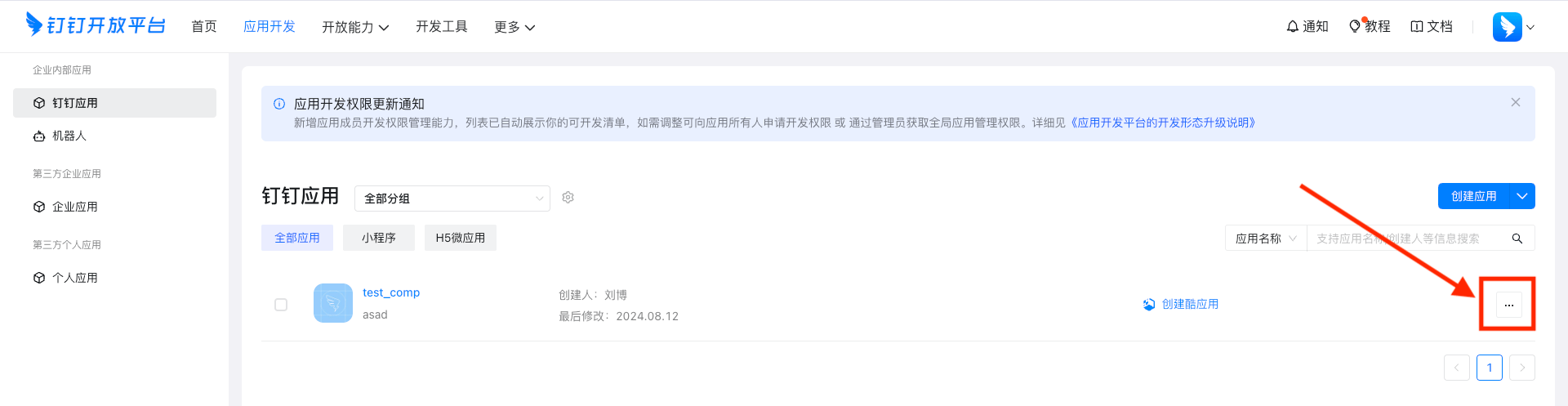
进入钉钉开发者后台([https://open-dev.dingtalk.com/](https://open-dev.dingtalk.com/))，创建应用并发布

<img src="https://mintcdn.com/bazhuayu-rpa-docs/W742rR5fGwXr1akA/helpcenter/commands/dingtalk/images/gM80NN-01.png?fit=max&auto=format&n=W742rR5fGwXr1akA&q=85&s=203d6f3455bcc4e136a5647e1a473d0e" alt="钉钉在线表格指令模块" width="1920" height="497" data-path="helpcenter/commands/dingtalk/images/gM80NN-01.png" />

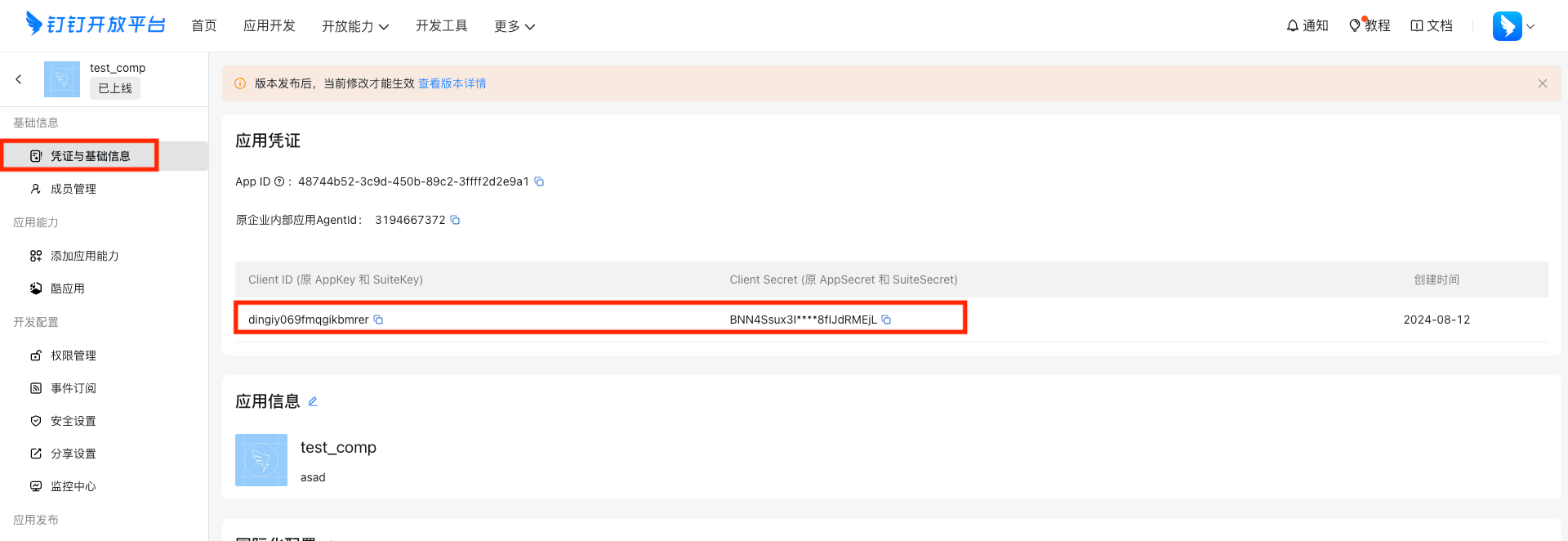
点击凭证与基础信息，查看应用的appKey和appSecrit

<img src="https://mintcdn.com/bazhuayu-rpa-docs/W742rR5fGwXr1akA/helpcenter/commands/dingtalk/images/gM80NN-02.png?fit=max&auto=format&n=W742rR5fGwXr1akA&q=85&s=b0816c65d12639945a3edfad8f513c41" alt="钉钉在线表格指令模块" width="1920" height="662" data-path="helpcenter/commands/dingtalk/images/gM80NN-02.png" />

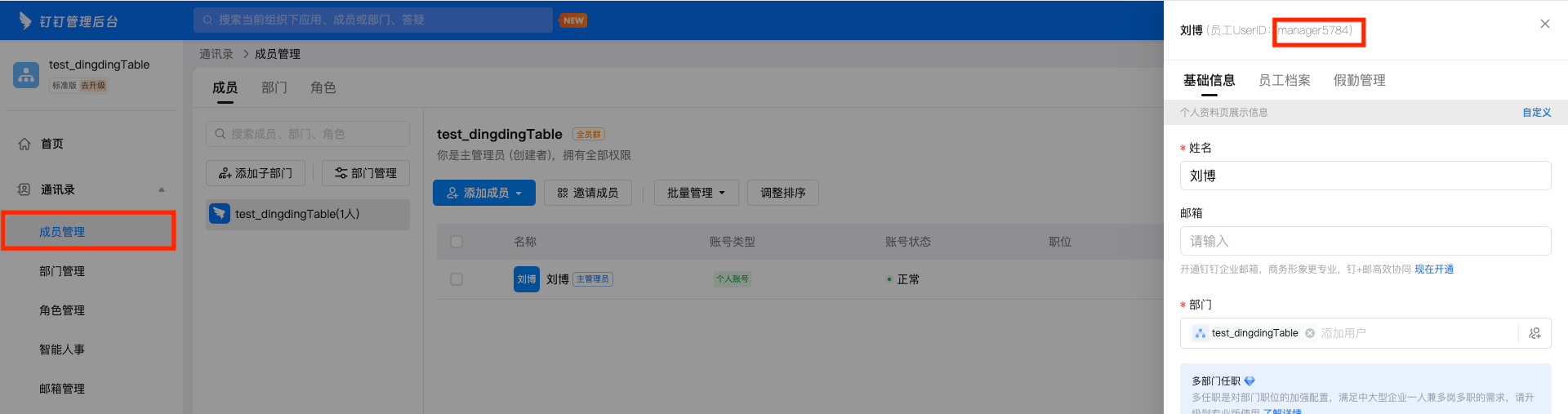
登录钉钉管理后台（[https://oa.dingtalk.com/](https://oa.dingtalk.com/)），获取userID

<img src="https://mintcdn.com/bazhuayu-rpa-docs/W742rR5fGwXr1akA/helpcenter/commands/dingtalk/images/gM80NN-03.png?fit=max&auto=format&n=W742rR5fGwXr1akA&q=85&s=5c4d23deb82b83b26455fe492e99b012" alt="钉钉在线表格指令模块" width="748" height="448" data-path="helpcenter/commands/dingtalk/images/gM80NN-03.png" />

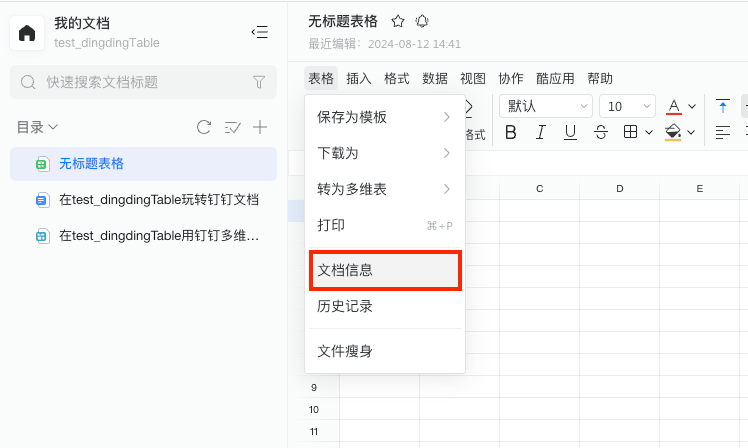
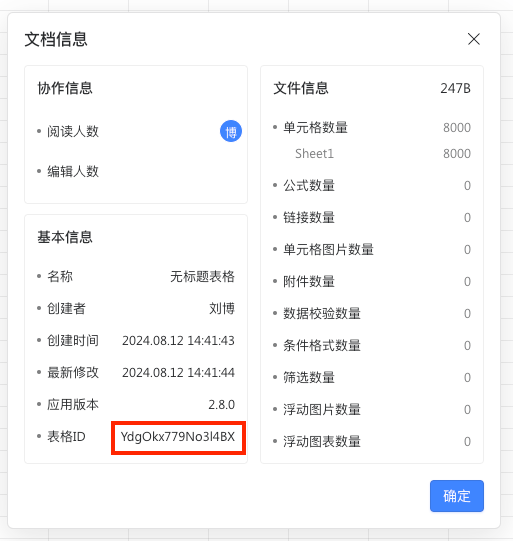
打开要操作的钉钉表格，如图获取要操作的表格的表格ID

<img src="https://mintcdn.com/bazhuayu-rpa-docs/W742rR5fGwXr1akA/helpcenter/commands/dingtalk/images/gM80NN-04.png?fit=max&auto=format&n=W742rR5fGwXr1akA&q=85&s=0443d06622019b4910ba7003bf20d767" alt="钉钉在线表格指令模块" width="513" height="541" data-path="helpcenter/commands/dingtalk/images/gM80NN-04.png" />

<img src="https://mintcdn.com/bazhuayu-rpa-docs/W742rR5fGwXr1akA/helpcenter/commands/dingtalk/images/gM80NN-05.png?fit=max&auto=format&n=W742rR5fGwXr1akA&q=85&s=b4888efb069fde4548a2b9ff721e9bb7" alt="钉钉在线表格指令模块" width="1920" height="507" data-path="helpcenter/commands/dingtalk/images/gM80NN-05.png" />

<Info>
  使用过程中遇到问题？前往 [八爪鱼RPA 开发者社区问答板块](https://rpa.bazhuayu.com/community/questions) 提问，获取官方与社区帮助。
</Info>