> ## Documentation Index
> Fetch the complete documentation index at: https://rpa.bazhuayu.com/helpcenter/llms.txt
> Use this file to discover all available pages before exploring further.

# 插入空列

## 指令说明

**描述：** 在Excel工作表中插入空列。

## 参数说明

<Tabs>
  <Tab title="常规">
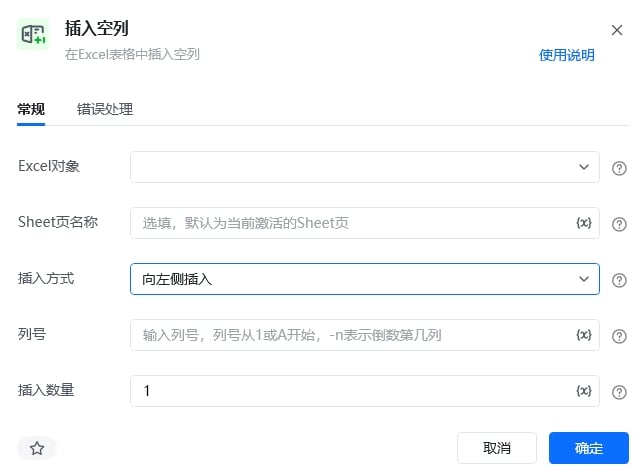
    <img src="https://mintcdn.com/bazhuayu-rpa-docs/PoBbJh6tQuwbCrmc/helpcenter/commands/excel/images/insertexcelcolumncommand-10.jpg?fit=max&auto=format&n=PoBbJh6tQuwbCrmc&q=85&s=07d35901caba14889816b1666e54b44c" alt="插入空列指令参数面板" width="638" height="472" data-path="helpcenter/commands/excel/images/insertexcelcolumncommand-10.jpg" />

    | 参数           | 说明                                                         |
    | ------------ | ---------------------------------------------------------- |
    | **Excel对象**  | 请选择Excel对象（可通过指令【启动Excel】或【获取当前激活的Excel对象】创建），用于确定待操作的工作簿。 |
    | **Sheet页名称** | 操作目标工作表的名称，支持选填，默认为当前Excel激活的Sheet页。                       |
    | **插入位置**     | 输入要插入的列号，列号从1或A开始。                                         |
    | **插入数量**     | 输入要插入的列数，默认为1。                                             |
  </Tab>

  <Tab title="高级">
    本指令暂无高级参数。
  </Tab>
</Tabs>

## 使用示例

<img src="https://mintcdn.com/bazhuayu-rpa-docs/PoBbJh6tQuwbCrmc/helpcenter/commands/excel/images/insertexcelcolumncommand-02.png?fit=max&auto=format&n=PoBbJh6tQuwbCrmc&q=85&s=00f374fb61dffe320d9ea705f39224f0" alt="插入空列使用示例 - 流程搭建" width="850" height="197" data-path="helpcenter/commands/excel/images/insertexcelcolumncommand-02.png" />

**该流程执行逻辑：**

使用【启动Excel】打开已有的Excel，并将Excel对象保存到excel对象

使用【插入空列】指令在指定位置插入空列

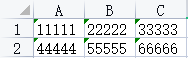
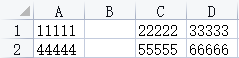
### 效果展示
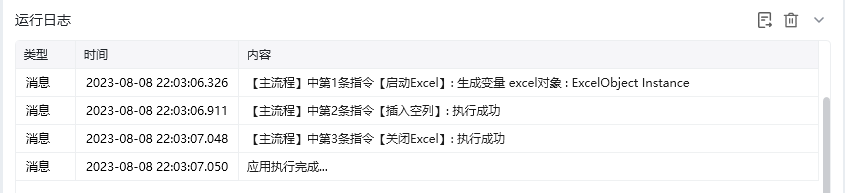
<img src="https://mintcdn.com/bazhuayu-rpa-docs/PoBbJh6tQuwbCrmc/helpcenter/commands/excel/images/insertexcelcolumncommand-03.png?fit=max&auto=format&n=PoBbJh6tQuwbCrmc&q=85&s=b5c5b53cb5adb2bbf98c384d02f6de51" alt="插入空列使用示例 - 效果展示" width="845" height="193" data-path="helpcenter/commands/excel/images/insertexcelcolumncommand-03.png" />

<img src="https://mintcdn.com/bazhuayu-rpa-docs/PoBbJh6tQuwbCrmc/helpcenter/commands/excel/images/insertexcelcolumncommand-04.png?fit=max&auto=format&n=PoBbJh6tQuwbCrmc&q=85&s=4ee6fb0e5c668512f33ecaaae9b6dfed" alt="插入空列使用示例 - 效果展示 2" width="188" height="58" data-path="helpcenter/commands/excel/images/insertexcelcolumncommand-04.png" />

<img src="https://mintcdn.com/bazhuayu-rpa-docs/PoBbJh6tQuwbCrmc/helpcenter/commands/excel/images/insertexcelcolumncommand-05.png?fit=max&auto=format&n=PoBbJh6tQuwbCrmc&q=85&s=418694903db984de16efa4c8a016c0a5" alt="插入空列使用示例 - 效果展示 3" width="239" height="58" data-path="helpcenter/commands/excel/images/insertexcelcolumncommand-05.png" />

<Info>
  使用指令过程中遇到问题？前往 [八爪鱼RPA 开发者社区问答板块](https://rpa.bazhuayu.com/community/questions) 提问，获取官方与社区帮助。
</Info>