> ## Documentation Index
> Fetch the complete documentation index at: https://rpa.bazhuayu.com/helpcenter/llms.txt
> Use this file to discover all available pages before exploring further.

# 批量添加记录

## 指令说明

**描述：** 在飞书多维数据表中新增多条记录。

## 参数说明

<Tabs>
  <Tab title="常规">
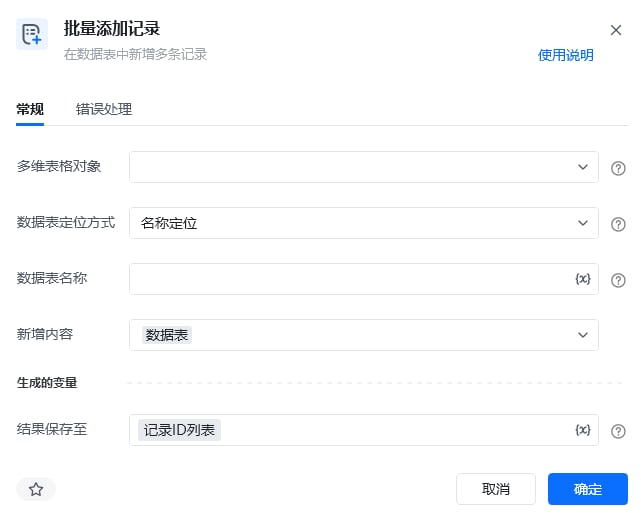
    <img src="https://mintcdn.com/bazhuayu-rpa-docs/oMGzRtmKPLqq2VoW/helpcenter/commands/feishu/images/batchaddlarkbitablerecordcommand-01.png?fit=max&auto=format&n=oMGzRtmKPLqq2VoW&q=85&s=a29011661e69d9f8cf518bbd41ad84ce" alt="批量添加记录指令参数面板" width="641" height="513" data-path="helpcenter/commands/feishu/images/batchaddlarkbitablerecordcommand-01.png" />

    | 参数          | 说明                          |
    | ----------- | --------------------------- |
    | **多维表格对象**  | 请选择通过【连接飞书多维表格】指令产生的多维表格对象。 |
    | **数据表定位方式** | 选择通过名称或 ID 定位待操作的数据表。       |
    | **数据表名称**   | 当定位方式选择“名称”时，输入待操作的数据表名称。   |
    | **新增内容**    | 输入存放待新增记录的数据表格变量。           |
  </Tab>

  <Tab title="高级">
    本指令暂无高级参数。
  </Tab>
</Tabs>

## 使用示例

<img src="https://mintcdn.com/bazhuayu-rpa-docs/oMGzRtmKPLqq2VoW/helpcenter/commands/feishu/images/batchaddlarkbitablerecordcommand-02.png?fit=max&auto=format&n=oMGzRtmKPLqq2VoW&q=85&s=1de980f5bc9932f789935cd44d450e87" alt="批量添加记录使用示例 - 流程搭建" width="894" height="156" data-path="helpcenter/commands/feishu/images/batchaddlarkbitablerecordcommand-02.png" />

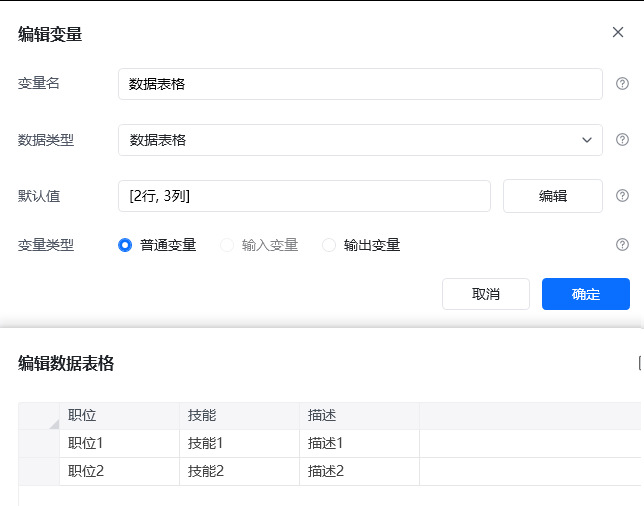
<img src="https://mintcdn.com/bazhuayu-rpa-docs/oMGzRtmKPLqq2VoW/helpcenter/commands/feishu/images/batchaddlarkbitablerecordcommand-03.png?fit=max&auto=format&n=oMGzRtmKPLqq2VoW&q=85&s=24c5ecd97abc93bafbc74b166ab0768f" alt="批量添加记录使用示例 - 指令配置" width="644" height="506" data-path="helpcenter/commands/feishu/images/batchaddlarkbitablerecordcommand-03.png" />

**该流程执行逻辑：**

1. 获取飞书访问凭证，并连接需要写入的飞书多维表格。
2. 准备字段结构与目标数据表一致的数据表格对象。
3. 执行【批量添加记录】，选择目标数据表并传入待新增内容。
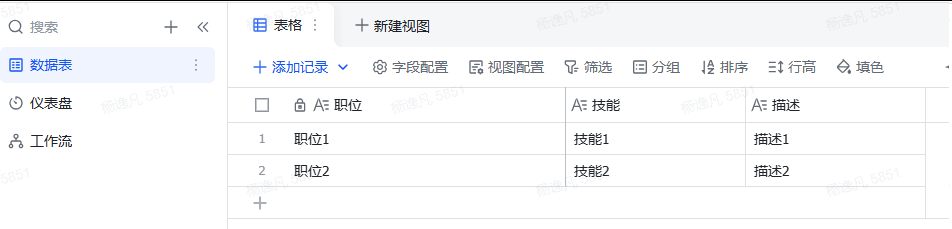
4. 运行后，数据表格中的多行数据批量生成飞书记录，可在目标数据表中核对新增结果。

### 效果展示

<img src="https://mintcdn.com/bazhuayu-rpa-docs/oMGzRtmKPLqq2VoW/helpcenter/commands/feishu/images/batchaddlarkbitablerecordcommand-04.png?fit=max&auto=format&n=oMGzRtmKPLqq2VoW&q=85&s=0d498e502555c2c9acfb6818ea9be2c9" alt="批量添加记录效果展示 - 运行日志" width="1308" height="247" data-path="helpcenter/commands/feishu/images/batchaddlarkbitablerecordcommand-04.png" />

<img src="https://mintcdn.com/bazhuayu-rpa-docs/oMGzRtmKPLqq2VoW/helpcenter/commands/feishu/images/batchaddlarkbitablerecordcommand-05.png?fit=max&auto=format&n=oMGzRtmKPLqq2VoW&q=85&s=b97af875819c772e4c2d3b07e9272eb9" alt="批量添加记录效果展示 - 飞书多维表结果" width="952" height="229" data-path="helpcenter/commands/feishu/images/batchaddlarkbitablerecordcommand-05.png" />

<Info>
  使用指令过程中遇到问题？前往 [八爪鱼RPA 开发者社区问答板块](https://rpa.bazhuayu.com/community/questions) 提问，获取官方与社区帮助。
</Info>