> ## Documentation Index
> Fetch the complete documentation index at: https://rpa.bazhuayu.com/helpcenter/llms.txt
> Use this file to discover all available pages before exploring further.

# 拷贝飞书表格

## 指令说明

**描述：** 拷贝飞书表格中指定的Sheet页

## 参数说明

<Tabs>
  <Tab title="常规">
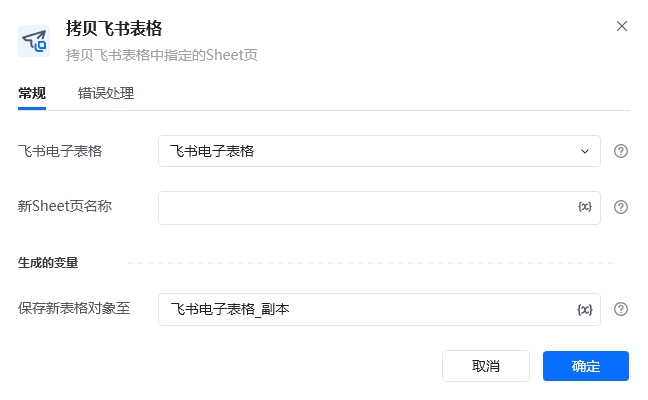
    <img src="https://mintcdn.com/bazhuayu-rpa-docs/oMGzRtmKPLqq2VoW/helpcenter/commands/feishu/images/copylarkspreadsheetcommand-01.png?fit=max&auto=format&n=oMGzRtmKPLqq2VoW&q=85&s=7251196bedd96b83da970a0d4ddcc5b8" alt="拷贝飞书表格指令参数面板" width="648" height="400" data-path="helpcenter/commands/feishu/images/copylarkspreadsheetcommand-01.png" />

    | 参数            | 说明                               |
    | ------------- | -------------------------------- |
    | **飞书电子表格**    | 选择需要读取的飞书电子表格                    |
    | **新Sheet页名称** | 输入新飞书电子表格Sheet页的名称（未存在的Sheet页名称） |
    | **生成的变量**     | 保存新表格对象变量                        |
  </Tab>

  <Tab title="高级">
    本指令暂无高级参数。
  </Tab>
</Tabs>

## 使用示例

<img src="https://mintcdn.com/bazhuayu-rpa-docs/oMGzRtmKPLqq2VoW/helpcenter/commands/feishu/images/copylarkspreadsheetcommand-02.png?fit=max&auto=format&n=oMGzRtmKPLqq2VoW&q=85&s=21591bac254e5a07743636602ad4bb5a" alt="拷贝飞书表格使用示例 - 流程搭建" width="960" height="190" data-path="helpcenter/commands/feishu/images/copylarkspreadsheetcommand-02.png" />

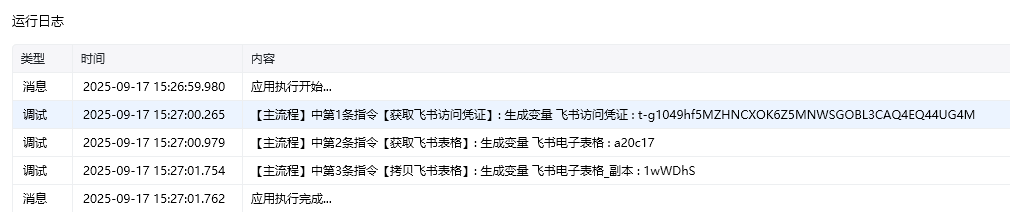
**该流程执行逻辑：**

1. 获取飞书访问凭证，并将授权结果保存到“飞书访问凭证”。
2. 根据表格网址获取目标飞书表格，并将表格对象保存到“飞书电子表格”。
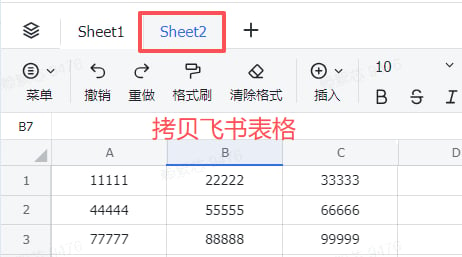
3. 执行【拷贝飞书表格】，复制指定 Sheet，并将新 Sheet 命名为 `Sheet2`。
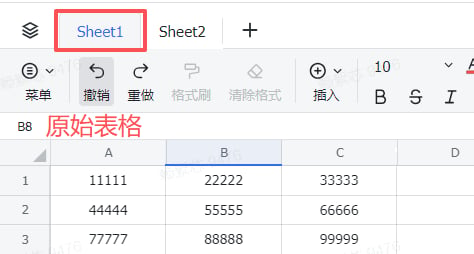
4. 将复制后的表格对象保存到“飞书电子表格\_副本”，可通过运行前、运行后截图确认新增的 Sheet。

### 效果展示

<img src="https://mintcdn.com/bazhuayu-rpa-docs/oMGzRtmKPLqq2VoW/helpcenter/commands/feishu/images/copylarkspreadsheetcommand-03.png?fit=max&auto=format&n=oMGzRtmKPLqq2VoW&q=85&s=e11bc2d6c666b4fcfb915560039f66e5" alt="拷贝飞书表格使用示例 - 效果展示" width="1010" height="212" data-path="helpcenter/commands/feishu/images/copylarkspreadsheetcommand-03.png" />

<img src="https://mintcdn.com/bazhuayu-rpa-docs/oMGzRtmKPLqq2VoW/helpcenter/commands/feishu/images/copylarkspreadsheetcommand-04.png?fit=max&auto=format&n=oMGzRtmKPLqq2VoW&q=85&s=7be1d0ffb9f1a32ad842d94d2d6a8045" alt="拷贝飞书表格使用示例 - 效果展示" width="474" height="254" data-path="helpcenter/commands/feishu/images/copylarkspreadsheetcommand-04.png" />

<img src="https://mintcdn.com/bazhuayu-rpa-docs/oMGzRtmKPLqq2VoW/helpcenter/commands/feishu/images/copylarkspreadsheetcommand-05.png?fit=max&auto=format&n=oMGzRtmKPLqq2VoW&q=85&s=0a3c07a25da32aaf82dc4a9bf941e193" alt="拷贝飞书表格使用示例 - 效果展示" width="462" height="257" data-path="helpcenter/commands/feishu/images/copylarkspreadsheetcommand-05.png" />

<Info>
  使用指令过程中遇到问题？前往 [八爪鱼RPA 开发者社区问答板块](https://rpa.bazhuayu.com/community/questions) 提问，获取官方与社区帮助。
</Info>