> ## Documentation Index
> Fetch the complete documentation index at: https://rpa.bazhuayu.com/helpcenter/llms.txt
> Use this file to discover all available pages before exploring further.
# 获取记录详情
## 指令说明
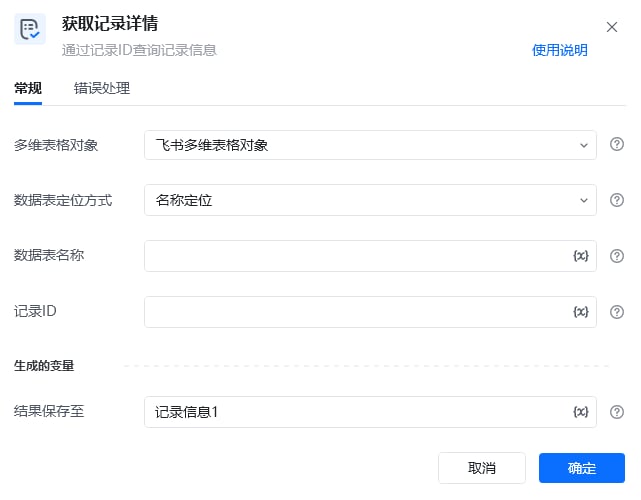
**描述:** 根据记录 ID 查询飞书多维表格中的一条记录,并返回该记录的字段信息。
## 参数说明
 | 参数 | 说明 |
| ----------- | ----------------------------------- |
| **多维表格对象** | 请选择通过“连接飞书多维表格”指令产生的多维表格对象 |
| **数据表定位方式** | 选择定位方式,可以通过名称定位或ID定位来指定待操作的数据表 |
| **数据表名称** | 请输入要获取记录详情的数据表名称(数据表定位方式选择名称定位时) |
| **数据表ID** | 请输入要获取记录详情的数据表ID(数据表定位方式选择ID定位时) |
| **记录ID** | 请输入需要获取详情的记录ID(可先通过查询记录指令获取所有记录的ID) |
本指令暂无高级参数。
## 使用示例
| 参数 | 说明 |
| ----------- | ----------------------------------- |
| **多维表格对象** | 请选择通过“连接飞书多维表格”指令产生的多维表格对象 |
| **数据表定位方式** | 选择定位方式,可以通过名称定位或ID定位来指定待操作的数据表 |
| **数据表名称** | 请输入要获取记录详情的数据表名称(数据表定位方式选择名称定位时) |
| **数据表ID** | 请输入要获取记录详情的数据表ID(数据表定位方式选择ID定位时) |
| **记录ID** | 请输入需要获取详情的记录ID(可先通过查询记录指令获取所有记录的ID) |
本指令暂无高级参数。
## 使用示例
 **该流程执行逻辑:**
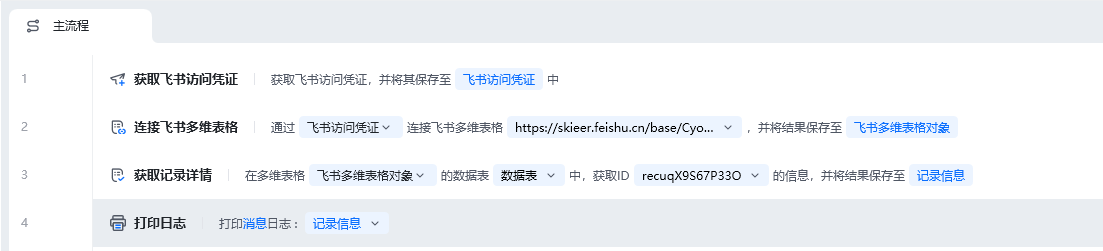
使用【获取飞书访问凭证】获取飞书访问凭证,并将其保存至飞书访问凭证中
使用【连接飞书多维表格】连接到指定的飞书多维表格,并将其保存至飞书多维表格对象中
使用【获取记录详情】在飞书多维表格指定的数据表中获取ID为recuqX9S67P33O的记录详情信息,并将其存为记录信息
使用【打印日志】将记录信息打印输出,输出内容可在\[运行日志]区查看
### 效果展示
**该流程执行逻辑:**
使用【获取飞书访问凭证】获取飞书访问凭证,并将其保存至飞书访问凭证中
使用【连接飞书多维表格】连接到指定的飞书多维表格,并将其保存至飞书多维表格对象中
使用【获取记录详情】在飞书多维表格指定的数据表中获取ID为recuqX9S67P33O的记录详情信息,并将其存为记录信息
使用【打印日志】将记录信息打印输出,输出内容可在\[运行日志]区查看
### 效果展示
 使用指令过程中遇到问题?前往 [八爪鱼RPA 开发者社区问答板块](https://rpa.bazhuayu.com/community/questions) 提问,获取官方与社区帮助。