> ## Documentation Index
> Fetch the complete documentation index at: https://rpa.bazhuayu.com/helpcenter/llms.txt
> Use this file to discover all available pages before exploring further.
# 读取飞书表格内容
## 指令说明
**描述:** 读取飞书电子表格里内容,支持多种方式读取
## 参数说明
 | 参数 | 说明 |
| ---------- | ------------------------------------------------------ |
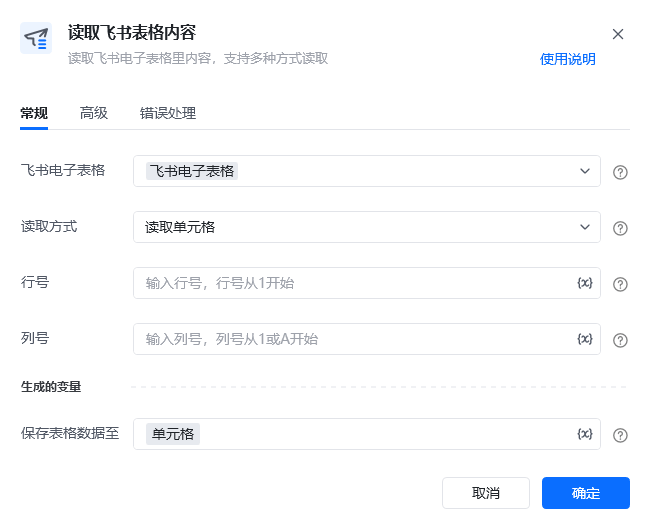
| **飞书电子表格** | 选择需要读取的飞书电子表格 |
| **读取方式** | 读取单元格:返回文本值、 读取一行:返回列表值、 读取一列:返回列表值、 读取区域:返回表格值,数据表格类型 |
| **行号** | 输入行号,行号从1开始 |
| **列号** | 输入列号,列号从1开始 |
| **开始行** | 输入行号,行号从1开始 |
| **结束行** | 输入行号,行号从1开始 |
| **开始列** | 输入列号,列号从1开始 |
| **结束列** | 输入列号,列号从1开始 |
| 参数 | 说明 |
| ---------- | ------------------------------------------------------ |
| **飞书电子表格** | 选择需要读取的飞书电子表格 |
| **读取方式** | 读取单元格:返回文本值、 读取一行:返回列表值、 读取一列:返回列表值、 读取区域:返回表格值,数据表格类型 |
| **行号** | 输入行号,行号从1开始 |
| **列号** | 输入列号,列号从1开始 |
| **开始行** | 输入行号,行号从1开始 |
| **结束行** | 输入行号,行号从1开始 |
| **开始列** | 输入列号,列号从1开始 |
| **结束列** | 输入列号,列号从1开始 |
 | 参数 | 说明 |
| ----------- | ---------------------------------------------------------------------------------------------------------- |
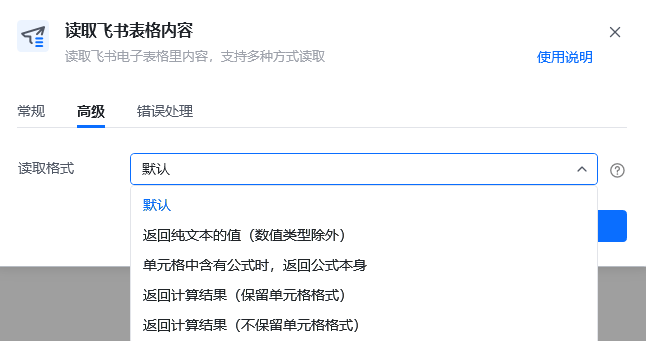
| **读取格式** | 返回纯文本的值(数值类型除外) 、 单元格中含有公式时,返回公式本身 、 返回计算结果(保留单元格格式):返回带格式的计算结果,如货币格式、保留位数等 、 返回计算结果(不保留单元格格式):返回不带格式的计算结果 |
| **保存表格数据至** | 设置输出变量名称,保存读取到的表格内容。输出变量类型分别是: 文本值(读取单元格)、 文本列表(读取一行/读取一列)、 数据表格(读取区域) |
## 使用示例
| 参数 | 说明 |
| ----------- | ---------------------------------------------------------------------------------------------------------- |
| **读取格式** | 返回纯文本的值(数值类型除外) 、 单元格中含有公式时,返回公式本身 、 返回计算结果(保留单元格格式):返回带格式的计算结果,如货币格式、保留位数等 、 返回计算结果(不保留单元格格式):返回不带格式的计算结果 |
| **保存表格数据至** | 设置输出变量名称,保存读取到的表格内容。输出变量类型分别是: 文本值(读取单元格)、 文本列表(读取一行/读取一列)、 数据表格(读取区域) |
## 使用示例
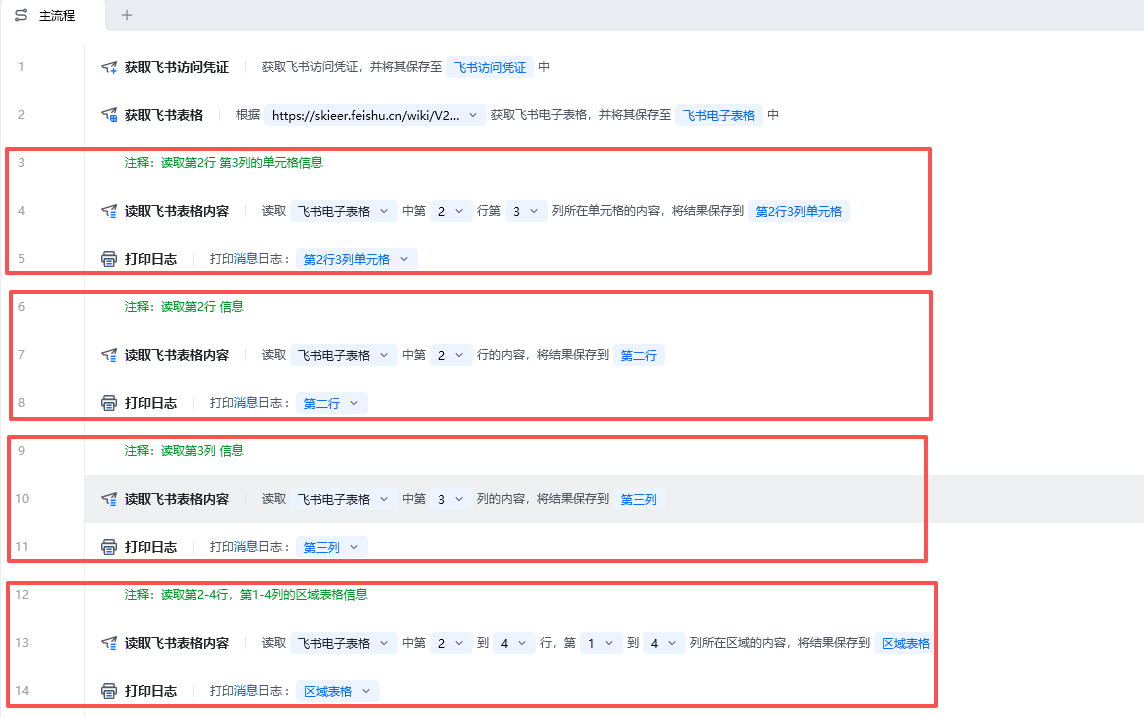 **该流程执行逻辑:**
本例演示【读取飞书表格内容】指令的配置与执行:
1. 选择飞书电子表格,并设置读取方式及行列范围。
2. 按选择的读取格式读取表格内容,并将数据保存到指定变量。
### 效果展示
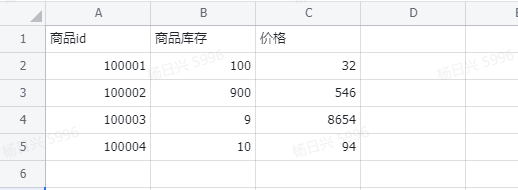
**该流程执行逻辑:**
本例演示【读取飞书表格内容】指令的配置与执行:
1. 选择飞书电子表格,并设置读取方式及行列范围。
2. 按选择的读取格式读取表格内容,并将数据保存到指定变量。
### 效果展示
 使用指令过程中遇到问题?前往 [八爪鱼RPA 开发者社区问答板块](https://rpa.bazhuayu.com/community/questions) 提问,获取官方与社区帮助。