> ## Documentation Index
> Fetch the complete documentation index at: https://rpa.bazhuayu.com/helpcenter/llms.txt
> Use this file to discover all available pages before exploring further.

# 写入列至谷歌表格

## 指令说明

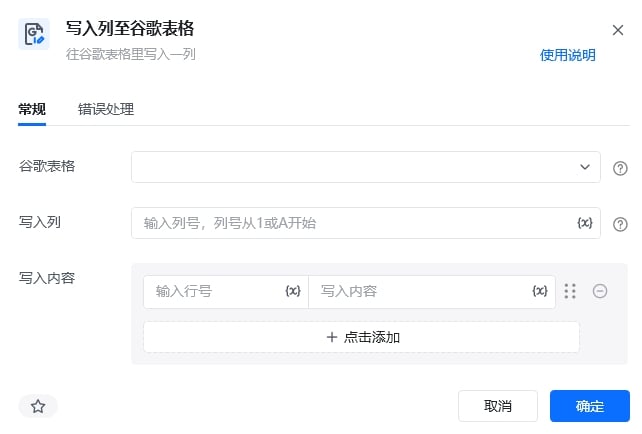
**描述：** 往谷歌表格里写入一列

## 参数说明

<Tabs>
  <Tab title="常规">
    <img src="https://mintcdn.com/bazhuayu-rpa-docs/Fj4gd-n2oOvAPIhl/helpcenter/commands/google/images/writecolumntogooglespreadsheetcommand-10.jpg?fit=max&auto=format&n=Fj4gd-n2oOvAPIhl&q=85&s=690acad199fa613d4edb17f44d25331c" alt="写入列至谷歌表格指令参数面板" width="642" height="434" data-path="helpcenter/commands/google/images/writecolumntogooglespreadsheetcommand-10.jpg" />

    | 参数         | 说明                |
    | ---------- | ----------------- |
    | **谷歌电子表格** | 选择需要读取的谷歌电子表格     |
    | **写入列**    | 输入列号，列号从1或A开始     |
    | **写入内容**   | 输入列号，输入写入内容，可添加多列 |
  </Tab>

  <Tab title="高级">
    本指令暂无高级参数。
  </Tab>
</Tabs>

## 使用示例

<img src="https://mintcdn.com/bazhuayu-rpa-docs/Fj4gd-n2oOvAPIhl/helpcenter/commands/google/images/writecolumntogooglespreadsheetcommand-01.png?fit=max&auto=format&n=Fj4gd-n2oOvAPIhl&q=85&s=656cd96854ea553e5e5caa75151ff9c4" alt="写入列至谷歌表格使用示例" width="1052" height="184" data-path="helpcenter/commands/google/images/writecolumntogooglespreadsheetcommand-01.png" />

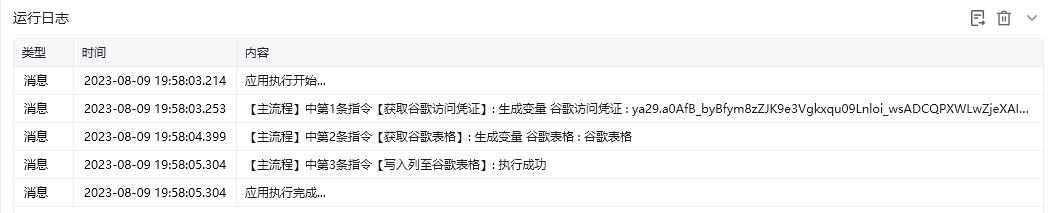
**该流程执行逻辑：**

使用【获取谷歌访问凭证】获取谷歌访问凭证，并将其保存至谷歌访问凭证中

使用【获取谷歌表格】获取飞书表格，并将结果保存至谷歌表格中

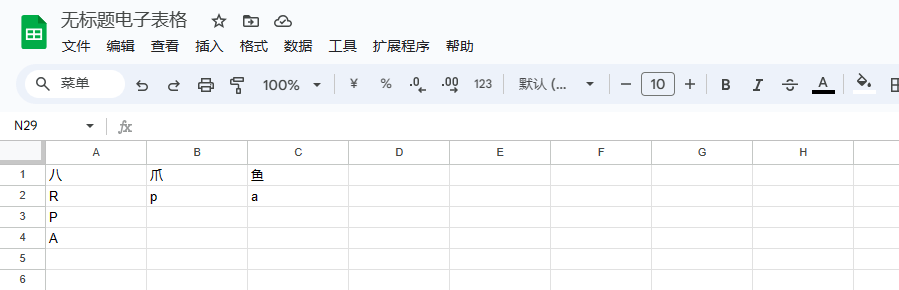
使用【写入列至谷歌表格】往谷歌表格的第1列的第2行写入“R”，第3行写入“P”，第4行写入“A”

### 效果展示

<img src="https://mintcdn.com/bazhuayu-rpa-docs/Fj4gd-n2oOvAPIhl/helpcenter/commands/google/images/writecolumntogooglespreadsheetcommand-03.png?fit=max&auto=format&n=Fj4gd-n2oOvAPIhl&q=85&s=9f4b113cc86acccf302cecfee11f4613" alt="写入列至谷歌表格效果展示" width="899" height="290" data-path="helpcenter/commands/google/images/writecolumntogooglespreadsheetcommand-03.png" />

<img src="https://mintcdn.com/bazhuayu-rpa-docs/Fj4gd-n2oOvAPIhl/helpcenter/commands/google/images/writecolumntogooglespreadsheetcommand-04.png?fit=max&auto=format&n=Fj4gd-n2oOvAPIhl&q=85&s=c3127cd81c933b2a971183de63375953" alt="写入列至谷歌表格效果展示" width="1054" height="213" data-path="helpcenter/commands/google/images/writecolumntogooglespreadsheetcommand-04.png" />

<Info>
  使用指令过程中遇到问题？前往 [八爪鱼RPA 开发者社区问答板块](https://rpa.bazhuayu.com/community/questions) 提问，获取官方与社区帮助。
</Info>