> ## Documentation Index
> Fetch the complete documentation index at: https://rpa.bazhuayu.com/helpcenter/llms.txt
> Use this file to discover all available pages before exploring further.

# 谷歌指令模块

> 这个指令需要填写谷歌OAuth凭证的客户端ID和谷歌OAuth凭证的客户端密钥

## 谷歌电子表格指令使用介绍

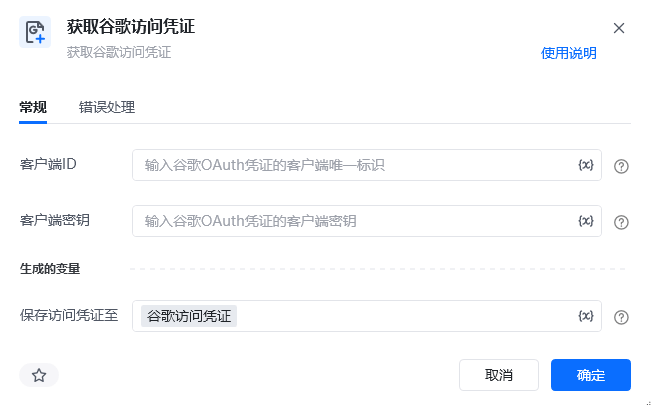
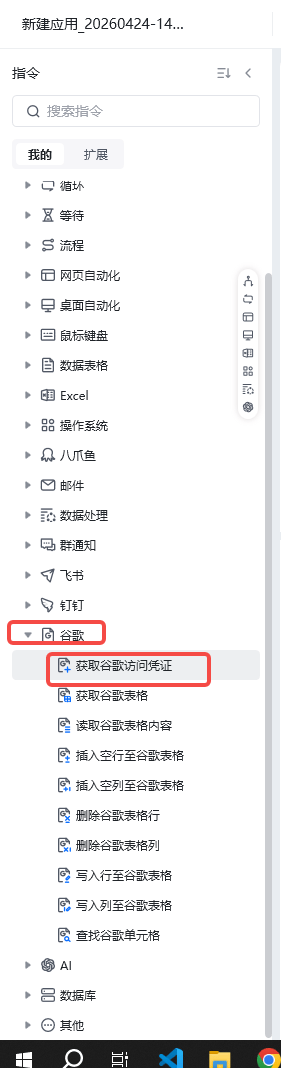
### 1. 使用“获取谷歌访问凭证指令”，获取谷歌的访问凭证

<img src="https://mintcdn.com/bazhuayu-rpa-docs/Fj4gd-n2oOvAPIhl/helpcenter/commands/google/images/xnN98S-01.png?fit=max&auto=format&n=Fj4gd-n2oOvAPIhl&q=85&s=e52bb9cf28b7dbf6f5717f2437649776" alt="谷歌指令模块" width="1280" height="604" data-path="helpcenter/commands/google/images/xnN98S-01.png" />

<img src="https://mintcdn.com/bazhuayu-rpa-docs/Fj4gd-n2oOvAPIhl/helpcenter/commands/google/images/xnN98S-02.png?fit=max&auto=format&n=Fj4gd-n2oOvAPIhl&q=85&s=526b7fdb67dda0c83c50db6fcc6a7443" alt="谷歌指令模块" width="579" height="658" data-path="helpcenter/commands/google/images/xnN98S-02.png" />

这个指令需要填写谷歌OAuth凭证的**客户端ID**和谷歌OAuth凭证的**客户端密钥**

**获取客户端ID和客户端密钥的流程：**

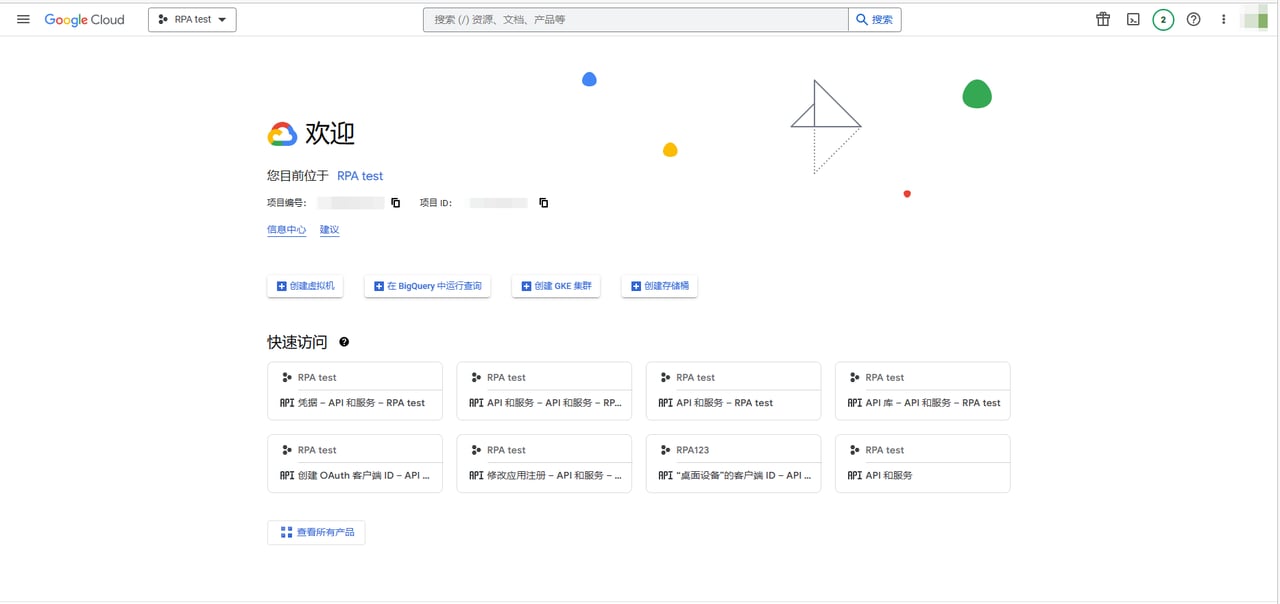
**在浏览器输入网址：[https://console.cloud.google.com/](https://console.cloud.google.com/) ，进入Google Cloud。**

<img src="https://mintcdn.com/bazhuayu-rpa-docs/Fj4gd-n2oOvAPIhl/helpcenter/commands/google/images/xnN98S-03.png?fit=max&auto=format&n=Fj4gd-n2oOvAPIhl&q=85&s=af612a16e0dafacd51200a4bc366bab8" alt="谷歌指令模块" width="719" height="461" data-path="helpcenter/commands/google/images/xnN98S-03.png" />

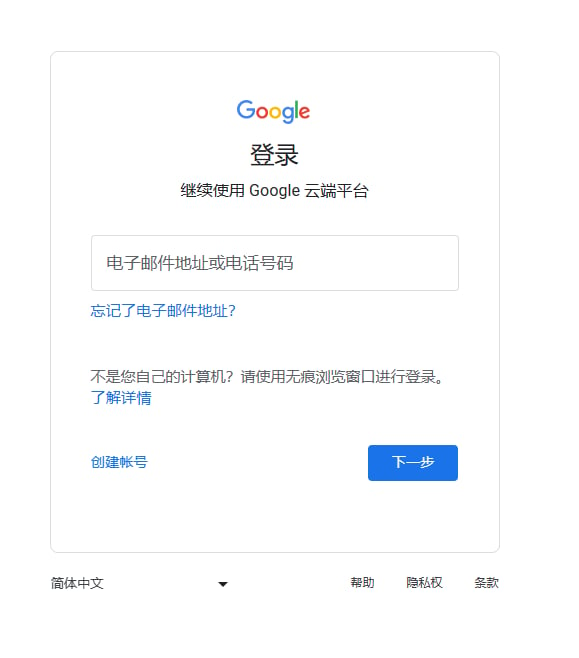
**如未登录Google云端平台，则可使用您的Google账号登录Google云端平台**

<img src="https://mintcdn.com/bazhuayu-rpa-docs/Fj4gd-n2oOvAPIhl/helpcenter/commands/google/images/xnN98S-04.png?fit=max&auto=format&n=Fj4gd-n2oOvAPIhl&q=85&s=cafdc26c7fc2aa816deb54028d31883f" alt="谷歌指令模块" width="1280" height="910" data-path="helpcenter/commands/google/images/xnN98S-04.png" />

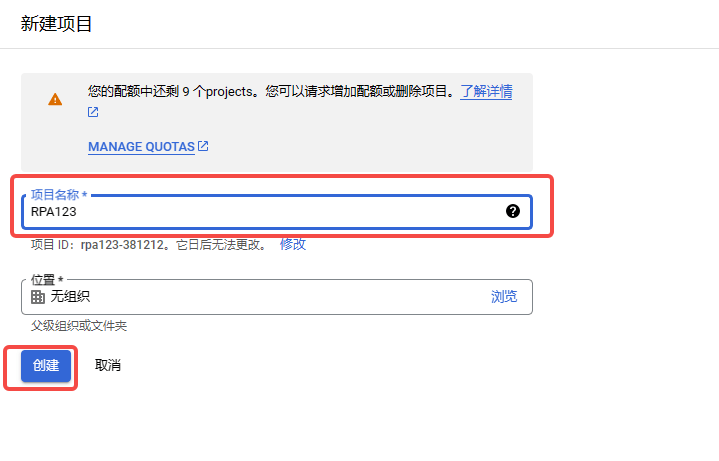
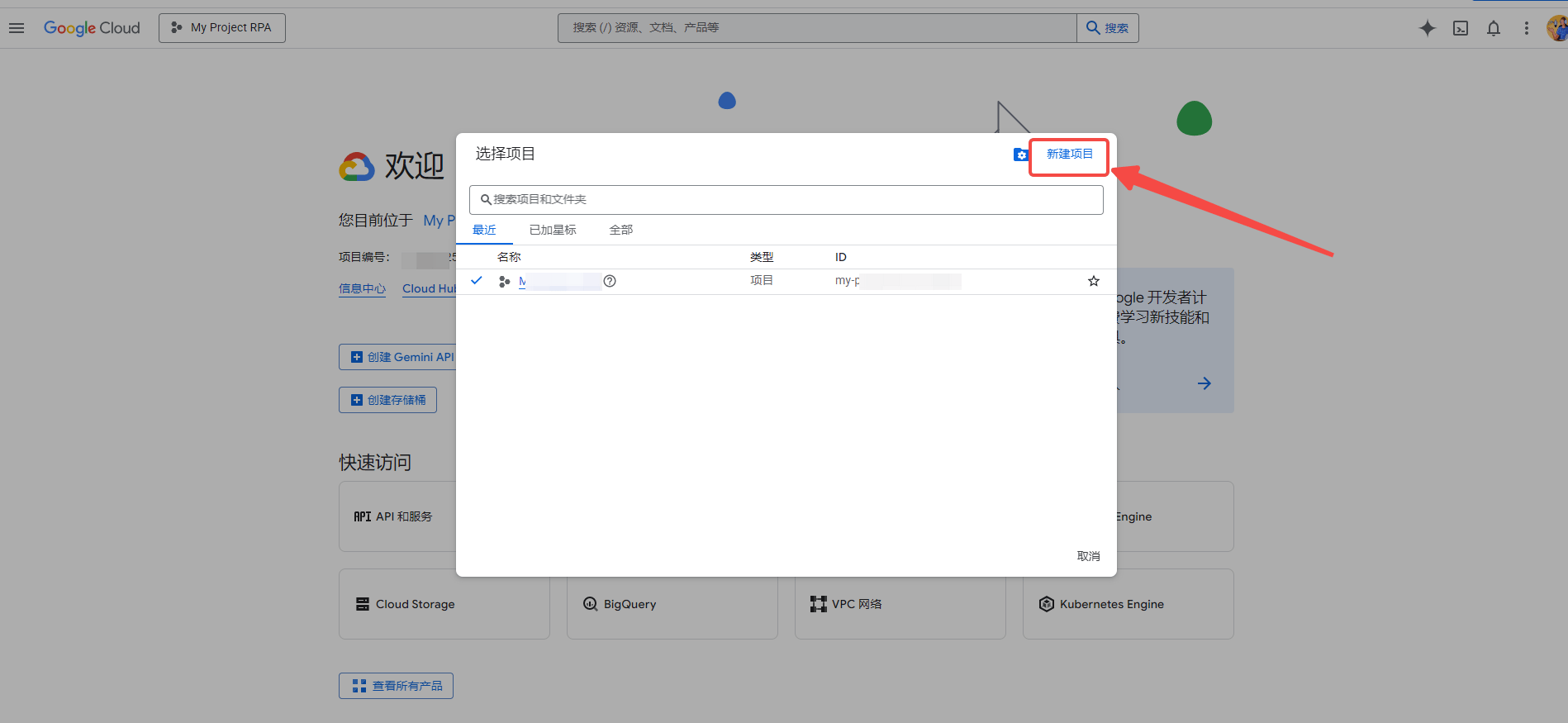
**创建一个新项目**

<img src="https://mintcdn.com/bazhuayu-rpa-docs/Fj4gd-n2oOvAPIhl/helpcenter/commands/google/images/xnN98S-05.png?fit=max&auto=format&n=Fj4gd-n2oOvAPIhl&q=85&s=dada3dae39d26e6885140ddd1df5f122" alt="谷歌指令模块" width="1813" height="924" data-path="helpcenter/commands/google/images/xnN98S-05.png" />

<img src="https://mintcdn.com/bazhuayu-rpa-docs/Fj4gd-n2oOvAPIhl/helpcenter/commands/google/images/xnN98S-06.png?fit=max&auto=format&n=Fj4gd-n2oOvAPIhl&q=85&s=5b66e02b186e5df908b5000713ad30ff" alt="谷歌指令模块" width="1863" height="929" data-path="helpcenter/commands/google/images/xnN98S-06.png" />

<img src="https://mintcdn.com/bazhuayu-rpa-docs/Fj4gd-n2oOvAPIhl/helpcenter/commands/google/images/xnN98S-07.png?fit=max&auto=format&n=Fj4gd-n2oOvAPIhl&q=85&s=4dcd12c071d5990d706bbbb33e2ba987" alt="谷歌指令模块" width="935" height="395" data-path="helpcenter/commands/google/images/xnN98S-07.png" />

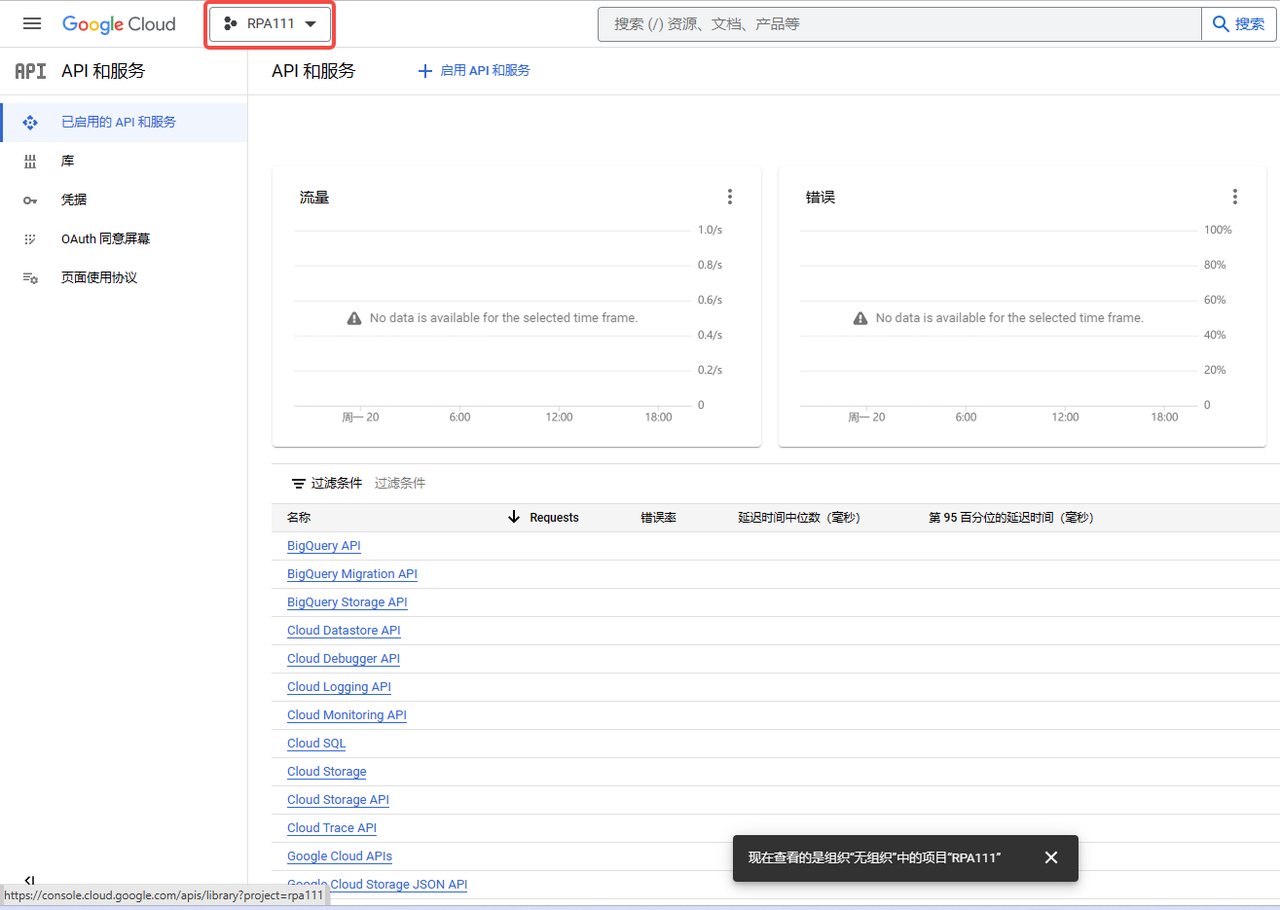
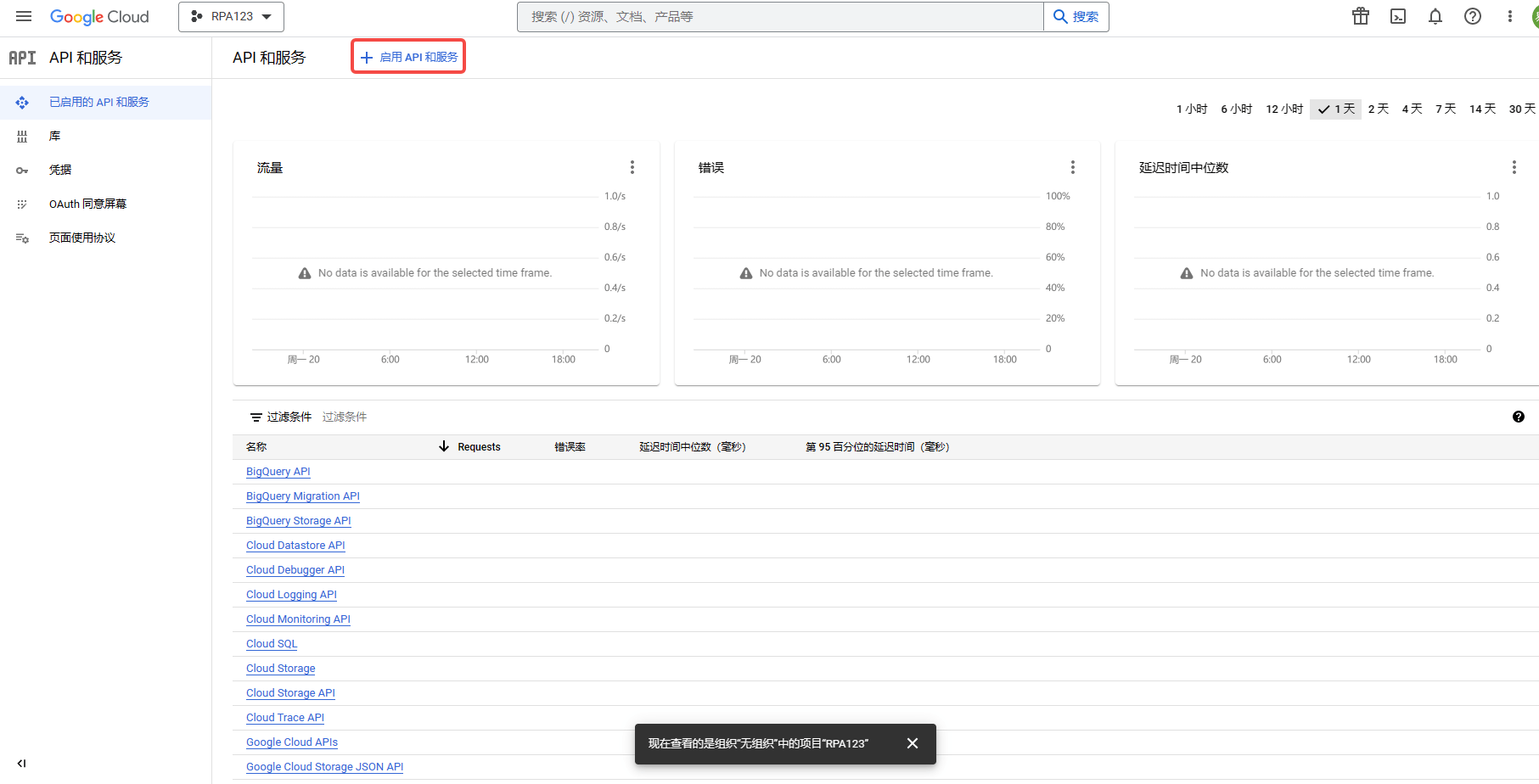
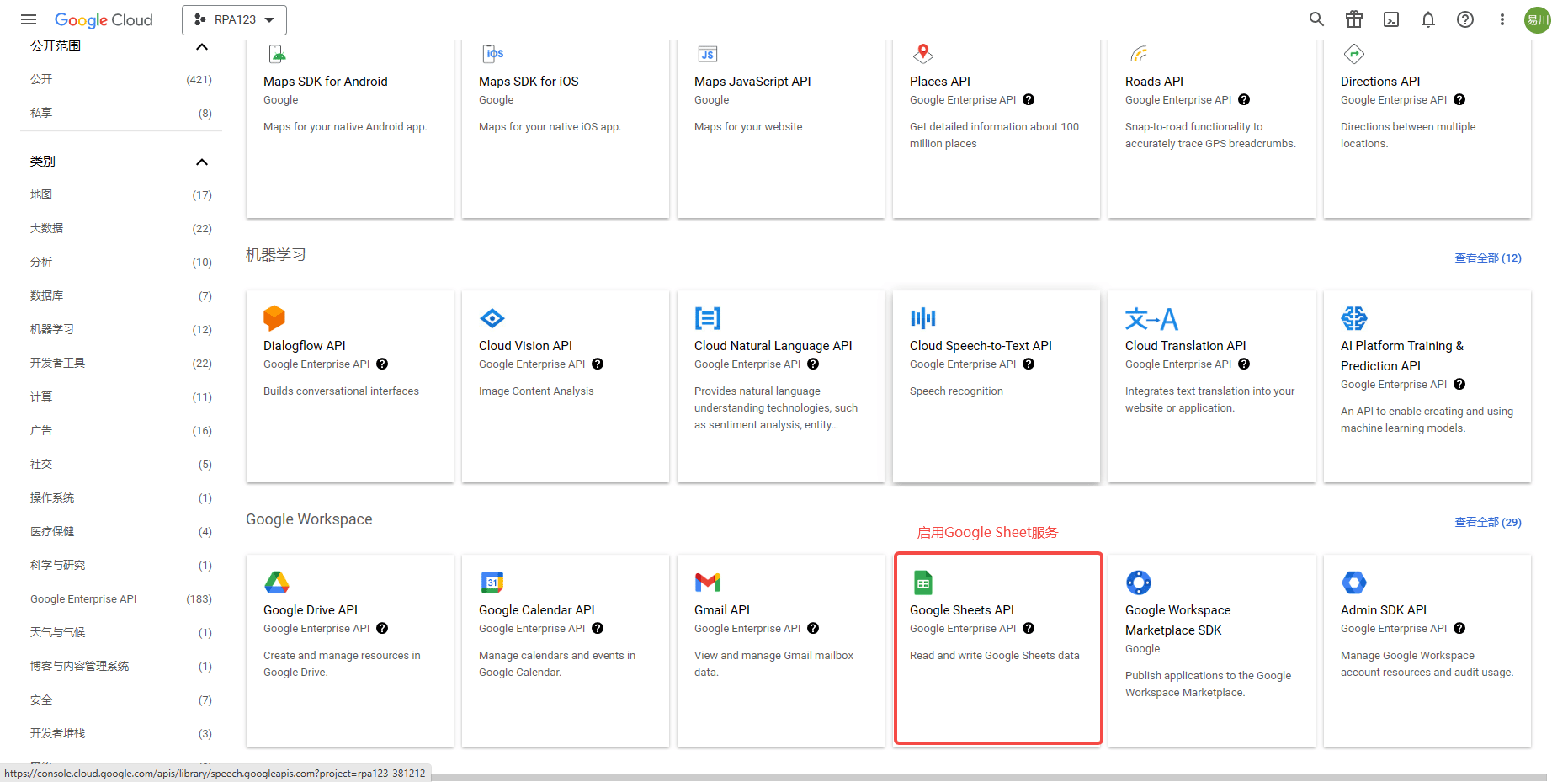
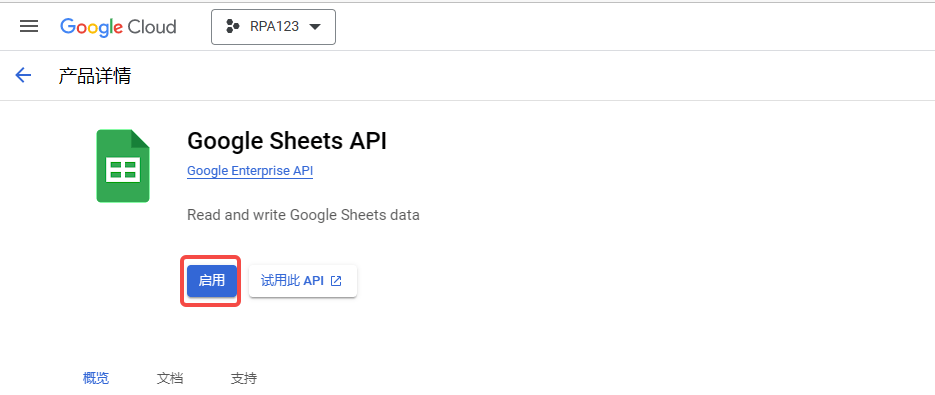
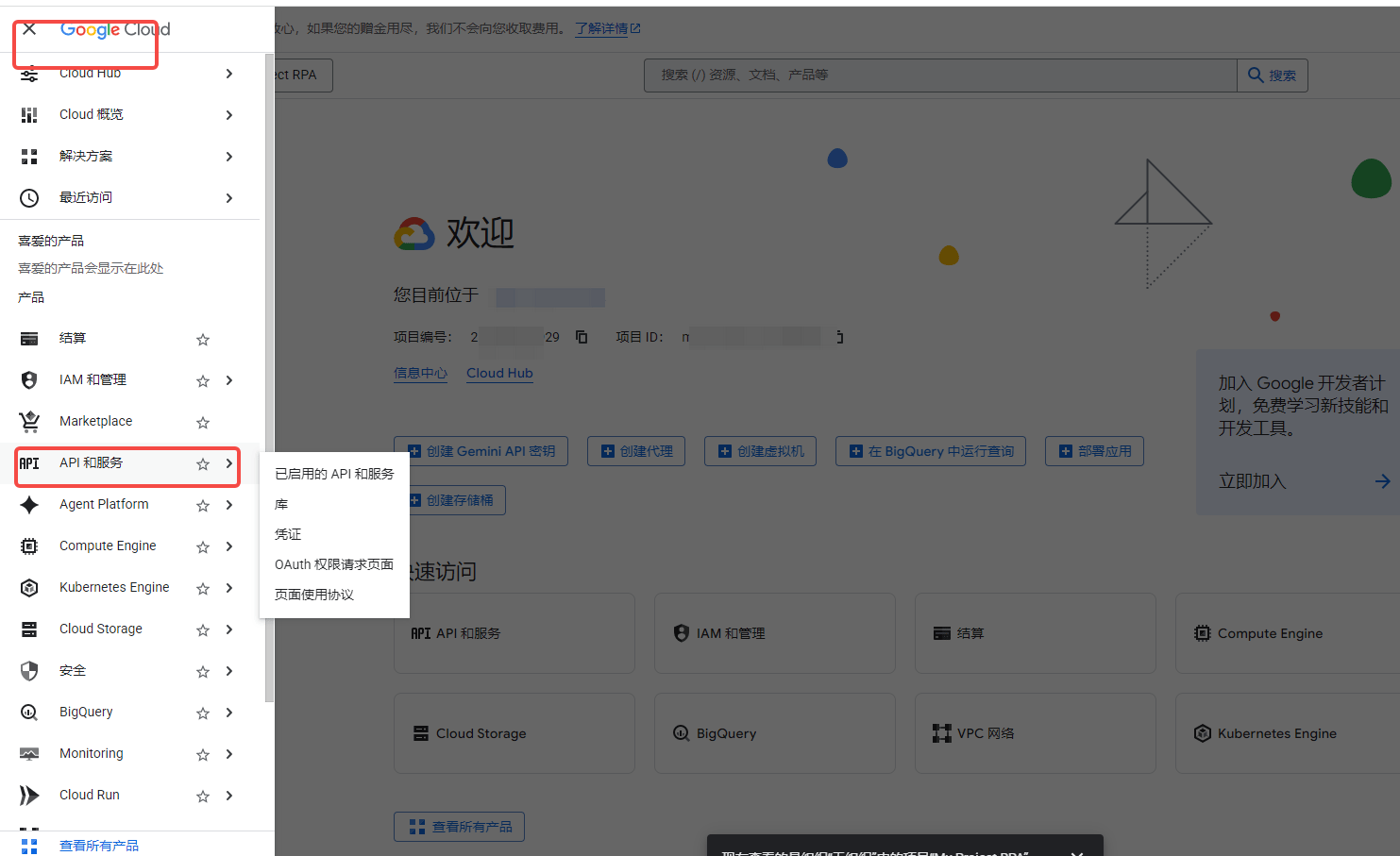
**点击“启用API和服务”按钮**

<img src="https://mintcdn.com/bazhuayu-rpa-docs/Fj4gd-n2oOvAPIhl/helpcenter/commands/google/images/xnN98S-08.png?fit=max&auto=format&n=Fj4gd-n2oOvAPIhl&q=85&s=1d6c418b885ddd9e211af0c409000f7e" alt="谷歌指令模块" width="979" height="871" data-path="helpcenter/commands/google/images/xnN98S-08.png" />

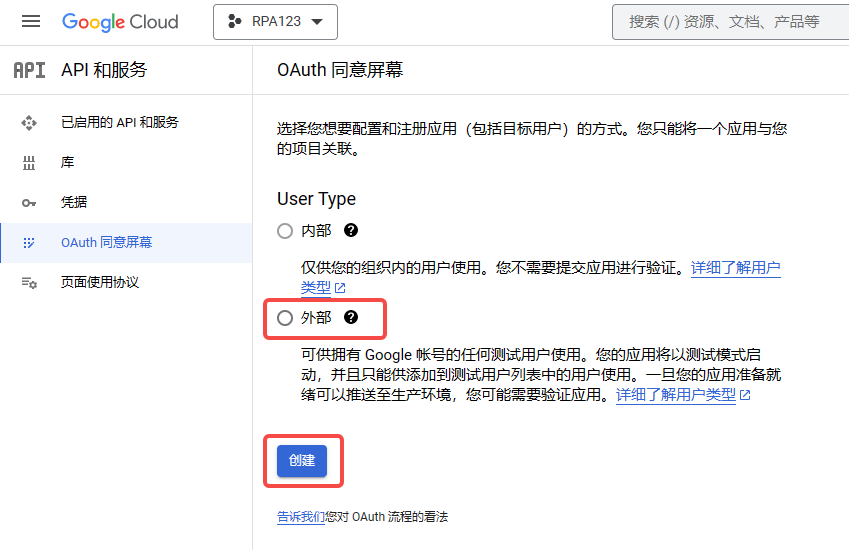
<img src="https://mintcdn.com/bazhuayu-rpa-docs/Fj4gd-n2oOvAPIhl/helpcenter/commands/google/images/xnN98S-09.png?fit=max&auto=format&n=Fj4gd-n2oOvAPIhl&q=85&s=a6f2d3eb949a862af48891117b11980f" alt="谷歌指令模块" width="849" height="550" data-path="helpcenter/commands/google/images/xnN98S-09.png" />

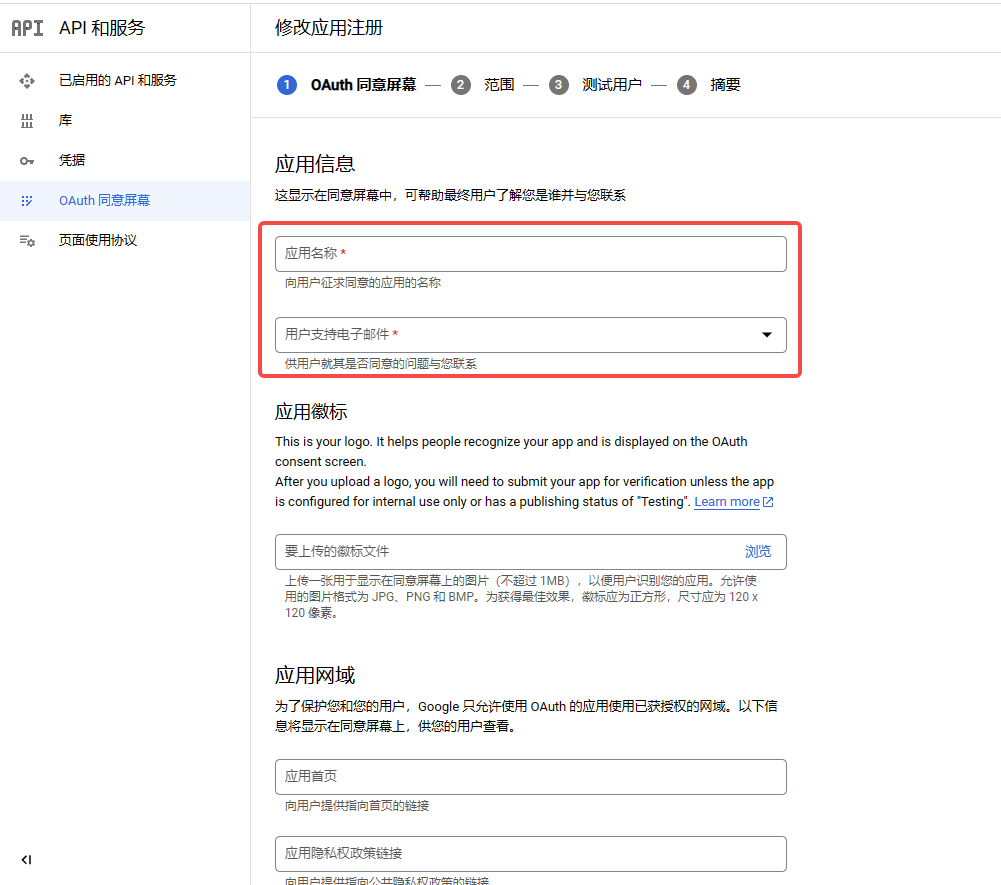
<img src="https://mintcdn.com/bazhuayu-rpa-docs/Fj4gd-n2oOvAPIhl/helpcenter/commands/google/images/xnN98S-10.png?fit=max&auto=format&n=Fj4gd-n2oOvAPIhl&q=85&s=7d1dd0899d712db3e234722ab6b79cb1" alt="谷歌指令模块" width="1001" height="885" data-path="helpcenter/commands/google/images/xnN98S-10.png" />

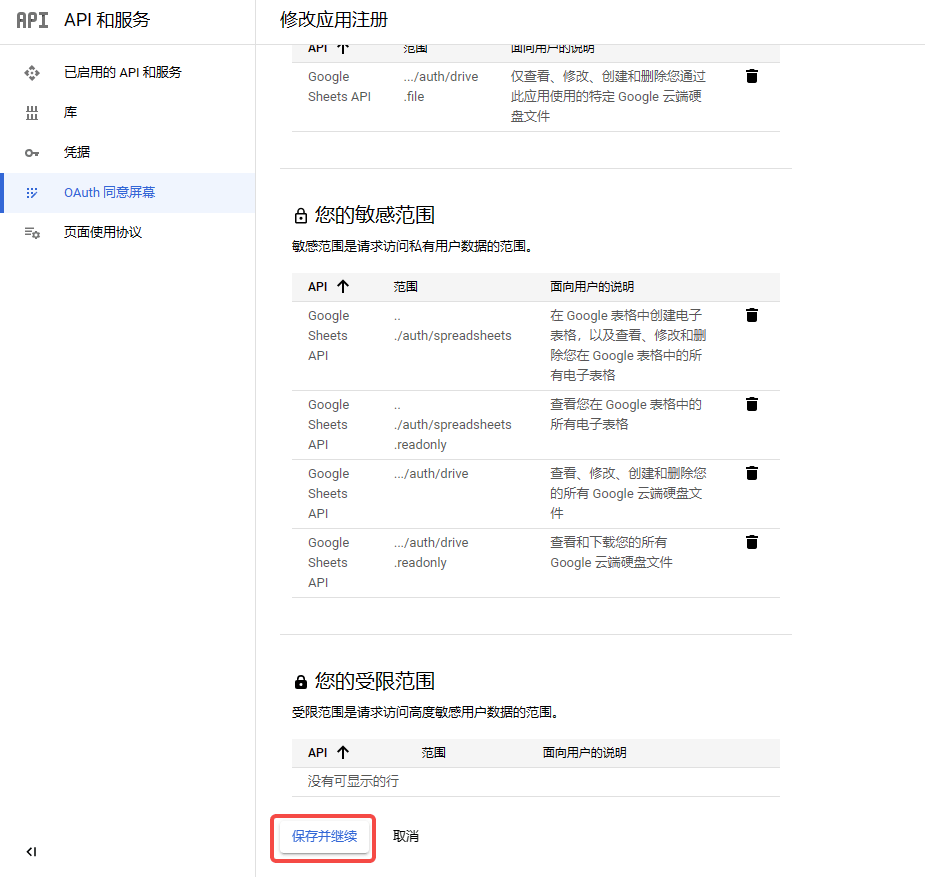
<img src="https://mintcdn.com/bazhuayu-rpa-docs/Fj4gd-n2oOvAPIhl/helpcenter/commands/google/images/xnN98S-11.png?fit=max&auto=format&n=Fj4gd-n2oOvAPIhl&q=85&s=670ea9012085631afd4397a8528f8668" alt="谷歌指令模块" width="925" height="877" data-path="helpcenter/commands/google/images/xnN98S-11.png" />

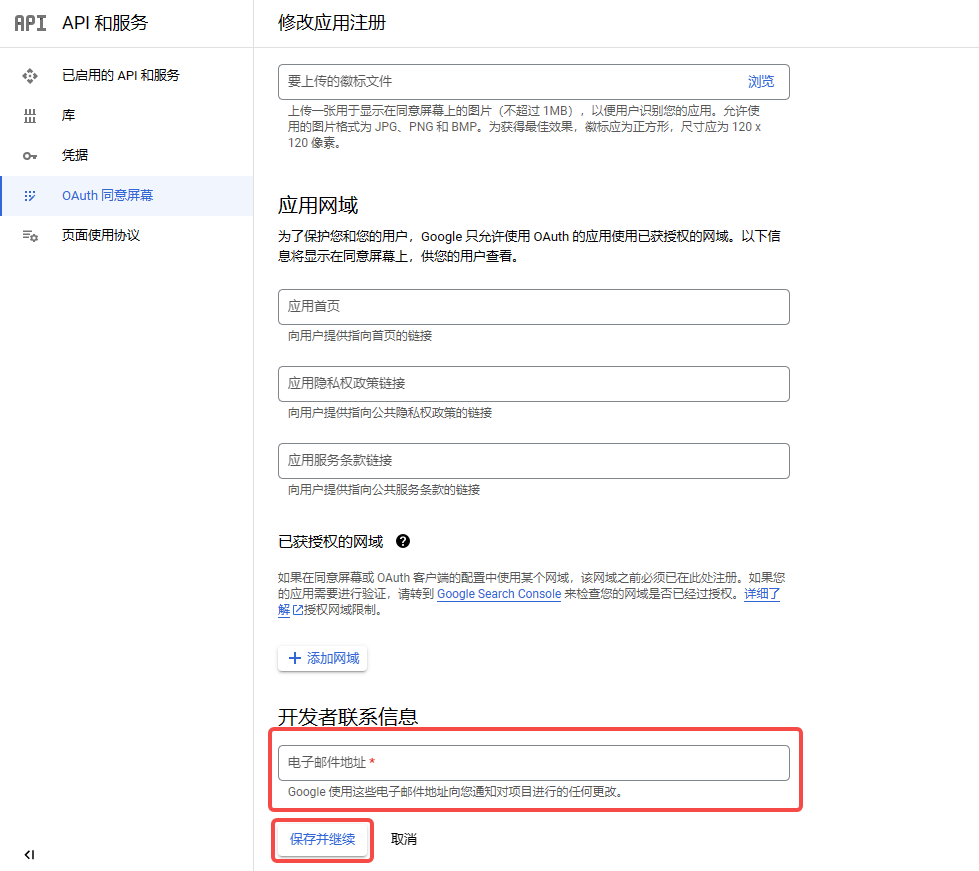
**点击“OAuth同意屏幕”按钮**

<img src="https://mintcdn.com/bazhuayu-rpa-docs/Fj4gd-n2oOvAPIhl/helpcenter/commands/google/images/xnN98S-12.png?fit=max&auto=format&n=Fj4gd-n2oOvAPIhl&q=85&s=7e14468c5ec505627ef16793aa5e0408" alt="谷歌指令模块" width="1863" height="929" data-path="helpcenter/commands/google/images/xnN98S-12.png" />

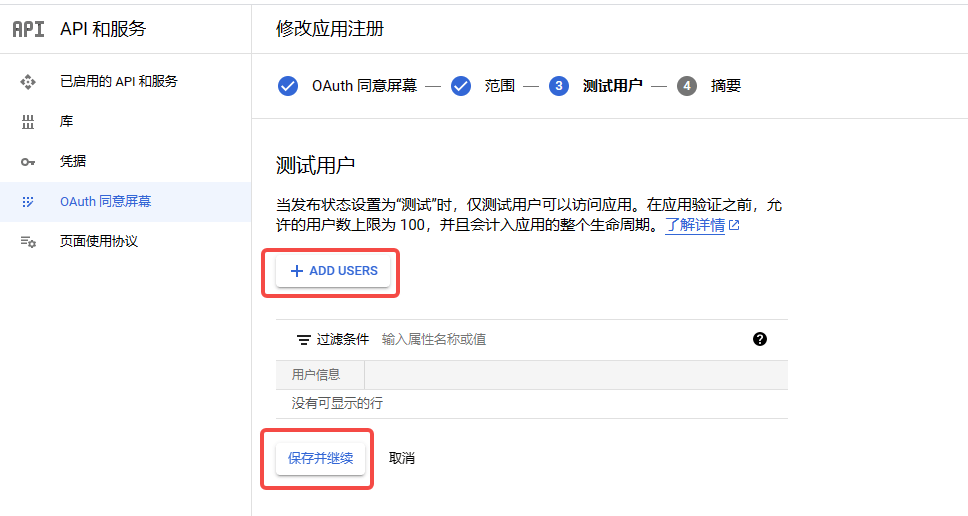
<img src="https://mintcdn.com/bazhuayu-rpa-docs/Fj4gd-n2oOvAPIhl/helpcenter/commands/google/images/xnN98S-13.png?fit=max&auto=format&n=Fj4gd-n2oOvAPIhl&q=85&s=21d1744e4eb2e1e1532c338e31969c4b" alt="谷歌指令模块" width="968" height="516" data-path="helpcenter/commands/google/images/xnN98S-13.png" />

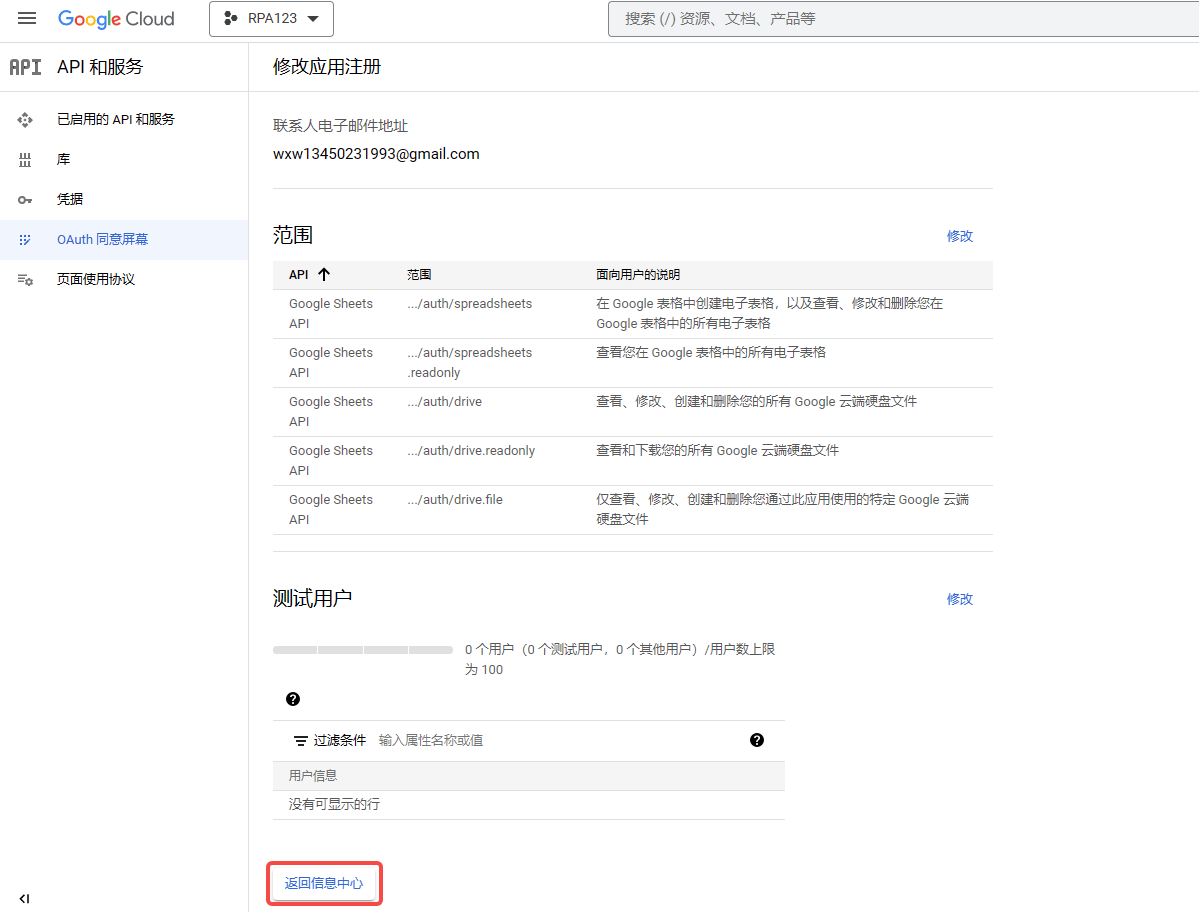
<img src="https://mintcdn.com/bazhuayu-rpa-docs/Fj4gd-n2oOvAPIhl/helpcenter/commands/google/images/xnN98S-14.png?fit=max&auto=format&n=Fj4gd-n2oOvAPIhl&q=85&s=c148a7468dbe8f970d726d3066c6af09" alt="谷歌指令模块" width="1199" height="912" data-path="helpcenter/commands/google/images/xnN98S-14.png" />

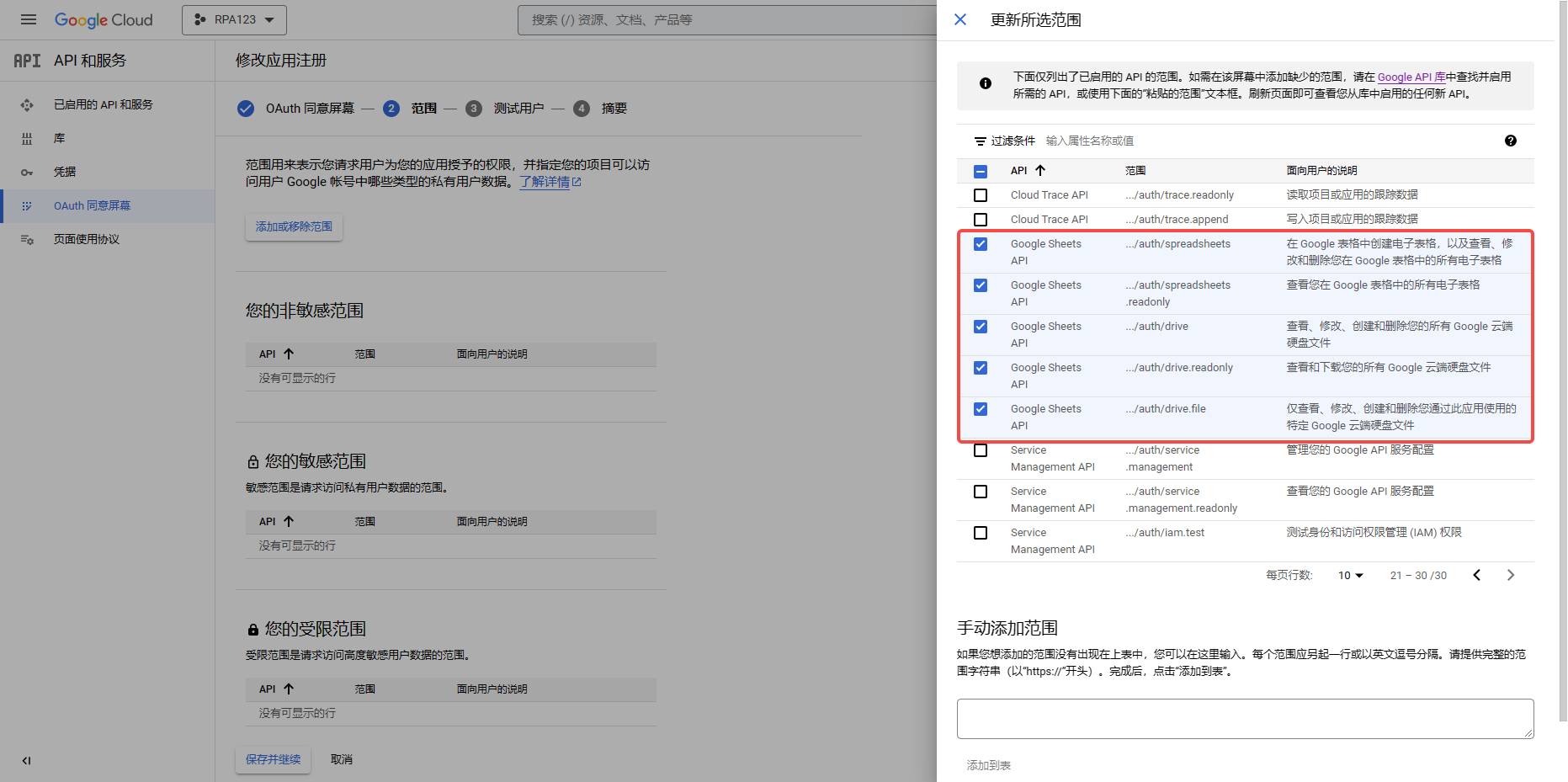
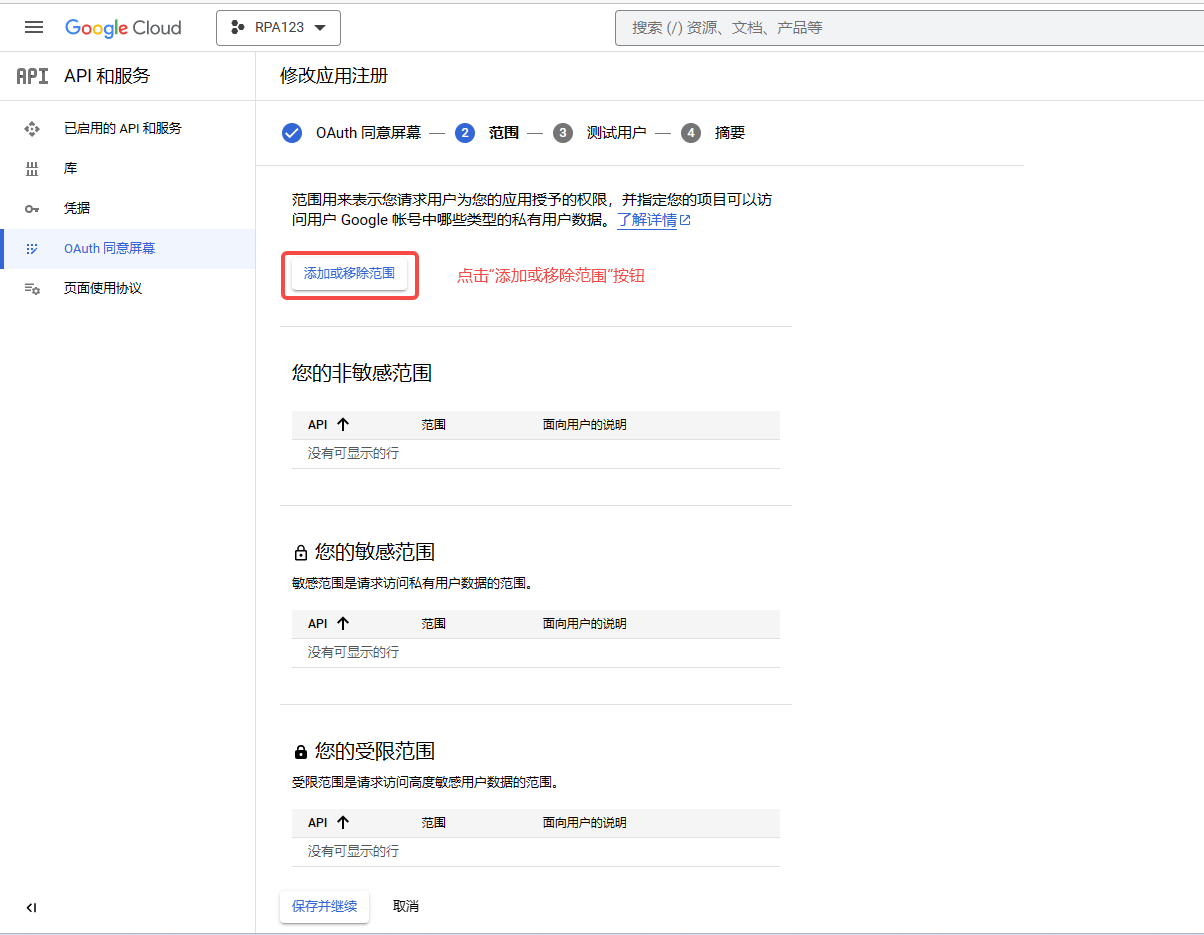
**添加或移除范围(范围用来表示您请求用户为您的应用授予的权限)**
<img src="https://mintcdn.com/bazhuayu-rpa-docs/Fj4gd-n2oOvAPIhl/helpcenter/commands/google/images/xnN98S-15.png?fit=max&auto=format&n=Fj4gd-n2oOvAPIhl&q=85&s=0b134040a4836a36e127bad86bab11d5" alt="谷歌指令模块" width="1320" height="923" data-path="helpcenter/commands/google/images/xnN98S-15.png" />

<img src="https://mintcdn.com/bazhuayu-rpa-docs/Fj4gd-n2oOvAPIhl/helpcenter/commands/google/images/xnN98S-16.png?fit=max&auto=format&n=Fj4gd-n2oOvAPIhl&q=85&s=7cb849010d44da14b12f8f208bf73a28" alt="谷歌指令模块" width="844" height="528" data-path="helpcenter/commands/google/images/xnN98S-16.png" />

<img src="https://mintcdn.com/bazhuayu-rpa-docs/Fj4gd-n2oOvAPIhl/helpcenter/commands/google/images/xnN98S-17.png?fit=max&auto=format&n=Fj4gd-n2oOvAPIhl&q=85&s=498c106451c54eb1b0c982722f5027c6" alt="谷歌指令模块" width="1204" height="935" data-path="helpcenter/commands/google/images/xnN98S-17.png" />

<img src="https://mintcdn.com/bazhuayu-rpa-docs/Fj4gd-n2oOvAPIhl/helpcenter/commands/google/images/xnN98S-18.png?fit=max&auto=format&n=Fj4gd-n2oOvAPIhl&q=85&s=2a9413dfa0c1c7dee7304c9022e0fc16" alt="谷歌指令模块" width="929" height="488" data-path="helpcenter/commands/google/images/xnN98S-18.png" />

<img src="https://mintcdn.com/bazhuayu-rpa-docs/Fj4gd-n2oOvAPIhl/helpcenter/commands/google/images/xnN98S-19.png?fit=max&auto=format&n=Fj4gd-n2oOvAPIhl&q=85&s=17a240a87c7ea9953a39fe2a19f08409" alt="谷歌指令模块" width="900" height="468" data-path="helpcenter/commands/google/images/xnN98S-19.png" />

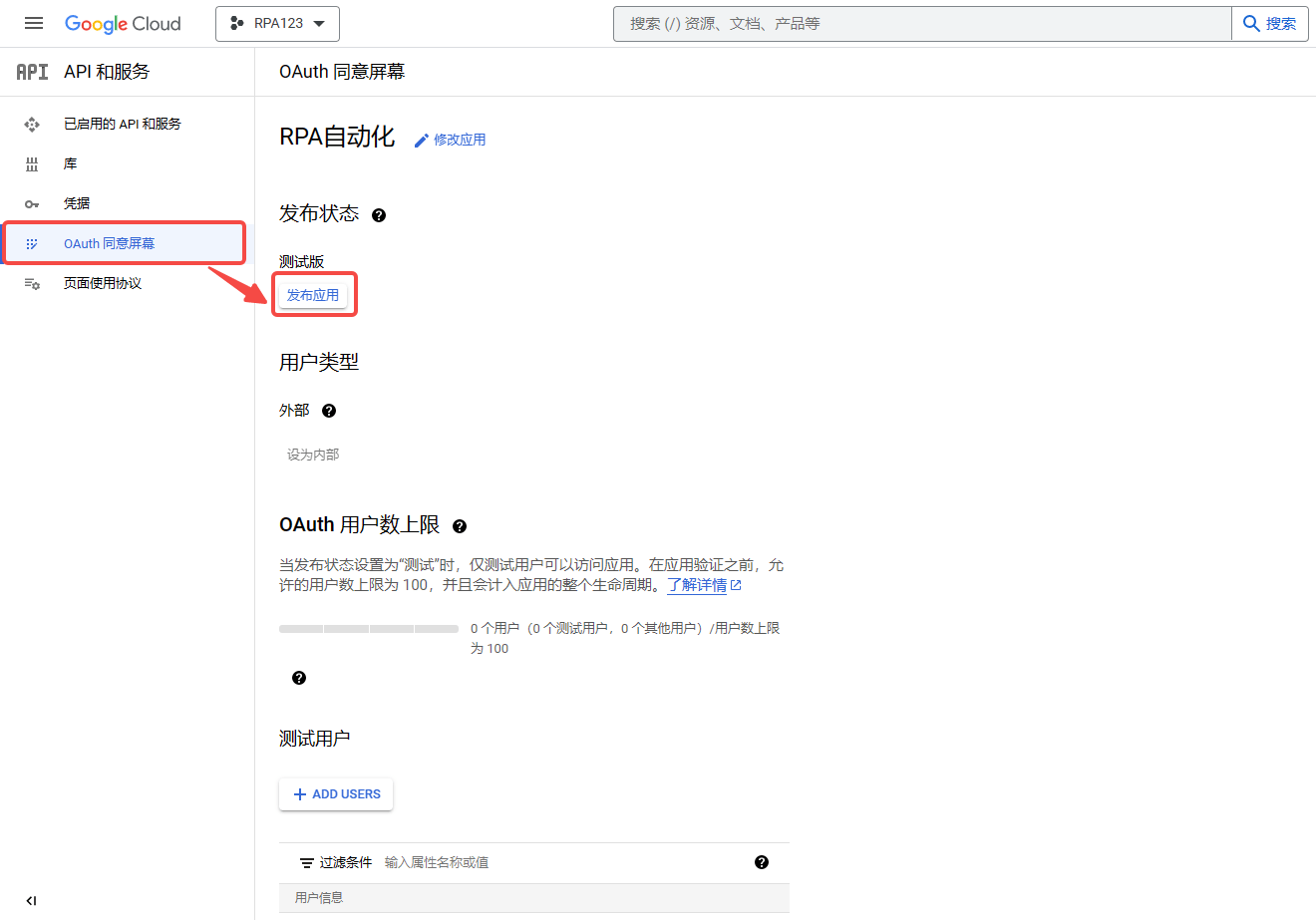
**如您没有添加测试用户，在应用信息修改完成后，需要先发布应用，可点击”OAuth同意屏幕“模块按钮，点击”发布应用“按钮，应用发布成功。**

<img src="https://mintcdn.com/bazhuayu-rpa-docs/Fj4gd-n2oOvAPIhl/helpcenter/commands/google/images/xnN98S-20.png?fit=max&auto=format&n=Fj4gd-n2oOvAPIhl&q=85&s=96d7cafd0172ebea55bf5e1b2c525d96" alt="谷歌指令模块" width="500" height="516" data-path="helpcenter/commands/google/images/xnN98S-20.png" />

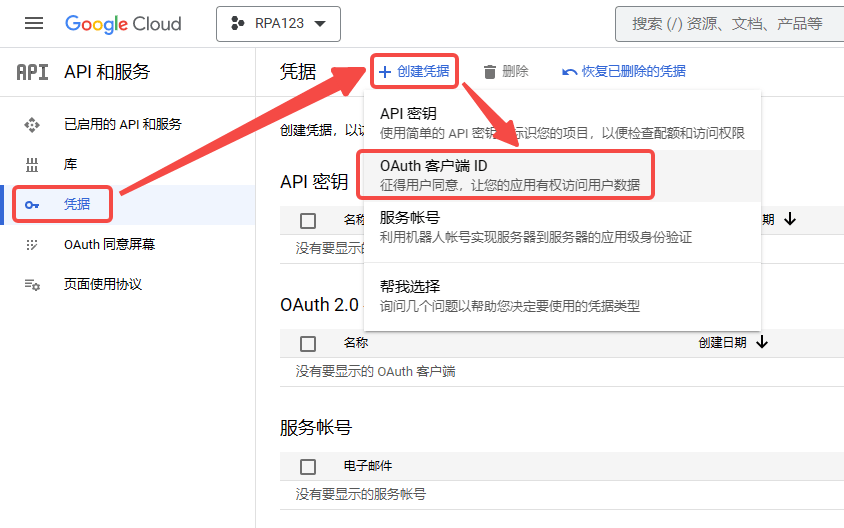
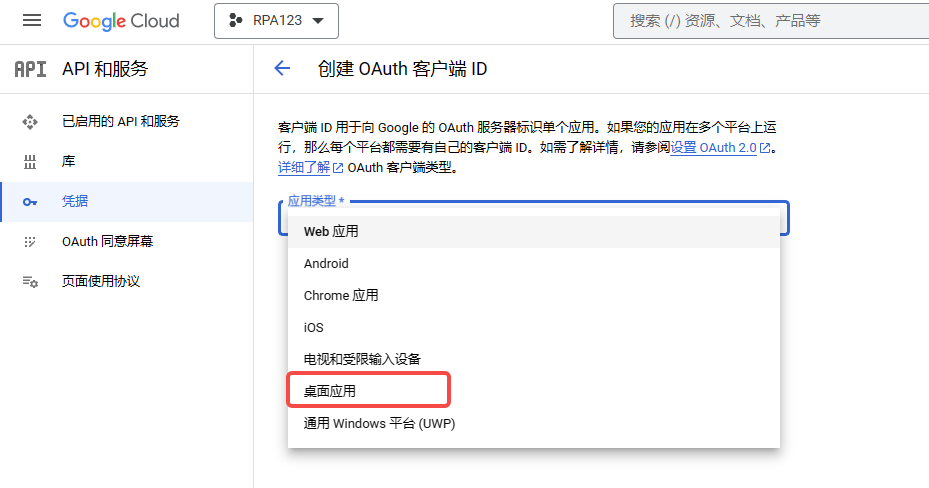
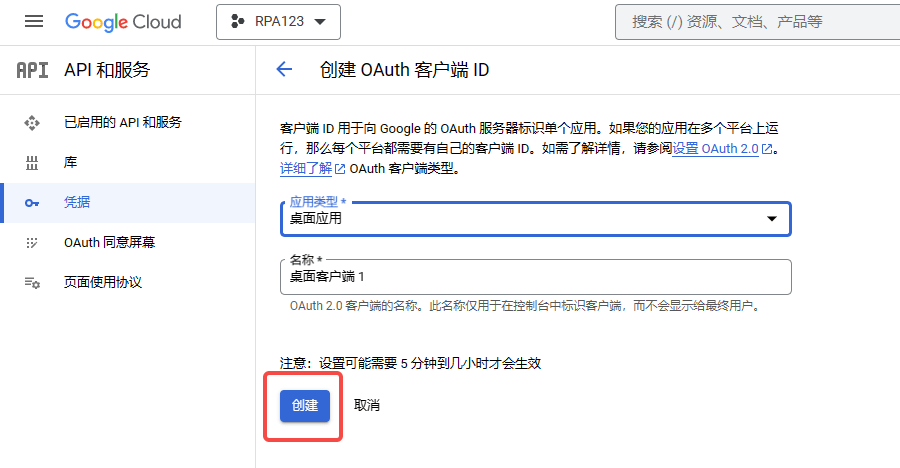
**创建客户端ID和密钥：点击”凭据“模块按钮，再点击”创建凭据“按钮，创建客户端凭证**

<img src="https://mintcdn.com/bazhuayu-rpa-docs/Fj4gd-n2oOvAPIhl/helpcenter/commands/google/images/xnN98S-21.png?fit=max&auto=format&n=Fj4gd-n2oOvAPIhl&q=85&s=3dc5674b43493534ae0c8b6c3ed4c1fc" alt="谷歌指令模块" width="1010" height="693" data-path="helpcenter/commands/google/images/xnN98S-21.png" />

<img src="https://mintcdn.com/bazhuayu-rpa-docs/vz87YmU8RN3LdaSE/helpcenter/commands/google/images/xnN98S-22.png?fit=max&auto=format&n=vz87YmU8RN3LdaSE&q=85&s=47f12fc54c55d8c89a4240550ce7f115" alt="谷歌指令模块" width="978" height="704" data-path="helpcenter/commands/google/images/xnN98S-22.png" />

<img src="https://mintcdn.com/bazhuayu-rpa-docs/vz87YmU8RN3LdaSE/helpcenter/commands/google/images/xnN98S-23.png?fit=max&auto=format&n=vz87YmU8RN3LdaSE&q=85&s=b4739cccaad0b90e80d0b417fd750154" alt="谷歌指令模块" width="1863" height="648" data-path="helpcenter/commands/google/images/xnN98S-23.png" />

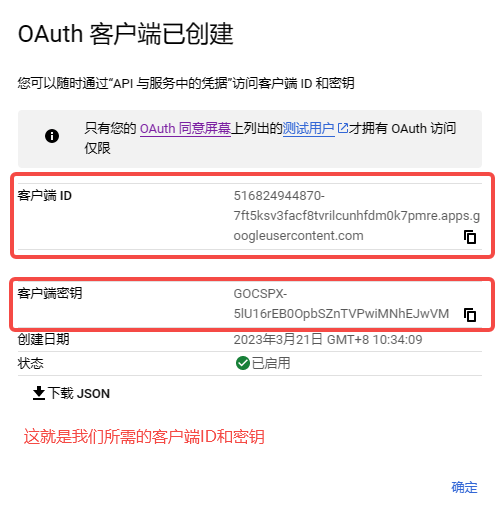
**完成凭据创建后，弹出客户端信息弹窗**

<img src="https://mintcdn.com/bazhuayu-rpa-docs/vz87YmU8RN3LdaSE/helpcenter/commands/google/images/xnN98S-24.png?fit=max&auto=format&n=vz87YmU8RN3LdaSE&q=85&s=8627974201b3395443de4f97421092b0" alt="谷歌指令模块" width="1863" height="478" data-path="helpcenter/commands/google/images/xnN98S-24.png" />

### 2. 使用“获取谷歌表格“指令，获取要操作的谷歌表格

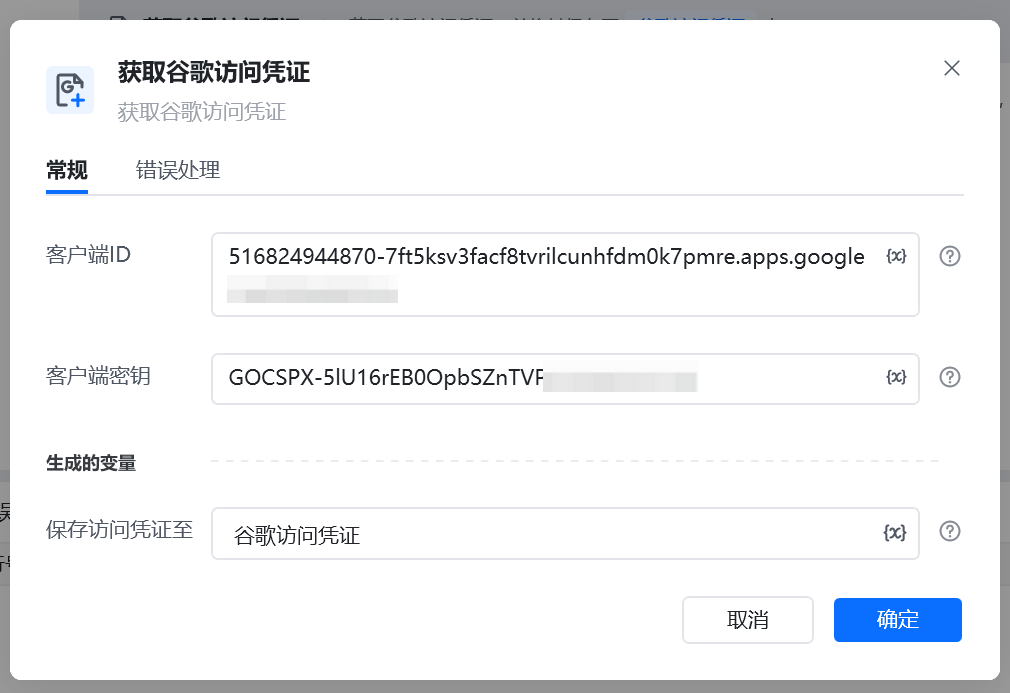
**填写客户端ID和客户端密钥，保存谷歌访问凭证**

<img src="https://mintcdn.com/bazhuayu-rpa-docs/vz87YmU8RN3LdaSE/helpcenter/commands/google/images/xnN98S-25.png?fit=max&auto=format&n=vz87YmU8RN3LdaSE&q=85&s=bf3548a93fc2ea19acb759a0508c9881" alt="谷歌指令模块" width="1867" height="1005" data-path="helpcenter/commands/google/images/xnN98S-25.png" />

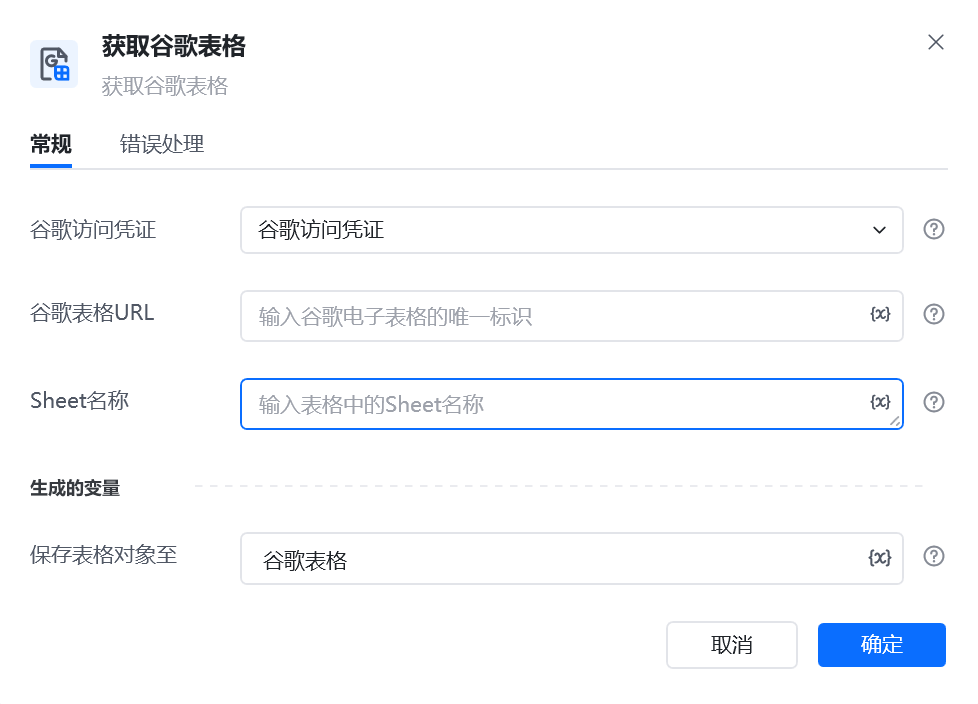
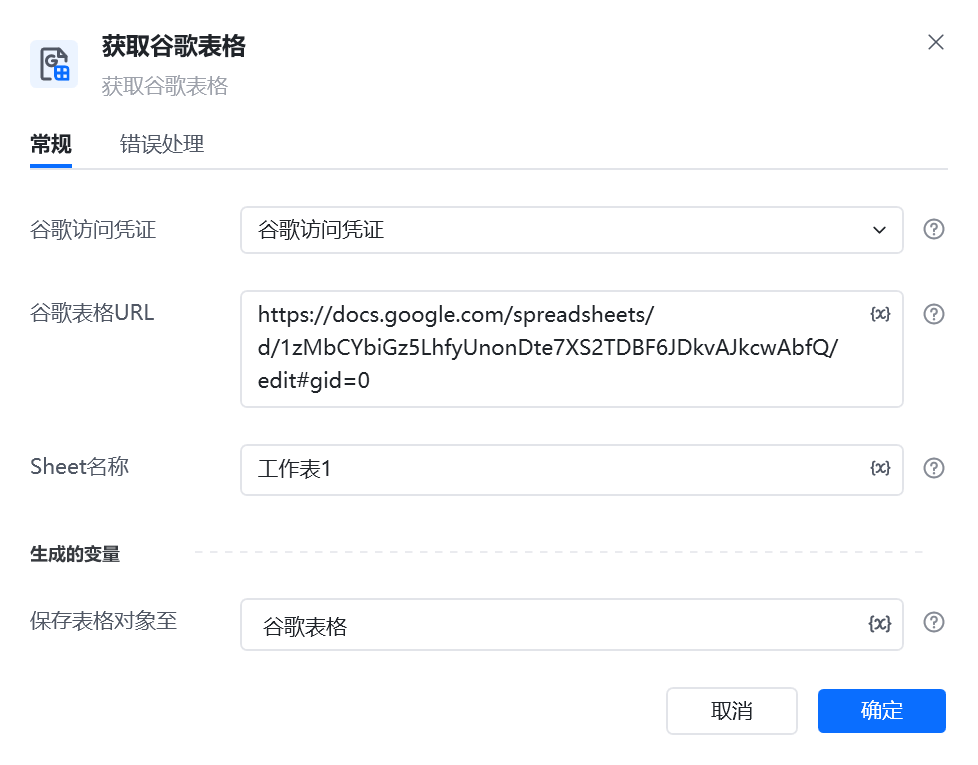
**获取谷歌表格需要填写谷歌表格URL和Sheet名称，并保存谷歌表格对象**

<img src="https://mintcdn.com/bazhuayu-rpa-docs/vz87YmU8RN3LdaSE/helpcenter/commands/google/images/xnN98S-26.png?fit=max&auto=format&n=vz87YmU8RN3LdaSE&q=85&s=2ed94e2ec35d718a22abdb639532e80b" alt="谷歌指令模块" width="978" height="765" data-path="helpcenter/commands/google/images/xnN98S-26.png" />

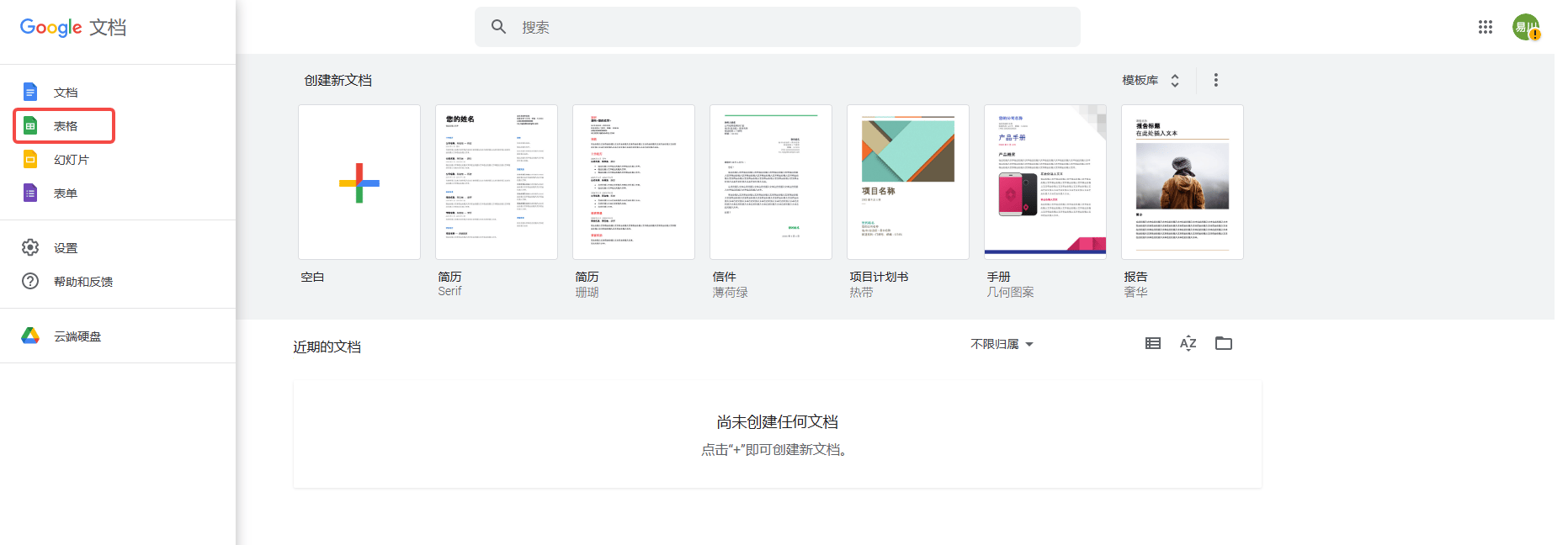
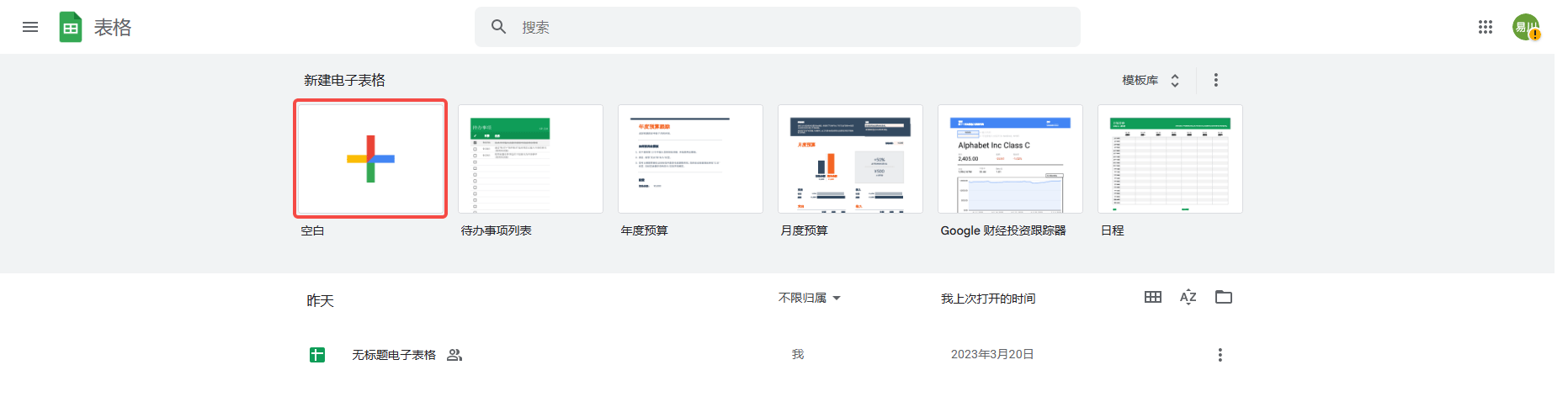
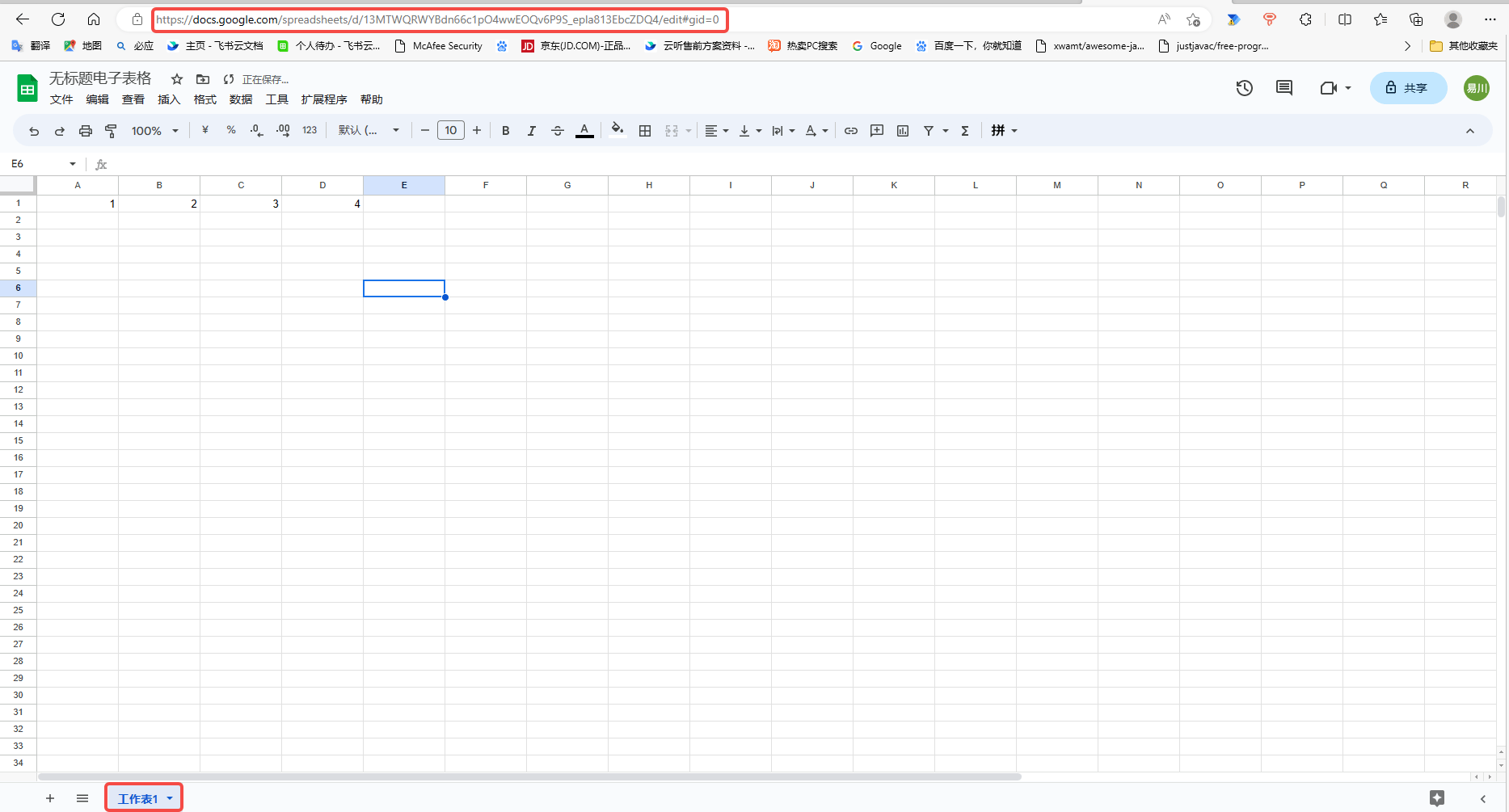
**获取谷歌表格URL和Sheet名称：**

<img src="https://mintcdn.com/bazhuayu-rpa-docs/vz87YmU8RN3LdaSE/helpcenter/commands/google/images/xnN98S-27.png?fit=max&auto=format&n=vz87YmU8RN3LdaSE&q=85&s=ae40ee88cfd43cc81507bd3199b1fb5d" alt="谷歌指令模块" width="417" height="504" data-path="helpcenter/commands/google/images/xnN98S-27.png" />

<img src="https://mintcdn.com/bazhuayu-rpa-docs/vz87YmU8RN3LdaSE/helpcenter/commands/google/images/xnN98S-28.png?fit=max&auto=format&n=vz87YmU8RN3LdaSE&q=85&s=c4d546882e2c3266d0981c0fe6183498" alt="谷歌指令模块" width="1439" height="368" data-path="helpcenter/commands/google/images/xnN98S-28.png" />

<img src="https://mintcdn.com/bazhuayu-rpa-docs/vz87YmU8RN3LdaSE/helpcenter/commands/google/images/xnN98S-29.png?fit=max&auto=format&n=vz87YmU8RN3LdaSE&q=85&s=0477a8249324bee5c3d8b84bc0aa7c66" alt="谷歌指令模块" width="413" height="649" data-path="helpcenter/commands/google/images/xnN98S-29.png" />

<img src="https://mintcdn.com/bazhuayu-rpa-docs/vz87YmU8RN3LdaSE/helpcenter/commands/google/images/xnN98S-30.png?fit=max&auto=format&n=vz87YmU8RN3LdaSE&q=85&s=b20fab58f899c9105c76ee78448cb31f" alt="谷歌指令模块" width="709" height="538" data-path="helpcenter/commands/google/images/xnN98S-30.png" />

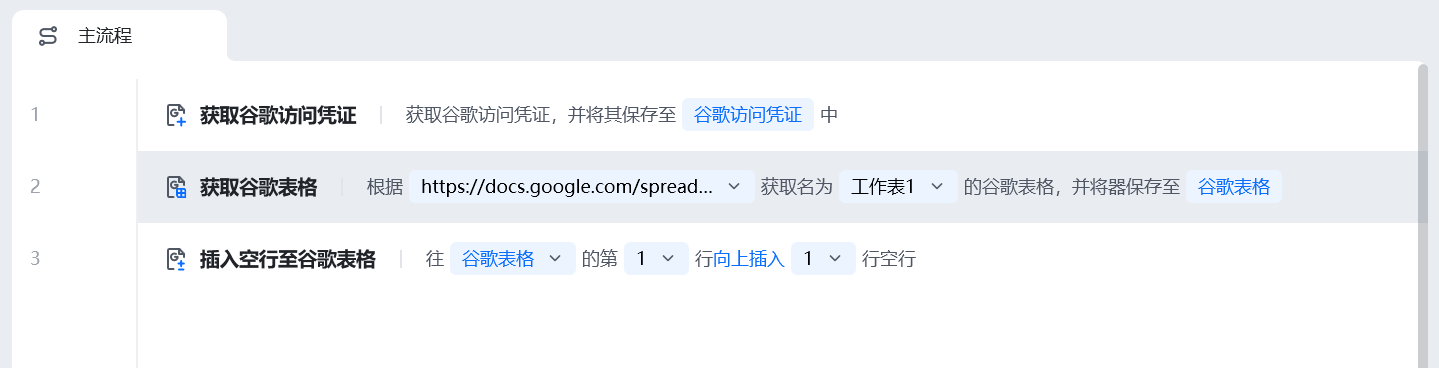
### 3.进行谷歌表格自动化操作，[第一次运行时谷歌表格需手动进行一次身份验证](https://docs.google.com/spreadsheets/d/1nejxjgq4Wz0oBiYW2KxFC50NmEeGleKaxCPwAflyw1c/edit#gid=0)
<img src="https://mintcdn.com/bazhuayu-rpa-docs/vz87YmU8RN3LdaSE/helpcenter/commands/google/images/xnN98S-31.png?fit=max&auto=format&n=vz87YmU8RN3LdaSE&q=85&s=505e7c67e5e62613a0e465710b9fe3ec" alt="谷歌指令模块" width="281" height="1068" data-path="helpcenter/commands/google/images/xnN98S-31.png" />

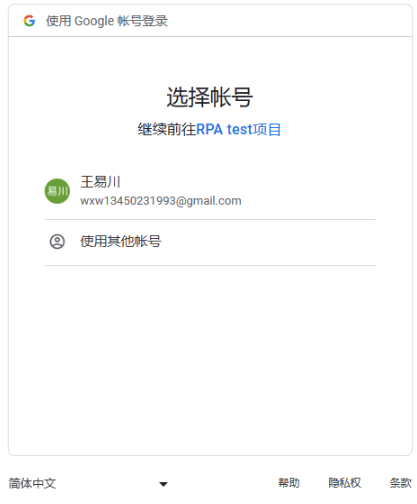
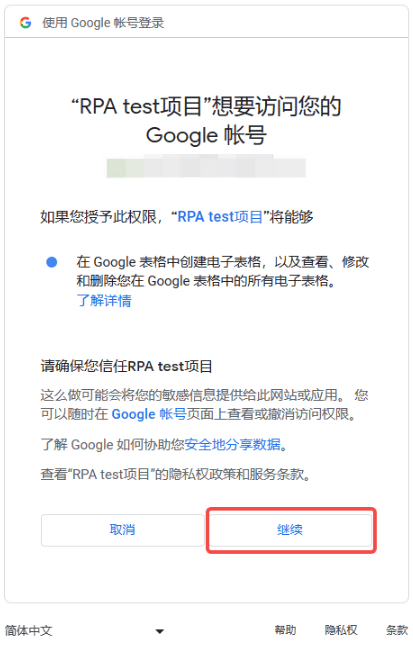
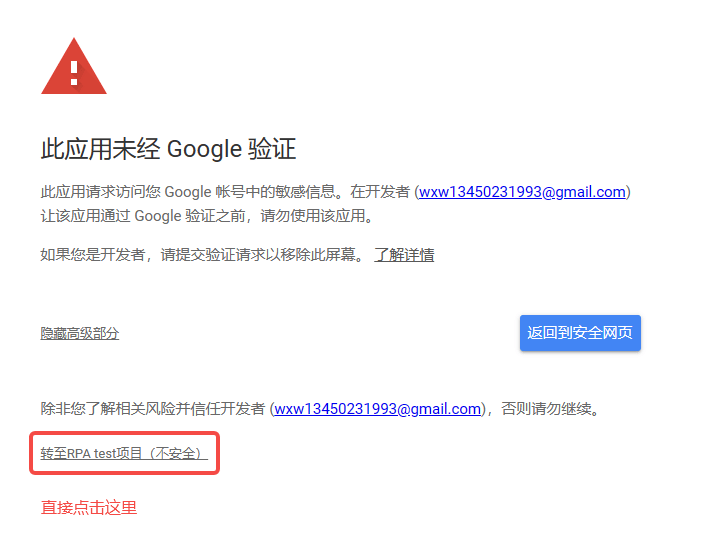
**第一次获取谷歌访问凭证需手动进行一次身份验证**

<img src="https://mintcdn.com/bazhuayu-rpa-docs/vz87YmU8RN3LdaSE/helpcenter/commands/google/images/xnN98S-32.png?fit=max&auto=format&n=vz87YmU8RN3LdaSE&q=85&s=e7f11c80c350df6ed8734067cfd2db3e" alt="谷歌指令模块" width="652" height="405" data-path="helpcenter/commands/google/images/xnN98S-32.png" />

<img src="https://mintcdn.com/bazhuayu-rpa-docs/vz87YmU8RN3LdaSE/helpcenter/commands/google/images/xnN98S-33.png?fit=max&auto=format&n=vz87YmU8RN3LdaSE&q=85&s=bb915cb089ccfd1fa3a6a487f02bdb43" alt="谷歌指令模块" width="1898" height="875" data-path="helpcenter/commands/google/images/xnN98S-33.png" />

<img src="https://mintcdn.com/bazhuayu-rpa-docs/vz87YmU8RN3LdaSE/helpcenter/commands/google/images/xnN98S-34.png?fit=max&auto=format&n=vz87YmU8RN3LdaSE&q=85&s=30dbfbb114daf50727043388e52ec939" alt="谷歌指令模块" width="1483" height="907" data-path="helpcenter/commands/google/images/xnN98S-34.png" />

**完成身份验证后，即可继续运行流程。**

<Info>
  使用过程中遇到问题？前往 [八爪鱼RPA 开发者社区问答板块](https://rpa.bazhuayu.com/community/questions) 提问，获取官方与社区帮助。
</Info>