> ## Documentation Index
> Fetch the complete documentation index at: https://rpa.bazhuayu.com/helpcenter/llms.txt
> Use this file to discover all available pages before exploring further.
# 钉钉群通知
## 指令说明
**描述:** 通过钉钉群机器人 Webhook 向指定群聊发送通知,用于流程结果、异常和进度提醒。
## 参数说明
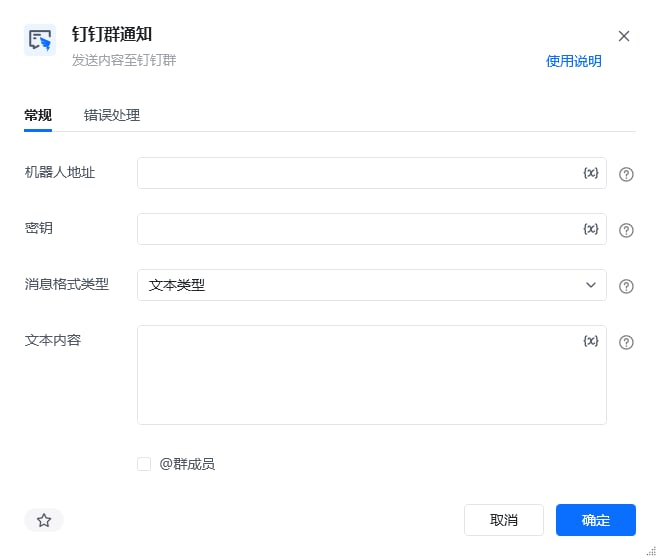 | 参数 | 说明 |
| ---------- | ------------------------------------------------------------------------------------------------------------------------------------------------------------------------------------------------------------------- |
| **机器人地址** | 机器人的网络地址,即webhook,机器人设置可查看教程:微信、飞书、钉钉群通知模块的使用 |
| **密钥** | 机器人安全设置页面,加签一栏下面显示的SEC开头的字符串 |
| **消息格式类型** | 单选项,选项含:文本类型/markdown类型/图文类型。 文本类型:仅发送纯文本消息,支持@全体群成员或某个群成员(通过输入成员手机号来实现@某个成员)、 markdown类型:输入markdown类型文本、 图文类型:输入消息标题,要求不超过128个字节,超过会自动截断;输入消息描述,要求不超过512个字节,超过会自动截断,非必填项;输入跳转链接,即被点击后所要跳转的内容链接;输入图文链接,支持JPG、PNG格式。 |
本指令暂无高级参数。
## 使用示例
| 参数 | 说明 |
| ---------- | ------------------------------------------------------------------------------------------------------------------------------------------------------------------------------------------------------------------- |
| **机器人地址** | 机器人的网络地址,即webhook,机器人设置可查看教程:微信、飞书、钉钉群通知模块的使用 |
| **密钥** | 机器人安全设置页面,加签一栏下面显示的SEC开头的字符串 |
| **消息格式类型** | 单选项,选项含:文本类型/markdown类型/图文类型。 文本类型:仅发送纯文本消息,支持@全体群成员或某个群成员(通过输入成员手机号来实现@某个成员)、 markdown类型:输入markdown类型文本、 图文类型:输入消息标题,要求不超过128个字节,超过会自动截断;输入消息描述,要求不超过512个字节,超过会自动截断,非必填项;输入跳转链接,即被点击后所要跳转的内容链接;输入图文链接,支持JPG、PNG格式。 |
本指令暂无高级参数。
## 使用示例
 **该流程执行逻辑:**
1. 在【钉钉群通知】中选择或填写目标钉钉群的机器人授权信息。
2. 配置需要发送的消息内容并运行指令。
3. 指令调用群机器人接口,将消息发送到指定钉钉群;可在群聊中确认通知是否成功到达。
### 效果展示
**该流程执行逻辑:**
1. 在【钉钉群通知】中选择或填写目标钉钉群的机器人授权信息。
2. 配置需要发送的消息内容并运行指令。
3. 指令调用群机器人接口,将消息发送到指定钉钉群;可在群聊中确认通知是否成功到达。
### 效果展示
 使用指令过程中遇到问题?前往 [八爪鱼RPA 开发者社区问答板块](https://rpa.bazhuayu.com/community/questions) 提问,获取官方与社区帮助。