> ## Documentation Index
> Fetch the complete documentation index at: https://rpa.bazhuayu.com/helpcenter/llms.txt
> Use this file to discover all available pages before exploring further.

# 企业微信群通知

## 指令说明

**描述：** 通过企业微信群机器人 Webhook 向指定群聊发送通知，用于流程结果、异常和进度提醒。

## 参数说明

<Tabs>
  <Tab title="常规">
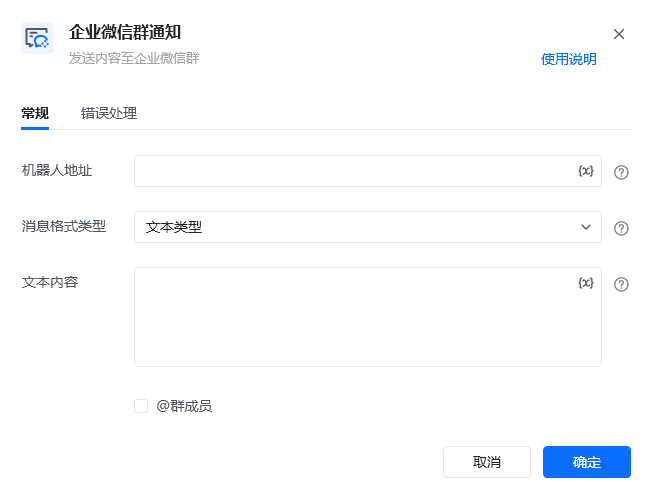
    <img src="https://mintcdn.com/bazhuayu-rpa-docs/vz87YmU8RN3LdaSE/helpcenter/commands/group-notification/images/notifywechatworkgroupcommand-01.png?fit=max&auto=format&n=vz87YmU8RN3LdaSE&q=85&s=c69297d8ab6c9891051c44ef63662345" alt="企业微信群通知指令参数面板" width="649" height="495" data-path="helpcenter/commands/group-notification/images/notifywechatworkgroupcommand-01.png" />

    | 参数         | 说明                                                                                                                                                                                                                                                                                    |
    | ---------- | ------------------------------------------------------------------------------------------------------------------------------------------------------------------------------------------------------------------------------------------------------------------------------------- |
    | **机器人地址**  | 机器人的网络地址，即webhook，机器人设置可查看教程：微信、飞书、钉钉群通知模块的使用                                                                                                                                                                                                                                         |
    | **信息格式类型** | 文本类型/markdown类型/文件类型/图片类型/图文类型<br /><br />文本类型：仅发送纯文本消息，支持@全体群成员或某个群成员、<br /><br />markdown类型：输入markdown类型文本、<br /><br />图片类型：选择要发送的图片，要求图片最大不能超过2M，支持JPG,PNG格式、<br /><br />图文类型：输入消息标题，要求不超过128个字节，超过会自动截断；输入消息描述，要求不超过512个字节，超过会自动截断，非必填项；输入跳转链接，即被点击后所要跳转的内容链接；输入图文链接，支持JPG、PNG格式。 |
    | **内容**     | 消息发送的内容，参考「信息格式类型」                                                                                                                                                                                                                                                                    |
    | **@群成员**   | 事后需要@群成员（支持全体成员/群内某成员）                                                                                                                                                                                                                                                                |
    | **@某人**    | 需填写@成员所绑定的手机号码。多个成员时可是使用";”间隔。                                                                                                                                                                                                                                                        |
  </Tab>

  <Tab title="高级">
    本指令暂无高级参数。
  </Tab>
</Tabs>

## 使用示例

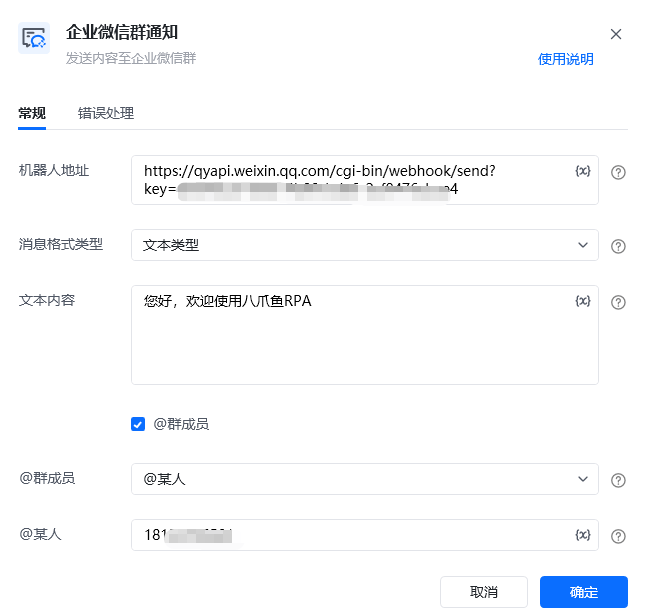
<img src="https://mintcdn.com/bazhuayu-rpa-docs/vz87YmU8RN3LdaSE/helpcenter/commands/group-notification/images/notifywechatworkgroupcommand-03.png?fit=max&auto=format&n=vz87YmU8RN3LdaSE&q=85&s=17e09976cbd1bfe426aaa62c875c64c2" alt="企业微信群通知使用示例" width="646" height="610" data-path="helpcenter/commands/group-notification/images/notifywechatworkgroupcommand-03.png" />

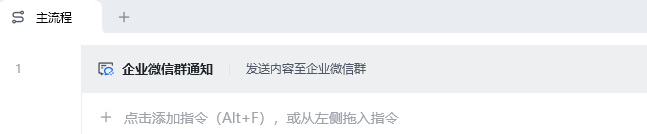
<img src="https://mintcdn.com/bazhuayu-rpa-docs/vz87YmU8RN3LdaSE/helpcenter/commands/group-notification/images/notifywechatworkgroupcommand-02.png?fit=max&auto=format&n=vz87YmU8RN3LdaSE&q=85&s=df8f7fffdf111be08445479e8daff7f4" alt="企业微信群通知使用示例 - 流程搭建" width="647" height="134" data-path="helpcenter/commands/group-notification/images/notifywechatworkgroupcommand-02.png" />

**该流程执行逻辑：**

本例演示【企业微信群通知】指令的配置与执行：

1. 填写企业微信群机器人的地址，并设置消息格式和通知内容。
2. 按需要设置要提醒的群成员或指定成员，将消息发送到对应群聊。

### 效果展示

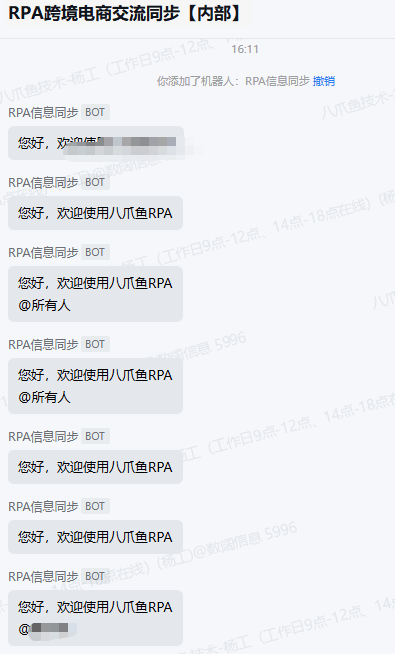
<img src="https://mintcdn.com/bazhuayu-rpa-docs/vz87YmU8RN3LdaSE/helpcenter/commands/group-notification/images/notifywechatworkgroupcommand-04.png?fit=max&auto=format&n=vz87YmU8RN3LdaSE&q=85&s=a0080dab3459df1ec94b8ba3b36db194" alt="企业微信群通知使用示例 - 效果展示" width="395" height="654" data-path="helpcenter/commands/group-notification/images/notifywechatworkgroupcommand-04.png" />

<Info>
  使用指令过程中遇到问题？前往 [八爪鱼RPA 开发者社区问答板块](https://rpa.bazhuayu.com/community/questions) 提问，获取官方与社区帮助。
</Info>