> ## Documentation Index
> Fetch the complete documentation index at: https://rpa.bazhuayu.com/helpcenter/llms.txt
> Use this file to discover all available pages before exploring further.
# 键盘输入
## 指令说明
**描述:** 给当前激活的窗口发送文本。
## 参数说明
 | 参数 | 说明 |
| --------- | ----------------------------------------------------------------------------------------------------------------------------- |
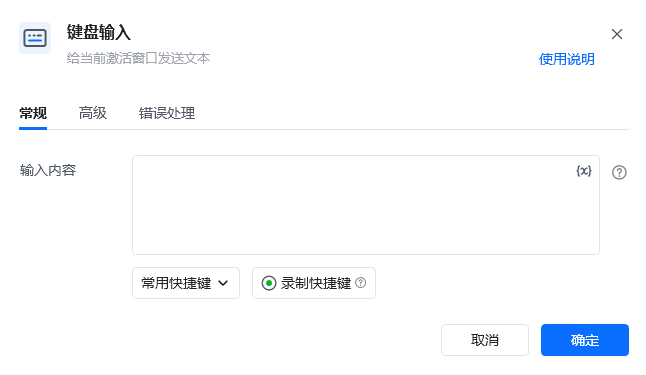
| **输入内容** | 要发送到应用程序的文本。要模拟正在按下的物理键,请使用大括号 `{}`,例如要模拟按下 Enter,请使用 `{Enter}`。要使用组合物理按键,请对两个键都使用大括号 `{}`,例如要按 Ctrl + A,请使用 `{Control}({A})` |
| **常用快捷键** | 使用频率高的快捷键可自选,单击想选中的快捷键组合即可。目前有:Ctrl+C、Ctrl+V、Ctrl+X、Ctrl+Z、Ctrl+S、Ctrl+A、Enter、Windows+D |
| **录制快捷键** | 按下此按钮后,您可以通过按下键盘上的按键自动生成快捷键。注:与 Windows 相关且会造成息屏的组合键可能无法录制成功,此时可手动输入 `{Window}`,输入后再去添加 `({})` 生成目标组合键 |
| 参数 | 说明 |
| -------------- | ----------------- |
| **按键输入间隔(ms)** | 两次按键输入的间隔时间,单位为毫秒 |
| **执行后延迟(s)** | 指令执行完成后的等待时间,单位为秒 |
## 使用示例
| 参数 | 说明 |
| --------- | ----------------------------------------------------------------------------------------------------------------------------- |
| **输入内容** | 要发送到应用程序的文本。要模拟正在按下的物理键,请使用大括号 `{}`,例如要模拟按下 Enter,请使用 `{Enter}`。要使用组合物理按键,请对两个键都使用大括号 `{}`,例如要按 Ctrl + A,请使用 `{Control}({A})` |
| **常用快捷键** | 使用频率高的快捷键可自选,单击想选中的快捷键组合即可。目前有:Ctrl+C、Ctrl+V、Ctrl+X、Ctrl+Z、Ctrl+S、Ctrl+A、Enter、Windows+D |
| **录制快捷键** | 按下此按钮后,您可以通过按下键盘上的按键自动生成快捷键。注:与 Windows 相关且会造成息屏的组合键可能无法录制成功,此时可手动输入 `{Window}`,输入后再去添加 `({})` 生成目标组合键 |
| 参数 | 说明 |
| -------------- | ----------------- |
| **按键输入间隔(ms)** | 两次按键输入的间隔时间,单位为毫秒 |
| **执行后延迟(s)** | 指令执行完成后的等待时间,单位为秒 |
## 使用示例
 **该流程执行逻辑:**
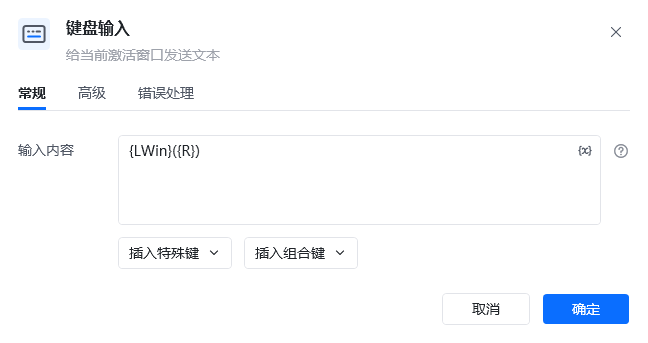
1. 执行【键盘输入】,将按键内容设置为 `{LWin}({R})`,模拟按下 Windows 键与 `R` 键。
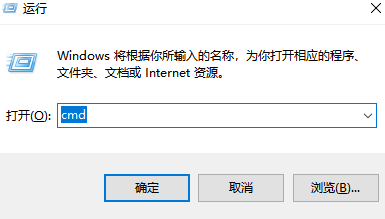
2. 系统接收到组合键后打开“运行”窗口。
3. 后续流程可继续使用【键盘输入】填写程序名称或命令并执行。
### 效果展示
**该流程执行逻辑:**
1. 执行【键盘输入】,将按键内容设置为 `{LWin}({R})`,模拟按下 Windows 键与 `R` 键。
2. 系统接收到组合键后打开“运行”窗口。
3. 后续流程可继续使用【键盘输入】填写程序名称或命令并执行。
### 效果展示
 使用指令过程中遇到问题?前往 [八爪鱼RPA 开发者社区问答板块](https://rpa.bazhuayu.com/community/questions) 提问,获取官方与社区帮助。