> ## Documentation Index
> Fetch the complete documentation index at: https://rpa.bazhuayu.com/helpcenter/llms.txt
> Use this file to discover all available pages before exploring further.
# 鼠标点击
## 指令说明
**描述:** 可进行鼠标按下、弹起、单击、双击、右键点击等动作。
## 参数说明
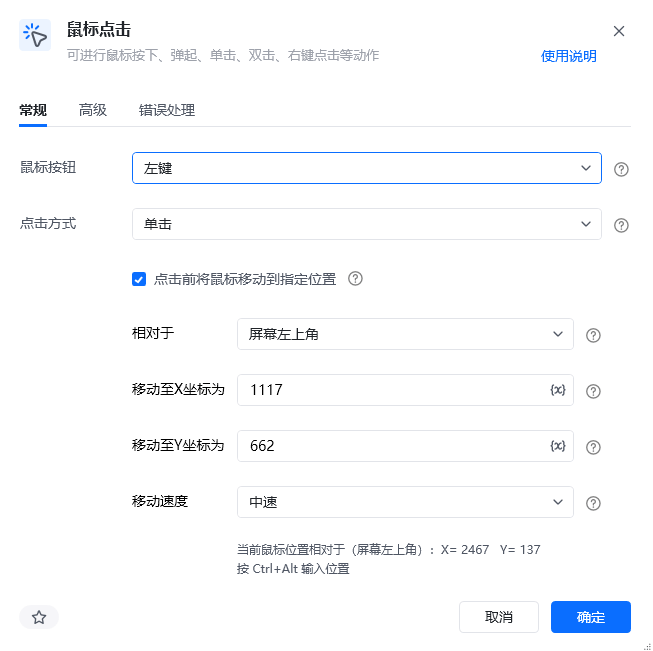 | 参数 | 说明 |
| ----------------- | ------------------------------------------------------------------ |
| **鼠标按钮** | 选择鼠标按钮,可选:左键、中键、右键 |
| **点击方式** | 选择点击方式,可选:单击、双击、弹起、按下 |
| **点击前将鼠标移动到指定位置** | 点击前是否将鼠标移动到指定位置,勾选后需设置目标坐标 |
| **相对于** | 选择新鼠标位置相对于屏幕左上角、激活窗口左上角或运行过程中鼠标当前位置。支持三种模式:屏幕左上角、激活窗口左上角、运行中当前鼠标位置 |
| **移动至X坐标为** | 输入移动至X轴坐标(按 Ctrl+Alt 自动填充鼠标位置) |
| **移动至Y坐标为** | 输入移动至Y轴坐标(按 Ctrl+Alt 自动填充鼠标位置) |
| **移动速度** | 选择鼠标移动速度,可选:瞬间、快速、中速、慢速 |
| 参数 | 说明 |
| ------------ | -------------------------------------- |
| **键盘辅助按钮** | 在点击时需要按下的键盘功能键,可选:无、Alt、Ctrl、Shift、Win |
| **执行后延迟(s)** | 指令执行完成后的等待时间,单位为秒 |
## 使用示例
| 参数 | 说明 |
| ----------------- | ------------------------------------------------------------------ |
| **鼠标按钮** | 选择鼠标按钮,可选:左键、中键、右键 |
| **点击方式** | 选择点击方式,可选:单击、双击、弹起、按下 |
| **点击前将鼠标移动到指定位置** | 点击前是否将鼠标移动到指定位置,勾选后需设置目标坐标 |
| **相对于** | 选择新鼠标位置相对于屏幕左上角、激活窗口左上角或运行过程中鼠标当前位置。支持三种模式:屏幕左上角、激活窗口左上角、运行中当前鼠标位置 |
| **移动至X坐标为** | 输入移动至X轴坐标(按 Ctrl+Alt 自动填充鼠标位置) |
| **移动至Y坐标为** | 输入移动至Y轴坐标(按 Ctrl+Alt 自动填充鼠标位置) |
| **移动速度** | 选择鼠标移动速度,可选:瞬间、快速、中速、慢速 |
| 参数 | 说明 |
| ------------ | -------------------------------------- |
| **键盘辅助按钮** | 在点击时需要按下的键盘功能键,可选:无、Alt、Ctrl、Shift、Win |
| **执行后延迟(s)** | 指令执行完成后的等待时间,单位为秒 |
## 使用示例
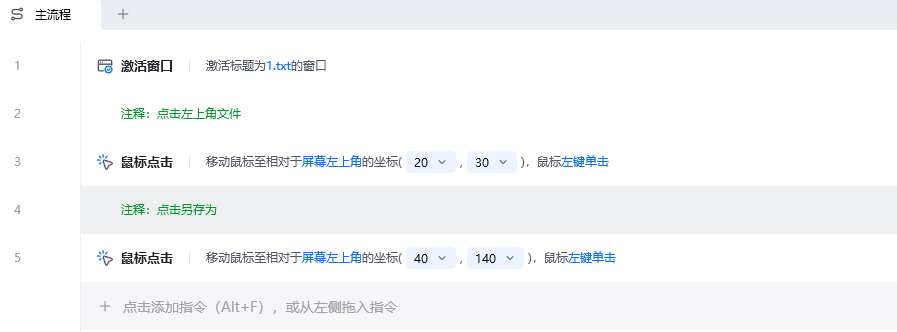 **该流程执行逻辑:**
1. 使用【激活窗口】激活标题为 `1.txt` 的窗口,确保后续坐标以该窗口为参照。
2. 第一次执行【鼠标点击】,移动到相对窗口左上角 `(20, 30)` 的位置并单击左键。
3. 第二次执行【鼠标点击】,移动到相对窗口左上角 `(40, 140)` 的位置并单击左键。
4. 两次点击依次触发窗口中对应位置的控件或操作。
### 效果展示
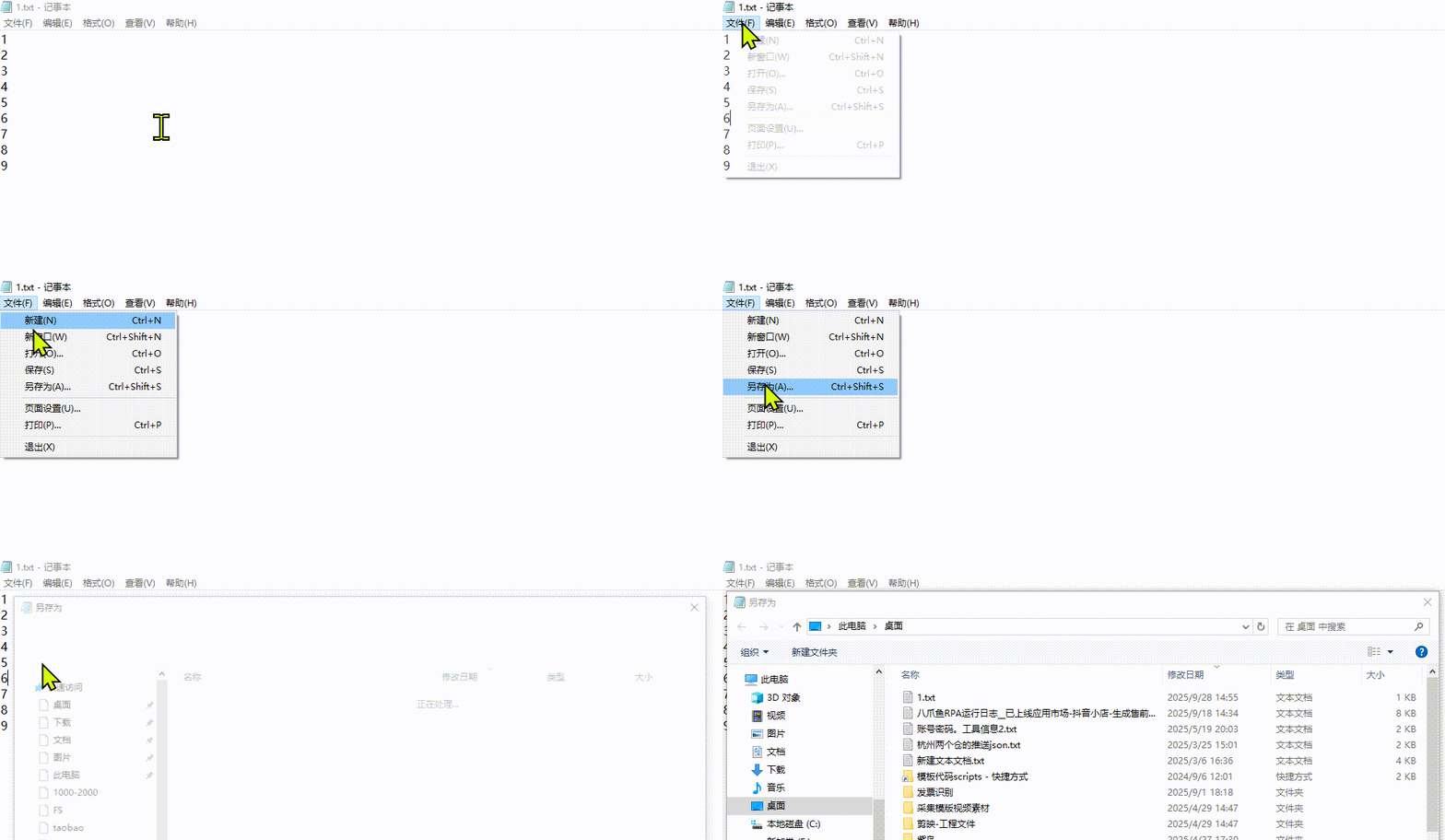
**该流程执行逻辑:**
1. 使用【激活窗口】激活标题为 `1.txt` 的窗口,确保后续坐标以该窗口为参照。
2. 第一次执行【鼠标点击】,移动到相对窗口左上角 `(20, 30)` 的位置并单击左键。
3. 第二次执行【鼠标点击】,移动到相对窗口左上角 `(40, 140)` 的位置并单击左键。
4. 两次点击依次触发窗口中对应位置的控件或操作。
### 效果展示

 使用指令过程中遇到问题?前往 [八爪鱼RPA 开发者社区问答板块](https://rpa.bazhuayu.com/community/questions) 提问,获取官方与社区帮助。