> ## Documentation Index
> Fetch the complete documentation index at: https://rpa.bazhuayu.com/helpcenter/llms.txt
> Use this file to discover all available pages before exploring further.

# 压缩文件/文件夹

## 指令说明

**描述：** 压缩文件/文件夹为zip文件

## 参数说明

<Tabs>
  <Tab title="常规">
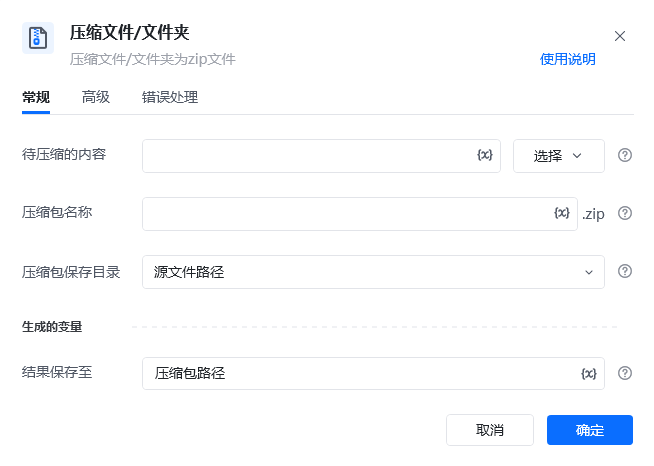
    <img src="https://mintcdn.com/bazhuayu-rpa-docs/vz87YmU8RN3LdaSE/helpcenter/commands/os/images/compressfilecommand-01.png?fit=max&auto=format&n=vz87YmU8RN3LdaSE&q=85&s=8534c1840f501bf597097516591321d3" alt="压缩文件/文件夹指令参数面板" width="654" height="466" data-path="helpcenter/commands/os/images/compressfilecommand-01.png" />

    | 参数          | 说明                                  |
    | ----------- | ----------------------------------- |
    | **待压缩的内容**  | 点击选择按钮选择要压缩至zip文件的文件/文件夹完整路径        |
    | **压缩包名称**   | 压缩后的文件名称，如果文件存在则生成副本                |
    | **压缩包保存目录** | 压缩后文件的保存位置，可以保存至源文件同级目录，也可以保存到指定文件夹 |
    | **结果保存至**   | 将压缩包路径保存至此变量，若不存在则自动创建              |
  </Tab>

  <Tab title="高级">
    本指令暂无高级参数。
  </Tab>
</Tabs>

## 使用示例

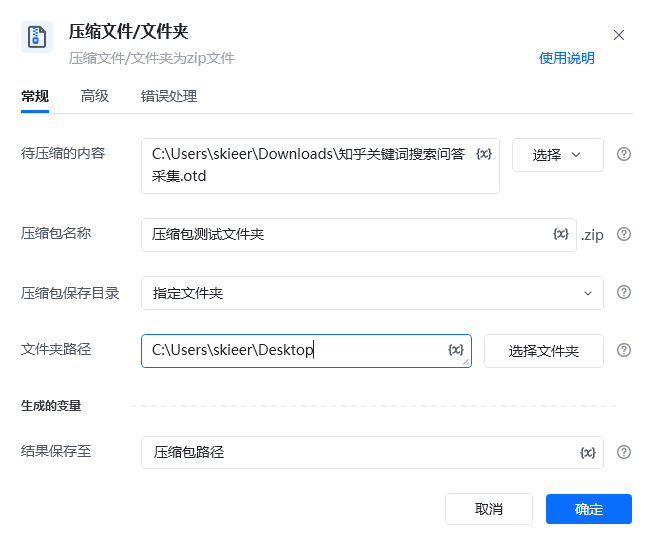
<img src="https://mintcdn.com/bazhuayu-rpa-docs/vz87YmU8RN3LdaSE/helpcenter/commands/os/images/compressfilecommand-02.png?fit=max&auto=format&n=vz87YmU8RN3LdaSE&q=85&s=9f43ecb8dacebe27b1bb6e1977339f10" alt="压缩文件/文件夹使用示例" width="655" height="547" data-path="helpcenter/commands/os/images/compressfilecommand-02.png" />

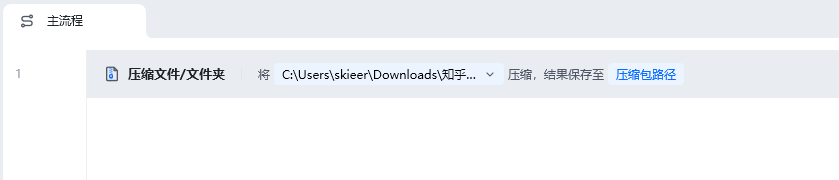
<img src="https://mintcdn.com/bazhuayu-rpa-docs/y7Z2TvwRJJef-uiI/helpcenter/commands/os/images/compressfilecommand-03.png?fit=max&auto=format&n=y7Z2TvwRJJef-uiI&q=85&s=2cdc657105484f639ed325455d58c3a0" alt="压缩文件/文件夹使用示例" width="839" height="180" data-path="helpcenter/commands/os/images/compressfilecommand-03.png" />

**该流程执行逻辑：**

1. 在【压缩文件/文件夹】中选择需要打包的多个文件，将压缩包名称设为“压缩包测试文件夹”。
2. 将保存位置设为桌面，并把生成的压缩包路径保存到变量“压缩包路径”。
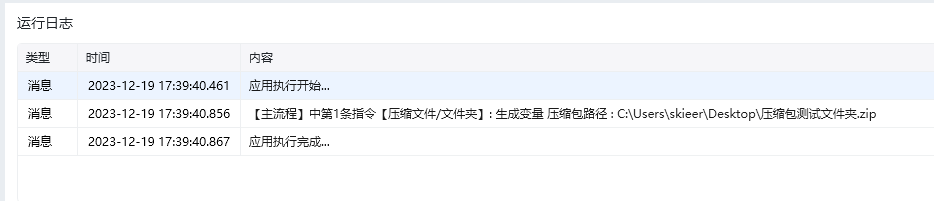
3. 执行后检查桌面，确认压缩包已生成；后续指令可直接使用“压缩包路径”变量访问该文件。

### 效果展示

<img src="https://mintcdn.com/bazhuayu-rpa-docs/y7Z2TvwRJJef-uiI/helpcenter/commands/os/images/compressfilecommand-04.png?fit=max&auto=format&n=y7Z2TvwRJJef-uiI&q=85&s=9e664968ce5c898d7a3e35f36ba3f2a6" alt="压缩文件/文件夹效果展示" width="934" height="201" data-path="helpcenter/commands/os/images/compressfilecommand-04.png" />

<img src="https://mintcdn.com/bazhuayu-rpa-docs/y7Z2TvwRJJef-uiI/helpcenter/commands/os/images/compressfilecommand-05.png?fit=max&auto=format&n=y7Z2TvwRJJef-uiI&q=85&s=7a2f71eff0e6485f613911225c502d5f" alt="压缩文件/文件夹效果展示" width="393" height="155" data-path="helpcenter/commands/os/images/compressfilecommand-05.png" />

<Info>
  使用指令过程中遇到问题？前往 [八爪鱼RPA 开发者社区问答板块](https://rpa.bazhuayu.com/community/questions) 提问，获取官方与社区帮助。
</Info>