> ## Documentation Index
> Fetch the complete documentation index at: https://rpa.bazhuayu.com/helpcenter/llms.txt
> Use this file to discover all available pages before exploring further.

# 删除文件

## 指令说明

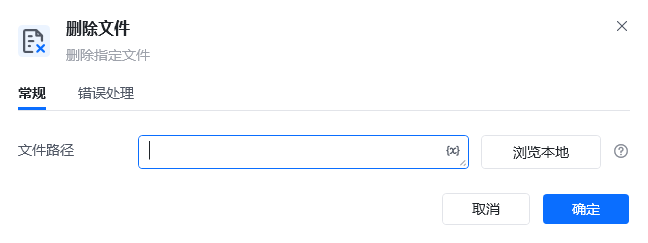
**描述：** 删除指定路径下的文件，用于在自动化流程中清理不再需要的文件。

## 参数说明

<Tabs>
  <Tab title="常规">
    <img src="https://mintcdn.com/bazhuayu-rpa-docs/y7Z2TvwRJJef-uiI/helpcenter/commands/os/images/deletefilecommand-02.png?fit=max&auto=format&n=y7Z2TvwRJJef-uiI&q=85&s=6a41e41ce5256cfd91705faa07670762" alt="删除文件指令参数面板" width="648" height="243" data-path="helpcenter/commands/os/images/deletefilecommand-02.png" />

    | 参数       | 说明         |
    | -------- | ---------- |
    | **文件路径** | 输入要删除的文件路径 |
  </Tab>

  <Tab title="高级">
    本指令暂无高级参数。
  </Tab>
</Tabs>

## 使用示例

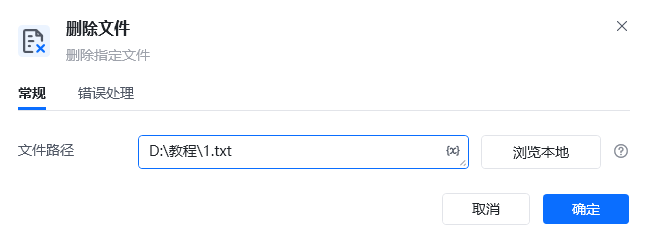
<img src="https://mintcdn.com/bazhuayu-rpa-docs/y7Z2TvwRJJef-uiI/helpcenter/commands/os/images/deletefilecommand-04.png?fit=max&auto=format&n=y7Z2TvwRJJef-uiI&q=85&s=52c26bca906f9a6f025ea185fc10bff5" alt="删除文件使用示例" width="648" height="243" data-path="helpcenter/commands/os/images/deletefilecommand-04.png" />

<img src="https://mintcdn.com/bazhuayu-rpa-docs/y7Z2TvwRJJef-uiI/helpcenter/commands/os/images/deletefilecommand-03.png?fit=max&auto=format&n=y7Z2TvwRJJef-uiI&q=85&s=1124c95c485fdd77e060ea166e47cb64" alt="删除文件使用示例" width="955" height="112" data-path="helpcenter/commands/os/images/deletefilecommand-03.png" />

**该流程执行逻辑：**

1. 在【删除文件】中选择需要删除的目标文件。
2. 运行指令后，目标文件从原路径中被删除。
3. 后续流程如需继续使用该文件，应先判断文件是否存在，避免因文件已经删除而执行失败。

### 效果展示

<img src="https://mintcdn.com/bazhuayu-rpa-docs/y7Z2TvwRJJef-uiI/helpcenter/commands/os/images/deletefilecommand-01.png?fit=max&auto=format&n=y7Z2TvwRJJef-uiI&q=85&s=9a38c0fb055a7b85291f00c89a2f23ad" alt="删除文件效果展示" width="958" height="165" data-path="helpcenter/commands/os/images/deletefilecommand-01.png" />

<Info>
  使用指令过程中遇到问题？前往 [八爪鱼RPA 开发者社区问答板块](https://rpa.bazhuayu.com/community/questions) 提问，获取官方与社区帮助。
</Info>