> ## Documentation Index
> Fetch the complete documentation index at: https://rpa.bazhuayu.com/helpcenter/llms.txt
> Use this file to discover all available pages before exploring further.

# 打印日志

## 指令说明

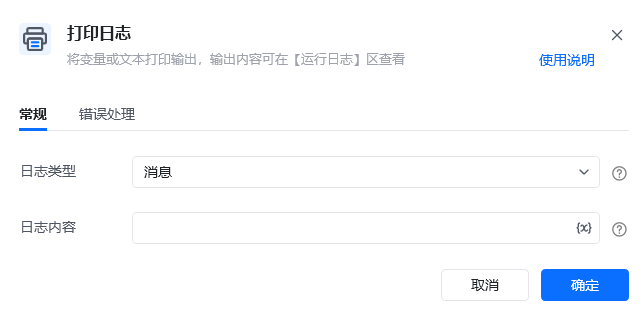
**描述：** 将变量或文本打印输出，输出内容可在【运行日志】区查看

## 参数说明

<Tabs>
  <Tab title="常规">
    <img src="https://mintcdn.com/bazhuayu-rpa-docs/y7Z2TvwRJJef-uiI/helpcenter/commands/others/images/addlogmessagecommand-04.png?fit=max&auto=format&n=y7Z2TvwRJJef-uiI&q=85&s=45db37bb5e29c78a10c7dbcec28f278b" alt="打印日志指令参数面板" width="644" height="321" data-path="helpcenter/commands/others/images/addlogmessagecommand-04.png" />

    | 参数       | 说明                             |
    | -------- | ------------------------------ |
    | **日志类型** | 选择打印的日志类型： 消息：常用选择（默认）、 错误、 警告 |
    | **日志内容** | 输入打印的内容                        |
  </Tab>

  <Tab title="高级">
    本指令暂无高级参数。
  </Tab>
</Tabs>

## 使用示例

<img src="https://mintcdn.com/bazhuayu-rpa-docs/y7Z2TvwRJJef-uiI/helpcenter/commands/others/images/addlogmessagecommand-01.png?fit=max&auto=format&n=y7Z2TvwRJJef-uiI&q=85&s=c5dceb3f50fb9ef95ad77ec13691dab8" alt="打印日志使用示例" width="960" height="242" data-path="helpcenter/commands/others/images/addlogmessagecommand-01.png" />

<img src="https://mintcdn.com/bazhuayu-rpa-docs/y7Z2TvwRJJef-uiI/helpcenter/commands/others/images/addlogmessagecommand-03.png?fit=max&auto=format&n=y7Z2TvwRJJef-uiI&q=85&s=ad1f7056dc120cab818d65dd561617bb" alt="打印日志使用示例" width="660" height="537" data-path="helpcenter/commands/others/images/addlogmessagecommand-03.png" />

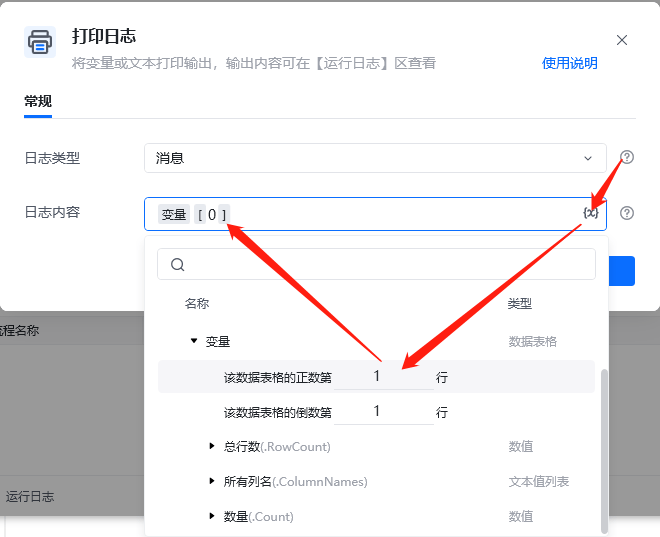
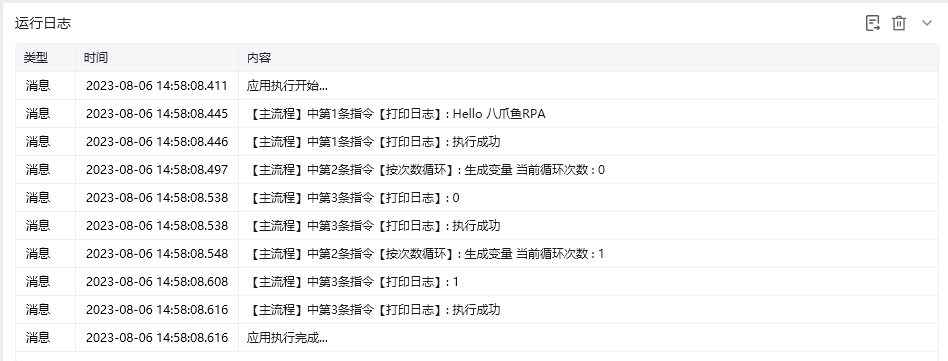
**该流程执行逻辑：**

1. 第一条【打印日志】输出固定文本“Hello 八爪鱼RPA”，用于确认流程已经开始执行。
2. 流程进入循环后，再次执行【打印日志】，每轮输出当前循环次数。
3. 运行日志中先出现固定文本，再依次出现各轮次数，便于检查流程执行顺序和循环进度。

### 效果展示

<img src="https://mintcdn.com/bazhuayu-rpa-docs/y7Z2TvwRJJef-uiI/helpcenter/commands/others/images/addlogmessagecommand-02.png?fit=max&auto=format&n=y7Z2TvwRJJef-uiI&q=85&s=19dfd28c8467ca461fcca783f18591c3" alt="打印日志效果展示" width="948" height="361" data-path="helpcenter/commands/others/images/addlogmessagecommand-02.png" />

<Info>
  使用指令过程中遇到问题？前往 [八爪鱼RPA 开发者社区问答板块](https://rpa.bazhuayu.com/community/questions) 提问，获取官方与社区帮助。
</Info>