> ## Documentation Index
> Fetch the complete documentation index at: https://rpa.bazhuayu.com/helpcenter/llms.txt
> Use this file to discover all available pages before exploring further.
# 执行Python代码
## 指令说明
**描述:** 执行Python代码,同时获取输出结果
## 参数说明
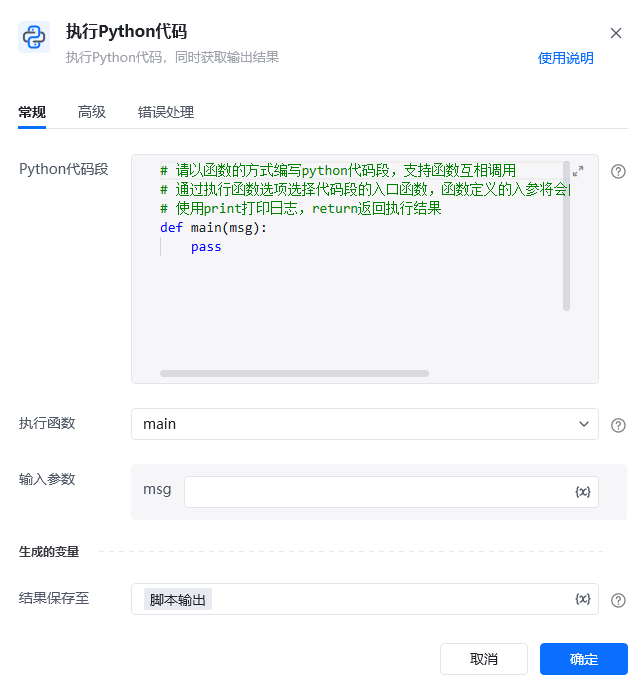 | 参数 | 说明 |
| ------------- | ------------------------------------------------------ |
| **Python代码段** | python代码需要以函数形式编写和执行 |
| **执行函数** | 选择需要执行代码段中的哪一个函数 |
| **输入参数** | 流程变量以函数入参方式传入,如main(a,b)函数包含a,b两个入参,当选择执行函数时可传入a,b流程变量 |
| **结果保存至** | 指定一个变量名称,该变量用于保存python代码执行函数后return的返回值 |
| 参数 | 说明 |
| ---------------- | ---------------------------------- |
| **使用本机Python环境** | 勾选则使用的是本机的Python环境 |
| **检测方式** | 自动检测系统可用的Python环境 使用指定目录下的Python环境 |
## 使用示例
| 参数 | 说明 |
| ------------- | ------------------------------------------------------ |
| **Python代码段** | python代码需要以函数形式编写和执行 |
| **执行函数** | 选择需要执行代码段中的哪一个函数 |
| **输入参数** | 流程变量以函数入参方式传入,如main(a,b)函数包含a,b两个入参,当选择执行函数时可传入a,b流程变量 |
| **结果保存至** | 指定一个变量名称,该变量用于保存python代码执行函数后return的返回值 |
| 参数 | 说明 |
| ---------------- | ---------------------------------- |
| **使用本机Python环境** | 勾选则使用的是本机的Python环境 |
| **检测方式** | 自动检测系统可用的Python环境 使用指定目录下的Python环境 |
## 使用示例
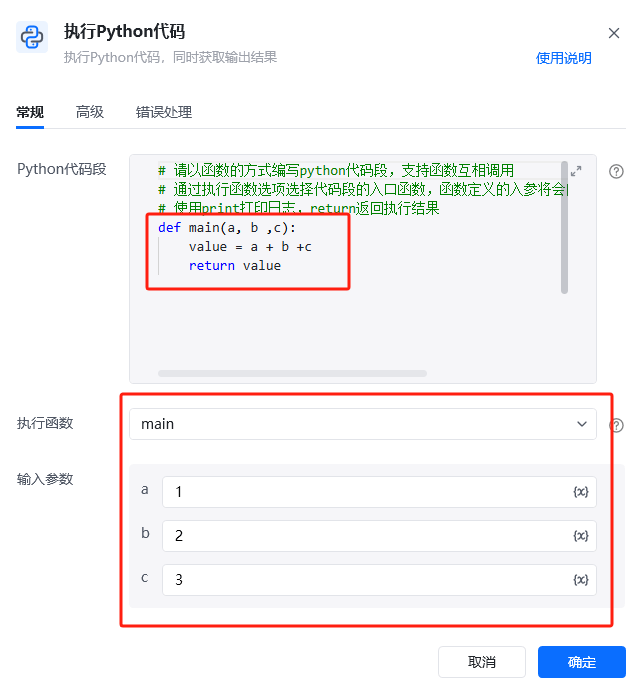
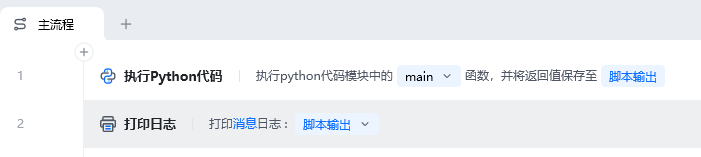 **该流程执行逻辑:**
1. 在【执行Python代码】中编写 `main(a, b, c)`,让函数返回三个参数之和;需要第三方包时可在代码中直接导入。
2. 选择 `main` 作为入口函数,依次传入 `a=1`、`b=2`、`c=3`,并把返回值保存到“脚本输出”。
3. 执行后使用【打印日志】输出“脚本输出”,结果为 `6`。
入口参数和返回值支持 `string`、`bool`、`int`、`float`、`list`、`dict`;其他类型需在代码中自行转换。
### 效果展示
**该流程执行逻辑:**
1. 在【执行Python代码】中编写 `main(a, b, c)`,让函数返回三个参数之和;需要第三方包时可在代码中直接导入。
2. 选择 `main` 作为入口函数,依次传入 `a=1`、`b=2`、`c=3`,并把返回值保存到“脚本输出”。
3. 执行后使用【打印日志】输出“脚本输出”,结果为 `6`。
入口参数和返回值支持 `string`、`bool`、`int`、`float`、`list`、`dict`;其他类型需在代码中自行转换。
### 效果展示
 使用指令过程中遇到问题?前往 [八爪鱼RPA 开发者社区问答板块](https://rpa.bazhuayu.com/community/questions) 提问,获取官方与社区帮助。