> ## Documentation Index
> Fetch the complete documentation index at: https://rpa.bazhuayu.com/helpcenter/llms.txt
> Use this file to discover all available pages before exploring further.
# 文本输入对话框
## 指令说明
**描述:** 弹出对话框,让用户输入文本并点击确认,返回用户输入的文本内容
## 参数说明
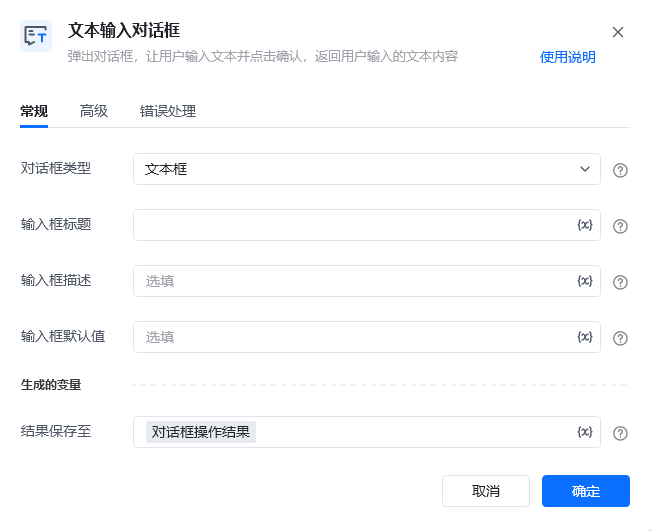 | 参数 | 说明 |
| ---------- | -------------------------------- |
| **对话框类型** | 请选择需要使用的输入框类型,支持文本框和多行文本框 |
| **输入框标题** | 输入框的标题,如用户名,建议8个字符以内,更多可以使用输入框描述 |
| **输入框描述** | 输入框填写提示,可进一步提醒用户需要输入的内容 |
| **输入框默认值** | 输入框内默认显示的文本内容 |
| 参数 | 说明 |
| ----------- | ------------------------ |
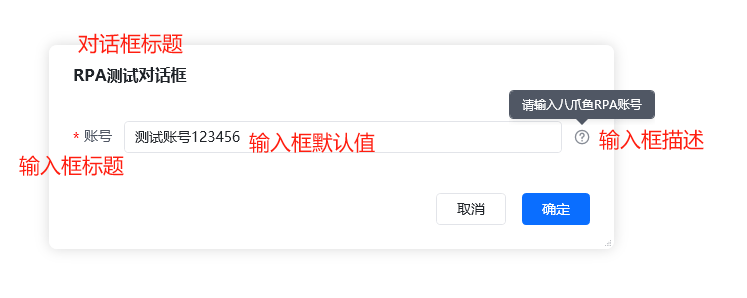
| **对话框标题** | 弹出对话框窗口的标题 |
| **输入框空白提示** | 未在输入框中输入内容且没有默认值时显示的提示信息 |
| **输入框为必填框** | 设置输入框内容是否为必填,默认为非必填 |
## 使用示例
| 参数 | 说明 |
| ---------- | -------------------------------- |
| **对话框类型** | 请选择需要使用的输入框类型,支持文本框和多行文本框 |
| **输入框标题** | 输入框的标题,如用户名,建议8个字符以内,更多可以使用输入框描述 |
| **输入框描述** | 输入框填写提示,可进一步提醒用户需要输入的内容 |
| **输入框默认值** | 输入框内默认显示的文本内容 |
| 参数 | 说明 |
| ----------- | ------------------------ |
| **对话框标题** | 弹出对话框窗口的标题 |
| **输入框空白提示** | 未在输入框中输入内容且没有默认值时显示的提示信息 |
| **输入框为必填框** | 设置输入框内容是否为必填,默认为非必填 |
## 使用示例
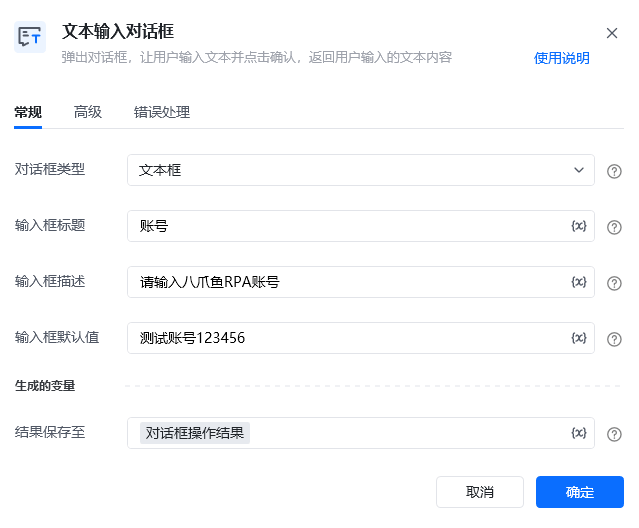
 **该流程执行逻辑:**
流程弹出文本输入对话框,提示用户填写所需内容;用户确认后,将输入值保存到指令生成的结果变量,供后续流程继续使用。
### 效果展示
**该流程执行逻辑:**
流程弹出文本输入对话框,提示用户填写所需内容;用户确认后,将输入值保存到指令生成的结果变量,供后续流程继续使用。
### 效果展示
 使用指令过程中遇到问题?前往 [八爪鱼RPA 开发者社区问答板块](https://rpa.bazhuayu.com/community/questions) 提问,获取官方与社区帮助。