> ## Documentation Index
> Fetch the complete documentation index at: https://rpa.bazhuayu.com/helpcenter/llms.txt
> Use this file to discover all available pages before exploring further.
# 移除Cookie
## 指令说明
**描述:** 移除指定的或全部Cookie。
## 参数说明
 | 参数 | 说明 |
| --------------- | ------------------------------------ |
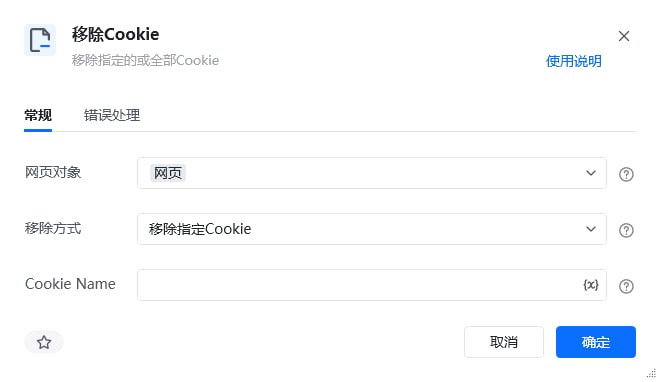
| **网页对象** | 选择要移除Cookie的网页对象 |
| **移除方式** | 下拉选择:移除指定名称Cookie、移除全部Cookie |
| **Cookie Name** | 当移除方式为"移除指定名称Cookie"时,输入要移除的Cookie名称 |
本指令暂无高级参数。
## 使用示例
| 参数 | 说明 |
| --------------- | ------------------------------------ |
| **网页对象** | 选择要移除Cookie的网页对象 |
| **移除方式** | 下拉选择:移除指定名称Cookie、移除全部Cookie |
| **Cookie Name** | 当移除方式为"移除指定名称Cookie"时,输入要移除的Cookie名称 |
本指令暂无高级参数。
## 使用示例
 **该流程执行逻辑:**
使用【获取已打开的网页对象】指令获取指定浏览器上已打开的所有网页并根据标题匹配选择已打开的网页
使用【移除Cookie】移除网页对象上的所有Cookie,即网页退出了登录状态
### 效果展示
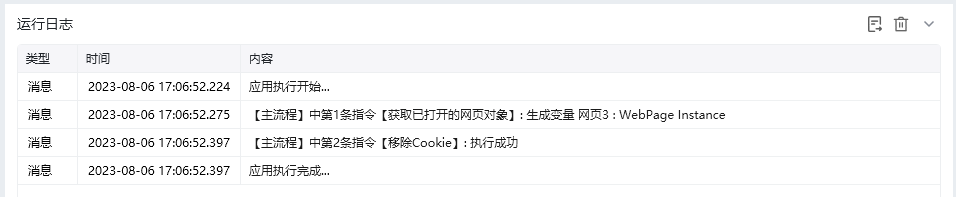
指定的Cookie或全部Cookie被成功移除。
**该流程执行逻辑:**
使用【获取已打开的网页对象】指令获取指定浏览器上已打开的所有网页并根据标题匹配选择已打开的网页
使用【移除Cookie】移除网页对象上的所有Cookie,即网页退出了登录状态
### 效果展示
指定的Cookie或全部Cookie被成功移除。
 使用指令过程中遇到问题?前往 [八爪鱼RPA 开发者社区问答板块](https://rpa.bazhuayu.com/community/questions) 提问,获取官方与社区帮助。