> ## Documentation Index
> Fetch the complete documentation index at: https://rpa.bazhuayu.com/helpcenter/llms.txt
> Use this file to discover all available pages before exploring further.

# 文件下载

## 指令说明

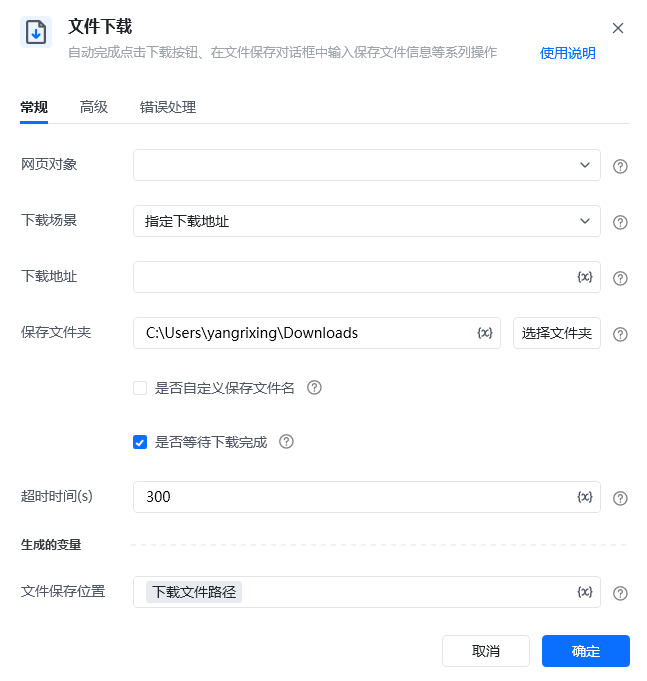
**描述：** 自动完成点击下载按钮、在文件保存对话框中输入保存文件信息等系列操作。

## 参数说明

<Tabs>
  <Tab title="常规">
    <img src="https://mintcdn.com/bazhuayu-rpa-docs/v_rTeoLOdoPnGE6I/helpcenter/commands/web-automation/images/web-download-01.png?fit=max&auto=format&n=v_rTeoLOdoPnGE6I&q=85&s=b5df4becfd398b43ba827040b0928aa9" alt="文件下载指令参数面板" width="647" height="681" data-path="helpcenter/commands/web-automation/images/web-download-01.png" />

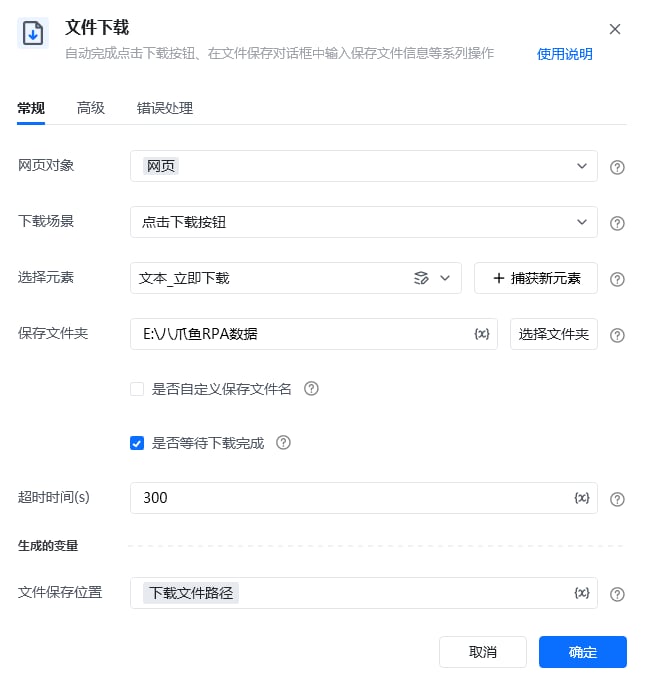
    | 参数           | 说明                                                                       |
    | ------------ | ------------------------------------------------------------------------ |
    | **网页对象**     | 输入一个获取到的或者通过"打开网页"创建的网页对象                                                |
    | **下载场景**     | 选择下载文件的方式<br />指定下载地址：输入的是一个待下载的文件url链接<br />点击下载按钮：适用于使用鼠标点击「下载按钮」的文件下载 |
    | **下载地址**     | 指定下载地址时出现，输入的是一个待下载的文件url链接                                              |
    | **选择元素**     | 点击下载按钮时出现，选择要操作下载的目标网页元素                                                 |
    | **保存文件夹**    | 保存下载文件的文件夹                                                               |
    | **自定义保存文件名** | 是否自定义保存文件名，不勾选则使用默认文件名                                                   |
    | **等待下载完成**   | 若是，会在最大超时时间内一直等待直到文件下载完成                                                 |
    | **超时时间（s）**  | 最大等待下载超时时间，单位（秒）                                                         |
    | **文件保存位置**   | 下载文件所在的位置：文件路径+名称，即下载文件的绝对文件路径                                           |
  </Tab>

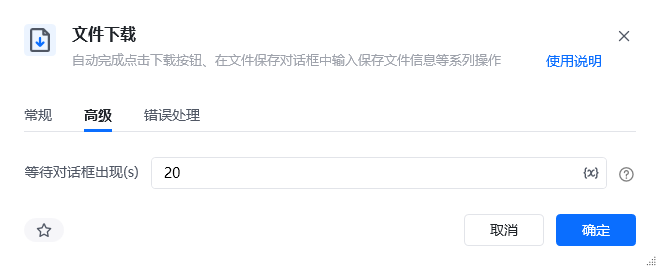
  <Tab title="高级">
    <img src="https://mintcdn.com/bazhuayu-rpa-docs/v_rTeoLOdoPnGE6I/helpcenter/commands/web-automation/images/web-download-adv-01.png?fit=max&auto=format&n=v_rTeoLOdoPnGE6I&q=85&s=ddfbe72e416e8e200ed78578c4e8fde4" alt="文件下载指令参数面板 - 高级" width="660" height="270" data-path="helpcenter/commands/web-automation/images/web-download-adv-01.png" />

    | 参数             | 说明                           |
    | -------------- | ---------------------------- |
    | **等待对话框出现（s）** | 点击下载按钮后，等待下载对话框出现的超时时间，单位（秒） |
  </Tab>
</Tabs>

## 使用示例

### 案例一：点击下载按钮

<img src="https://mintcdn.com/bazhuayu-rpa-docs/2nc_spg9_b4MXqPM/helpcenter/commands/web-automation/images/web-download-case1-flow-01.png?fit=max&auto=format&n=2nc_spg9_b4MXqPM&q=85&s=9beef22ee15214b1234d79cbdbc64bc5" alt="文件下载 - 案例一流程搭建" width="1117" height="173" data-path="helpcenter/commands/web-automation/images/web-download-case1-flow-01.png" />

<img src="https://mintcdn.com/bazhuayu-rpa-docs/2nc_spg9_b4MXqPM/helpcenter/commands/web-automation/images/web-download-case1-flow-02.png?fit=max&auto=format&n=2nc_spg9_b4MXqPM&q=85&s=2702c7dcae12589e0d446f4d2b2abf8c" alt="文件下载 - 案例一参数面板" width="648" height="678" data-path="helpcenter/commands/web-automation/images/web-download-case1-flow-02.png" />

**该流程执行逻辑：**

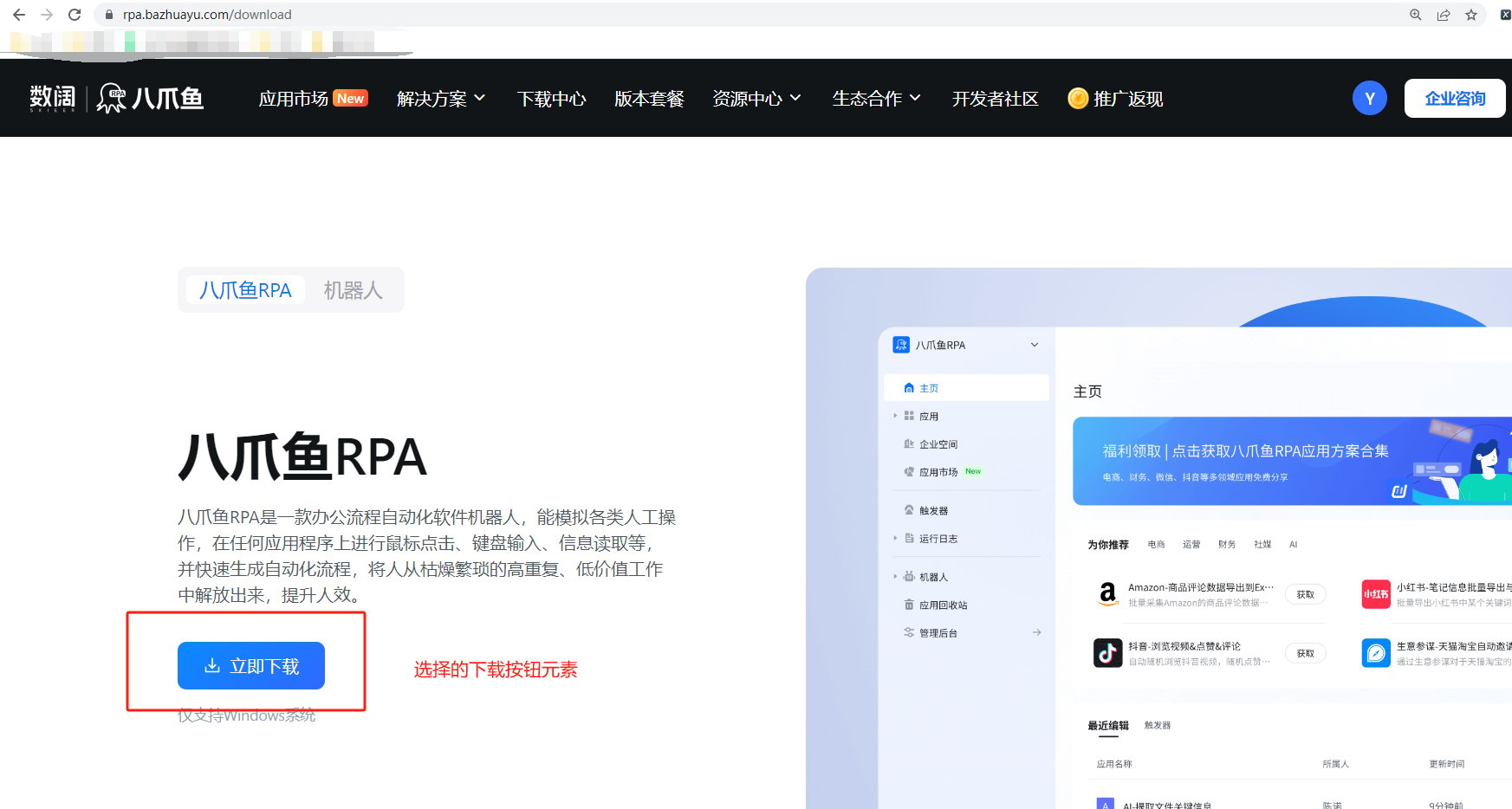
使用【打开网页】在google浏览器打开八爪鱼RPA下载页[https://rpa.bazhuayu.com/download](https://rpa.bazhuayu.com/download)

使用【文件下载】指令，下载方式选择「点击下载按钮」，通过点击网页页面的「下载按钮」将文件下载，选择保存到指定文件夹，并将下载的文件绝对路径打印出来

#### 效果展示

<img src="https://mintcdn.com/bazhuayu-rpa-docs/2nc_spg9_b4MXqPM/helpcenter/commands/web-automation/images/web-download-case1-result-01.png?fit=max&auto=format&n=2nc_spg9_b4MXqPM&q=85&s=40354478486c8ef0771855261c8d1b03" alt="文件下载 - 案例一效果展示 1" width="1357" height="179" data-path="helpcenter/commands/web-automation/images/web-download-case1-result-01.png" />

<img src="https://mintcdn.com/bazhuayu-rpa-docs/2nc_spg9_b4MXqPM/helpcenter/commands/web-automation/images/web-download-case1-result-02.png?fit=max&auto=format&n=2nc_spg9_b4MXqPM&q=85&s=0968371f6b7b85c797e1273444908bef" alt="文件下载 - 案例一效果展示 2" width="1745" height="934" data-path="helpcenter/commands/web-automation/images/web-download-case1-result-02.png" />

<img src="https://mintcdn.com/bazhuayu-rpa-docs/2nc_spg9_b4MXqPM/helpcenter/commands/web-automation/images/web-download-case1-result-03.png?fit=max&auto=format&n=2nc_spg9_b4MXqPM&q=85&s=7bdc80a125c20457c5cb6d3d6fd4b033" alt="文件下载 - 案例一效果展示 3" width="976" height="120" data-path="helpcenter/commands/web-automation/images/web-download-case1-result-03.png" />

### 案例二：指定下载链接

<img src="https://mintcdn.com/bazhuayu-rpa-docs/2nc_spg9_b4MXqPM/helpcenter/commands/web-automation/images/web-download-case2-flow-01.png?fit=max&auto=format&n=2nc_spg9_b4MXqPM&q=85&s=68d6928e072659c37a733a3bc8fd8314" alt="文件下载 - 案例二流程搭建" width="1205" height="187" data-path="helpcenter/commands/web-automation/images/web-download-case2-flow-01.png" />

<img src="https://mintcdn.com/bazhuayu-rpa-docs/2nc_spg9_b4MXqPM/helpcenter/commands/web-automation/images/web-download-case2-flow-02.png?fit=max&auto=format&n=2nc_spg9_b4MXqPM&q=85&s=6b47ae973bab32176e94a807dddbbbfe" alt="文件下载 - 案例二参数面板" width="647" height="686" data-path="helpcenter/commands/web-automation/images/web-download-case2-flow-02.png" />

**该流程执行逻辑：**

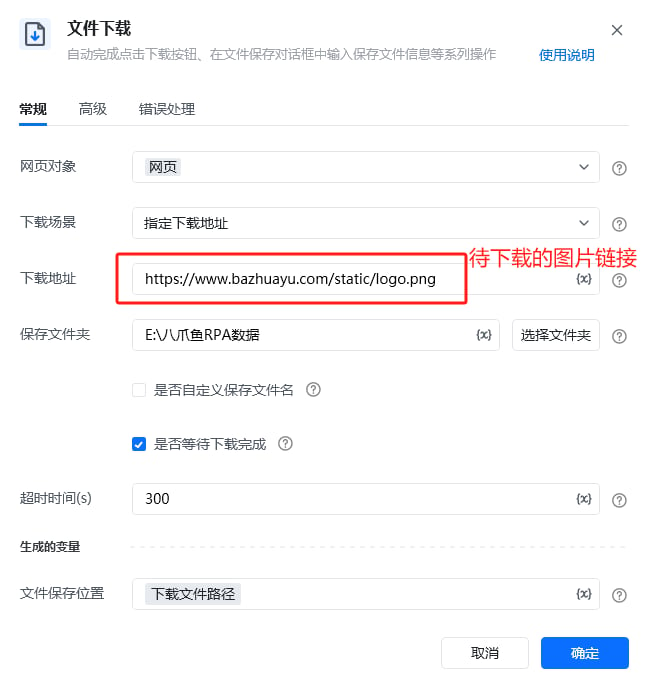
使用【打开网页】在google浏览器打开任意网页页面

使用【文件下载】指令，下载方式选择「指定下载地址」，将待下载的文件url填入「下载地址」中，选择保存到指定文件夹，并将下载的文件绝对路径打印出来

#### 效果展示

<img src="https://mintcdn.com/bazhuayu-rpa-docs/2nc_spg9_b4MXqPM/helpcenter/commands/web-automation/images/web-download-case2-result-01.png?fit=max&auto=format&n=2nc_spg9_b4MXqPM&q=85&s=66c85b905a757916b2321b499b2e2c0d" alt="文件下载 - 案例二效果展示 1" width="1343" height="164" data-path="helpcenter/commands/web-automation/images/web-download-case2-result-01.png" />

<img src="https://mintcdn.com/bazhuayu-rpa-docs/2nc_spg9_b4MXqPM/helpcenter/commands/web-automation/images/web-download-case2-result-02.png?fit=max&auto=format&n=2nc_spg9_b4MXqPM&q=85&s=82d567c3788848ccd62c0d4b8688bc01" alt="文件下载 - 案例二效果展示 2" width="848" height="129" data-path="helpcenter/commands/web-automation/images/web-download-case2-result-02.png" />

### 使用小Tips

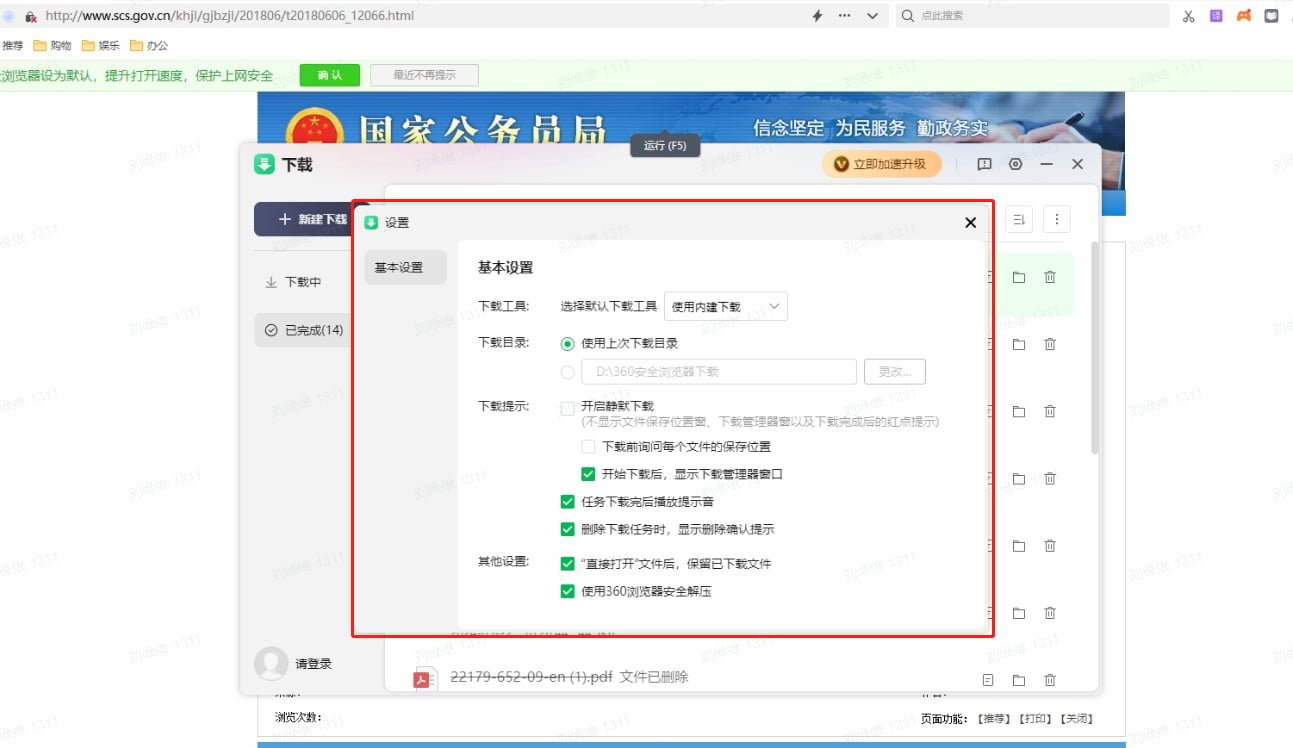
部分本地浏览器，需要在浏览器设置中进行配置，以免运行过程中出现弹窗影响RPA的正常执行。比如使用360浏览器下载时，会弹出下载保存路径弹窗，建议先手动修改浏览器中的配置，然后再运行RPA

<img src="https://mintcdn.com/bazhuayu-rpa-docs/2nc_spg9_b4MXqPM/helpcenter/commands/web-automation/images/web-download-tips-01.png?fit=max&auto=format&n=2nc_spg9_b4MXqPM&q=85&s=6aab0da234f6ee3b6175fd9a029afe76" alt="文件下载 - 使用小Tips" width="1293" height="748" data-path="helpcenter/commands/web-automation/images/web-download-tips-01.png" />

<Info>
  使用指令过程中遇到问题？前往 [八爪鱼RPA 开发者社区问答板块](https://rpa.bazhuayu.com/community/questions) 提问，获取官方与社区帮助。
</Info>